
Wsdataselect
Wsdataselect is an implementation of the dataselect web service as specified by the FDSN (https://www.fdsn.org/webservices/) to distribute seismological data.
In it's inners, the implementation takes in account all the context of the EPOS-France national seismological datacenter (https://seismology.resif.fr) and is connected to the osug/resif/sigma> database.
Chosen Technologies
This program is written un Elixir, with Phoenix:
- Ecto for interaction with the postgresql database https://github.com/elixir-ecto/ecto
- Sentry to catch exceptions and performance issues https://www.sentry.io/
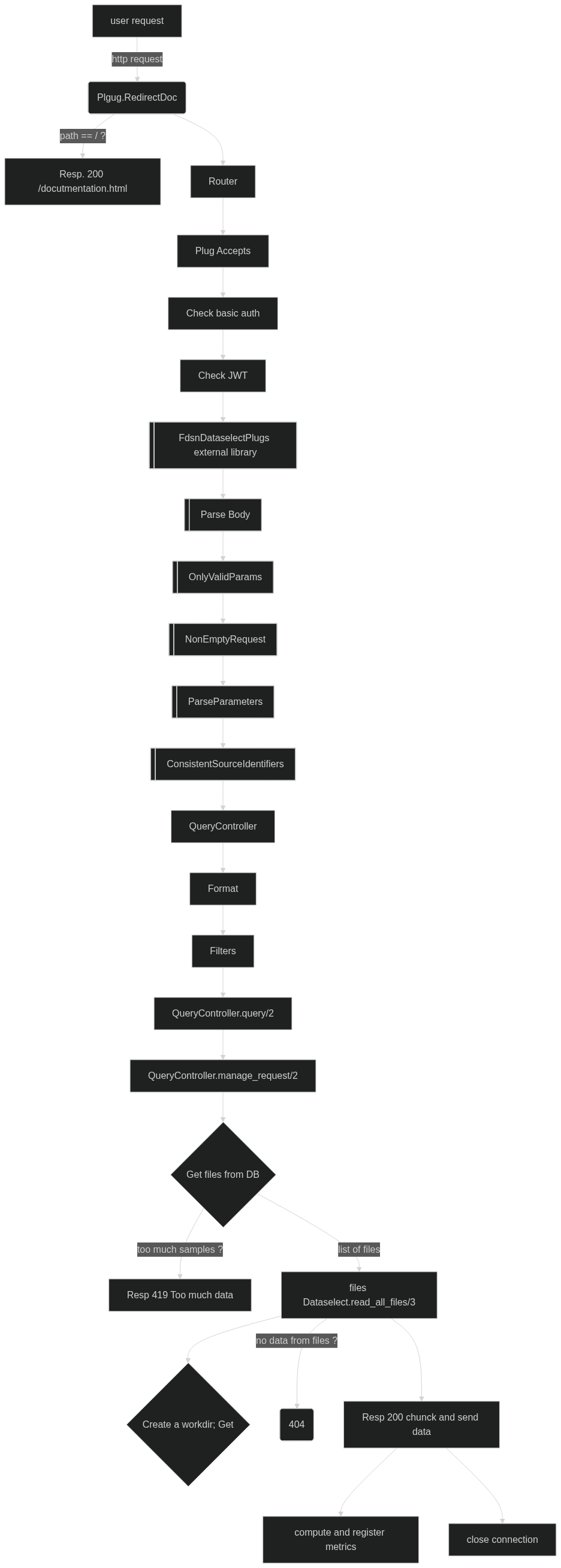
Request pipeline
Each HTTP request is managed by the following pipeline.
Note on Authentication
Digest for /queryauth
fdsnws-dataselect-1 describes authentication by HTTP Digest (https://datatracker.ietf.org/doc/html/rfc2617).
WsdataselectWeb.Plugs.Authentication implements the HTTP Digest protocol and is part of the plugs pipeline.
Then, the user name (or anonymous if unknown) is added in the data request structure.
The realm's value is by default "FDSN" which is hardcoded in the credential's hash at RESIF.
It can be changed at compilation time like this:
REALM="MyRealm" mix compileContainer
JWT
In order to authenticate using JWT, we rely on the JOSE library (not implemented yet). Here is an example on how JOSE works for that:
iex> jwkp = JOSE.JWK.from_pem_file("./test/keys/test_issuer.key")
iex> jwt = %{"iss" => "EIDA authentication system", "aud" => "FDSN", "sub" => "gaston.lagaffe@princeton.edu", "exp" => (DateTime.utc_now() |> DateTime.to_unix()) + 3600}
%{
  "aud" => "FDSN",
  "exp" => 1757421319,
  "iss" => "EIDA authentication system",
  "sub" => "gaston.lagaffe@princeton.edu"
}
iex> jwt_rsa256 = JOSE.JWT.sign(jwkp,jwt) |> JOSE.JWS.compact() |> elem(1)
"eyJhbGciOiJQUzI1NiIsInR5cCI6IkpXVCJ9.eyJhdWQiOiJGRFNOIiwiZXhwIjoxNzU3NDIxMzE5LCJpc3MiOiJFSURBIGF1dGhlbnRpY2F0aW9uIHN5c3RlbSIsInN1YiI6Imdhc3Rvbi5sYWdhZmZlQHByaW5jZXRvbi5lZHUifQ.gSdJUdjlu9hN1awd4NVOe8rx1Zxq1d5wZlWls0KNrZJRghrUl6NaCfvB65WA9hReoqcpp_DQLaIl1C1JZC59_Dw5jdH-s_pjbivCy6OUgYsj-tL5BqkcL1098dDwlKj_iVhr_XjwOgRBkIh-zW2zJKlCSVhj9dqhduZupUtPcsiMLIAnkpSlkTczqoVSkqXXbyE3dZRO8UwWOorfqYSc7S3tXpeuWPxwEdnpIk-3FfTOBELWL8hloH4g2-UnNuxdWWQXQ3PwJdSok1MdoUzdBIxaK7TYV0t2C-DElFnLvOHqhdjPdAbP_H8zSYr1OfWuHm_D4N4tQRkn2QKDylqzVQ"
iex(18)> JOSE.JWT.verify(jwk, jwt_rsa256)
{true,
 %JOSE.JWT{
   fields: %{
     "aud" => "FDSN",
     "exp" => 1757421319,
     "iss" => "EIDA authentication system",
     "sub" => "gaston.lagaffe@princeton.edu"
   }
 },
 %JOSE.JWS{
   alg: {:jose_jws_alg_rsa_pss, :PS256},
   b64: :undefined,
   fields: %{"typ" => "JWT"}
 }}
Parameters parsing and analyze (external plug FdsnPlugs.FdsnDataselectPlug)
Tha parameter parsing is done by the external library FdsnPlugs, in particular the wrapper module FdsnDataselectPlug.
For a POST request, the BodyParser implements the Plug.Parser behavior. Function Wsdataselect.BodyParser.parse/5 is called automatically when a POST request arrives.
Request validation
At this stage, the controler knows all the parameters as submitted by the user. They have to be validated:
- value for the nodata parameter (204 or 404)
- quality code is consistent with the sepecification
- validate each stream
- analyze start en end date parameters
Priviledges checks
TODO not implemented yet, will depend on the rest of the database structure.
Data volume evaluation
In order not to start serving too large data requests, the function WsdataselectWeb.Controllers.QueryController.evaluate_size/1 is evaluating how much data the request is going to stream.
As soon as the total gets larger than the defined limit (see WSDATASELECT_MAX_RESPONSE_SIZE environment variable), the client gets a "Too much data" response.
Files list
Wsdataselect.Backend.files_in_archive/1 will retrieve the list of files from the inventory.
This list is filtered by the actual existence of the data file in the inventory.
If the resulting list is empty, "no data" response is sent to the user. Error messages in the logs are there for the operator to check out this inconsistency.
Run dataselect
As Elixir has no library for miniSEED data format, we rely on the dataselect binary dataselect (https://github.com/EarthScope/dataselect/).
Wsdataselect.Dataselect.read_all_files/2 manages data fetching and streaming in the following steps.
Data usage statistics
After the request is completed, Wsdataselect.DeliveryMetrics computes how much data has been delivered by source identifier and writes the metrics in a dedicated database.
Deploy
Prerequisites
- Sigma database ready on a postgresql server
- Authentication database ready
-
Data archives mounted, in coherence with the
repositoriestable from sigma - dataselect binary compiled and present in the application's PATH (see https://github.com/EarthScope/dataselect/)
Configuration
Configuration is done with environment variables, at runtime.
| WSDATASELECT_URL_PREFIX | /fdsnws/dataselect/1/ | The URL prefix where the service is accessible from |
| WSDATASELECT_WORKDIR | /tmp/dataselect | The temporary directory where dataselect writes the data to |
| WSDATASELECT_DATASELECT_PATH | /usr/local/bin/dataselect | Path to the dataselect binary |
| WSDATASELECT_DATASELECT_TIMEOUT | 5000 | Timeout for reading data with the dataselect binary |
| WSDATASELECT_MAX_CONCURRENCY | 8 | Number of dataselect processes to start simultaneously |
| WSDATASELECT_MAX_SAMPLES | 1000000000 | Maximum samples that the service will deliver for one request |
| WSDATASELECT_REPOSITORIES_ROOT | /data | Root mountpoint of the data repositories |
| WSDATASELECT_POOL_SIZE | 10 | Pool of database connections to the sigma invenrory |
| WSDATASELECT_POOL_COUNT | 1 | Number of pools to the invenrory database (see Ecto documentation) |
| DATABASE_URL | ecto://USER:PASS@HOST/DATABASE | Access to the inventory database (managed by sigma) |
| AUTH_DATABASE_URL | ecto://USER:PASS@HOST/DATABASE | Access to the authentication database |
| METRICS_DATABASE_URL | ecto://USER:PASS@HOST/DATABASE | Access to the metrics database |
| SENTRY_TRACES_SAMPLE_RATE | 0.001 | The sampling rate to send perf metrics to sentry |
| SENTRY_DSN | The DSN of the project in sentry | |
| SENTRY_ENVIRONMENT | The environment used for sentry reporting | |
| SECRET_KEY_BASE | A secret for the application | |
| IPWHO_TOKEN | nil | The optional token for using the free API https://ipwho.org |
| AWS_SECRET_ACCESS_KEY | S3 secret access key to presign URL | |
| AWS_ACCESS_KEY_ID | S3 access key ID to presign URL |
Pre-built containers are available in the Gricad Gitlab forge: https://gricad-gitlab.univ-grenoble-alpes.fr/OSUG/RESIF/wsdataselect/container_registry/931
Compilation and launch locally
git clone https://gricad-gitlab.univ-grenoble-alpes.fr/OSUG/RESIF/wsdataselect.git
cd wsdataselect
mix deps.get
MIX_ENV=dev mix phx.server
Test
 podman run -d -p 5432:5432 -e POSTGRES_HOST_AUTH_METHOD=trust docker.io/postgres:13.22-trixie
 mix test