Workspace




Workspace provides a set of tools for working with elixir monorepos.
What is a monorepo? {: .neutral}
A monorepo is a single repository containing multiple distinct projects.
In a monorepo setup, all related application, libraries, and tools, are housed together, allowing developers to manage and version control them collectively.
Monorepos on big codebases offer several potential benefits:
- Code Sharing - Developers can easily share code and components across projects within the same repository, promoting code reuse and reducing duplication.
- Consistent Versioning - All components in the monorepo can share the same versioning scheme, ensuring consistency and compatibility.
- Simplified Dependency Management - Since all dependencies are managed within a single repository, dependency management can be more straightforward compared to managing dependencies across multiple repositories.
- Streamlined Build and Continuous Integration - With all code in one place, build processes and continuous integration (CI) pipelines can be more efficient, as changes to any part of the codebase can trigger only the CI steps affected by this change. Additionally any change to any component is immediately tested across all packages using the modified component.
- Improved Collaboration - Developers can more easily collaborate on different parts of the system since all code is accessible within the same repository.
- Modular Design and Architectural Consistency - With all related projects and components housed together, developers are incentivized to create modular, reusable code that adheres to consistent architectural patterns. This promotes better design practices and helps maintain a cohesive architecture across the entire codebase.
Overview
Workspace provides a set of tools for working with multiple projects under
the same git repo. Using path dependencies between the projects and the
provided tools you can effectively work on massive codebases properly
split into reusable packages.
Core features
The core features of Workspace are:
- Non intrusive - zero dependencies for your elixir projects.
- Run tasks efficiently - includes a
mix workspace.runcommand for orchestrating where each task will be executed; test only affected projects by a change, format only modified projects, or partition your executions, reducing significantly CI times. - Enforced boundaries - tag your projects and enforce boundaries between projects, facilitating architectural consistency.
- Consistency Checks - includes a
mix workspace.checkcommand for linting your workspace; ensure that all projects have the same versions of external dependencies, or that all projects have valid maintainers. - Arbitrary folder structure - you can create your projects wherever you wish under the workspace root, no assumptions are made.
The workspace folder structure
A workspace is a normal Mix.Project with some tweaks:
- No actual code is expected, so
:elixirc_pathsis set to[]. - It must have a
:workspaceproject option configured with a:typeset to:workspace. - You can have as many mix projects as you wish in any folder structure under the root.
- You must use path dependencies between workspace projects similarly to umbrellas.
Creating a workspace
The easiest way to create a workspace, is to use the workspace_new installer.
Assuming you have elixir installed, install the archive by running:
$ mix archive.install hex workspace_new
Now you can generate your workspace by running:
$ mix workspace.new my_workspace
This will scaffold an empty workspace project under $PWD/my_workspace. You can
now start adding mix projects as usual under this root folder.
The workspace graph
The central concept of the Workspace is the workspace graph. This is a directed
acyclic graph where each vertex is a workspace project and each edge a dependency
between two workspace projects.
You can view the graph of your workspace with the mix workspace.graph command:
$ mix workspace.graph --show-status
:api ●
├── :accounts ✔
│   └── :ecto_utils ✔
├── :cli_tools ✔
└── :orders ✚
    ├── :string_utils ✔
    └── :warehouse ✔
        └── :ecto_utils ✔
:back_office ✔
└── :cli_tools ✔
Project's status {: .info}
Notice the
--show-statusflag above.Workspacedetects the changes on your git repository and determined which projects aremodifiedand which ones areaffectedby the changes.This way you can limit the execution of a task to the relevant projects.
See also
mix workspace.status.
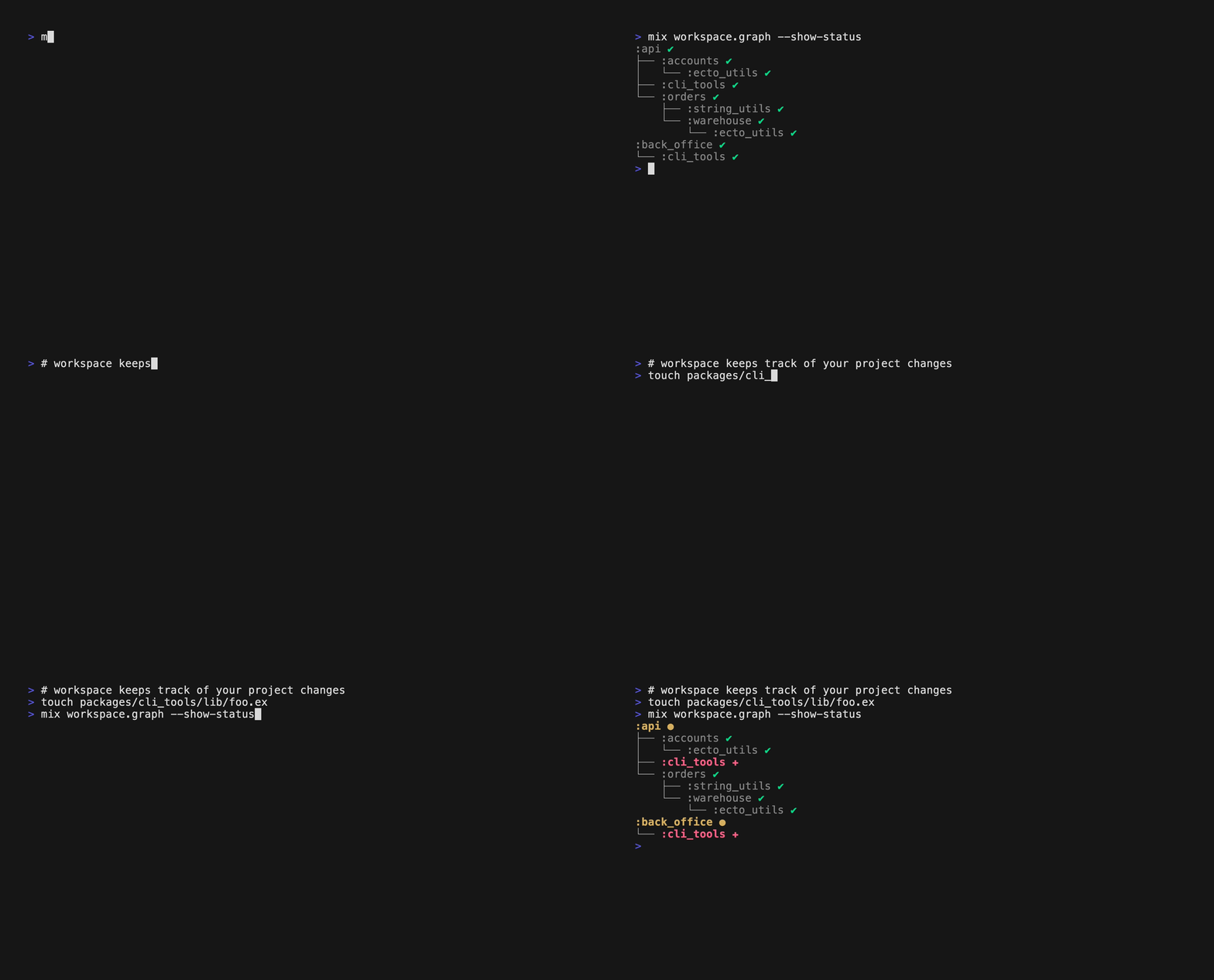
You can also output the graph as a mermaid chart:
flowchart TD
  accounts
  api
  back_office
  cli_tools
  ecto_utils
  orders
  string_utils
  warehouse

  accounts --> ecto_utils
  api --> accounts
  api --> cli_tools
  api --> orders
  back_office --> cli_tools
  orders --> string_utils
  orders --> warehouse
  warehouse --> ecto_utils

  classDef external fill:#999,color:#ee0;

  class api affected;
  class orders modified;

  classDef affected fill:#FA6,color:#FFF;
  classDef modified fill:#F33,color:#FFF;
Running tasks on projects
Monorepos can have hundreds of projects, so being able to run actions against
all (or some) of them is a key feature of Workspace.

mix workspace.run allows you to:
- Run a task against all or a subset of projects.
- Run tasks only on projects based on their status and workspace graph topology.
- Filter projects based on tags.
- Partitioning runs for parallelizing CI steps.
For example:
# Run mix deps.get on all workspace projects
$ mix workspace.run -t deps.get

# Run mix docs only on cli_tools
$ mix workspace.run -t docs -p cli_tools

# Run mix test on all affected projects
$ mix workspace.run -t test --affected

# Run mix format on all modified projects
$ mix workspace.run -t format --modified

# Run mix compile only on top level projects
$ mix workspace.run -t compile --only-roots -- --warnings-as-errors
Check the mix workspace.run docs for more details.
Workspace checks
When your mono-repo grows it is becoming more tedious to keep track with all projects and ensure that the same standards apply to all projects. For example you may wish to have common dependencies defined across all your projects, or specific conventions for the various artifacts output folders.
All checks implement the Workspace.Check behaviour and can be configured
in your .workspace.exs file. Workspace comes with some default checks
that among other, allow you to:
- Ensure that specific dependencies are set
on all projects, e.g.
ex_doc. - Ensure that external dependencies versions match the expected ones.
- Verify that no forbidden dependencies are defined.
- Validate arbitrarily the projects' config objects.
- Enforce boundaries between workspace projects.
You can also implement your own checks, incorporating any custom validation logic you may wish.
You can run the checks against your workspace through the mix workspace.check
command:
$ mix workspace.check
running 4 workspace checks on the workspace

==> C000 validate workspace relative path dependencies
==> C001 all projects must have a description set
ERROR :accounts - no :description set packages/accounts
==> C002 forbidden dependencies are not used
ERROR :ecto_utils - the following forbidden dependencies were detected: [:poison] packages/ecto_utils
==> C003 strict external dependencies
ERROR :string_utils - version mismatches for the following dependencies: [:ex_doc]
    → :ex_doc expected "== 0.28.3" "== 0.30.0" packages/string_utils
Installation
If you want to manually create the workspace root project and not you the
:workspace_new scaffolding tool, then you need to add workspace as a
top level dependency:
def deps do
  [
    {:workspace, "~> 0.2.0"}
  ]
end
and also indicate that the current project is a workspace:
def project do
[
  workspace: [
    type: :workspace,
    # arbitrary options can be set there
  ],
  # rest Mix.Project settings
]
end
License
Copyright (c) 2023 Panagiotis Nezis, Sportradar
Workspace is released under the MIT License. See the LICENSE file for more details.