Tak
Git worktree management for Elixir/Phoenix development.
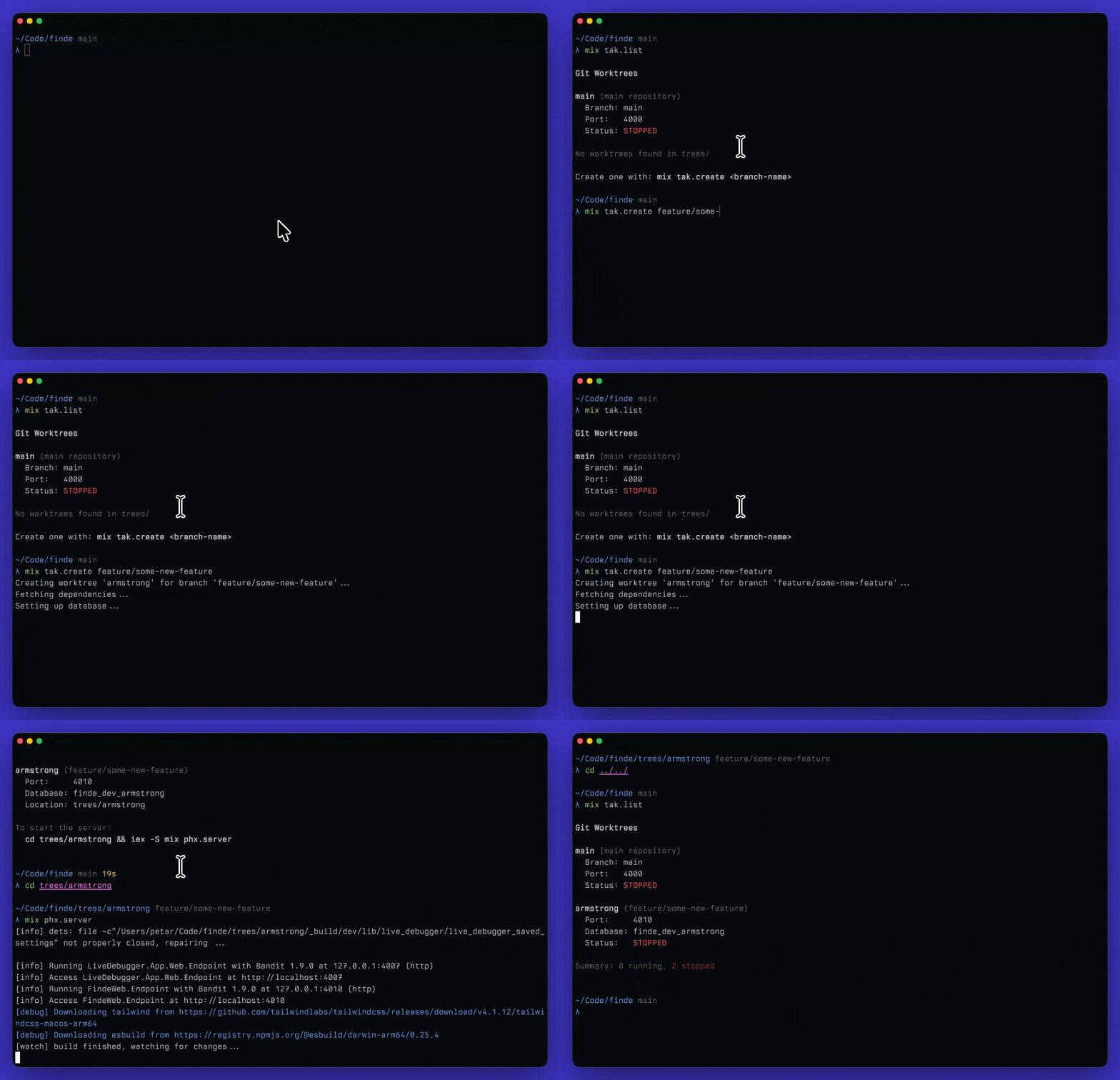
Tak (Dutch for "branch") helps you manage multiple git worktrees, each with isolated ports and databases for parallel development.
Requirements
- Elixir/Phoenix project with Ecto
- macOS or Linux (
lsofoptional, used for process management during removal) - PostgreSQL (for database management)
- Git (for worktree management)
- mise (optional, for PORT environment variable)
Installation
Add
takto your dependencies inmix.exs:def deps do [ {:tak, "~> 0.4.2", only: :dev} ] endAdd local config import to
config/config.exs(this allows tak to createdev.local.exsin each worktree with isolated port and database settings, without modifying tracked files):# At the end of config/config.exs if File.exists?("#{__DIR__}/#{config_env()}.local.exs") do import_config "#{config_env()}.local.exs" endAdd to
.gitignore:/config/*.local.exs /mise.local.toml /trees/Run
mix tak.doctorto verify your setup.
Usage
Create a worktree
$ mix tak.create feature/login
$ mix tak.create feature/login armstrong  # specify name
$ mix tak.create feature/login --no-db    # skip database setup
This will:
-
Create a git worktree in
trees/<name>/ -
Create
.takmetadata as Tak's source of truth for the worktree -
Create
config/dev.local.exswith isolated port and database -
If mise is installed, create
mise.local.tomlwith PORT env var -
Run
mix deps.getandmix ecto.setup
Tak writes .tak only after bootstrap succeeds. If bootstrap fails, it attempts best-effort cleanup of the partial worktree.
List worktrees
$ mix tak.listShows all worktrees with their branch, port, database, and running status.
Remove a worktree
$ mix tak.remove armstrong
$ mix tak.remove armstrong --force
$ mix tak.remove armstrong --keep-db
This will stop services, remove the worktree, delete the branch, and drop the database. Use --keep-db to preserve the database.
Check configuration
$ mix tak.doctorVerifies your project is configured correctly for tak (gitignore, dev.local.exs import, etc.).
Configuration
Configure Tak in your config/config.exs:
config :tak,
  names: ~w(armstrong hickey mccarthy lovelace kay valim),
  base_port: 4000,
  trees_dir: "trees",
  create_database: true,
  endpoint: MyAppWeb.Endpoint,
  repo: MyApp.Repo
Options
| Option | Default | Description |
|---|---|---|
names | ~w(armstrong hickey mccarthy lovelace kay valim) | Available worktree slot names |
base_port | 4000 | Base port (worktrees use 4010, 4020, etc.) |
trees_dir | "trees" | Directory to store worktrees |
create_database | true |
Whether to run mix ecto.setup on create |
endpoint | Inferred from app name | Phoenix endpoint module |
repo | Inferred from app name | Ecto repo module |
How it works
Each worktree gets:
- Tak metadata:
.takstores the worktree name, branch, port, database, and database ownership - Unique port: Assigned based on name index (armstrong=4010, hickey=4020, etc.)
- Isolated database:
<app>_dev_<name>(e.g.,myapp_dev_armstrong) - Local config:
config/dev.local.exsapplies the port and optional database override inside the worktree
If mise is installed, a mise.local.toml is also created with the PORT env var to override any inherited environment.
mix tak.list and mix tak.remove read .tak first. Older worktrees without .tak still work through the legacy config-scraping fallback, so no migration is required.
Runtime API
If you want to call Tak from Elixir instead of only through Mix tasks, the supported runtime API is:
Tak.WorktreesTak.WorktreeTak.WorktreeStatusTak.RemoveResult
License
MIT