PlugHTTPCache
A Plug that caches HTTP responses
This plug library relies on the http_cache
library. It supports all caching features of
RFC9111 and more
(such as conditional requests and range requests).
See http_cache documentation for more information.
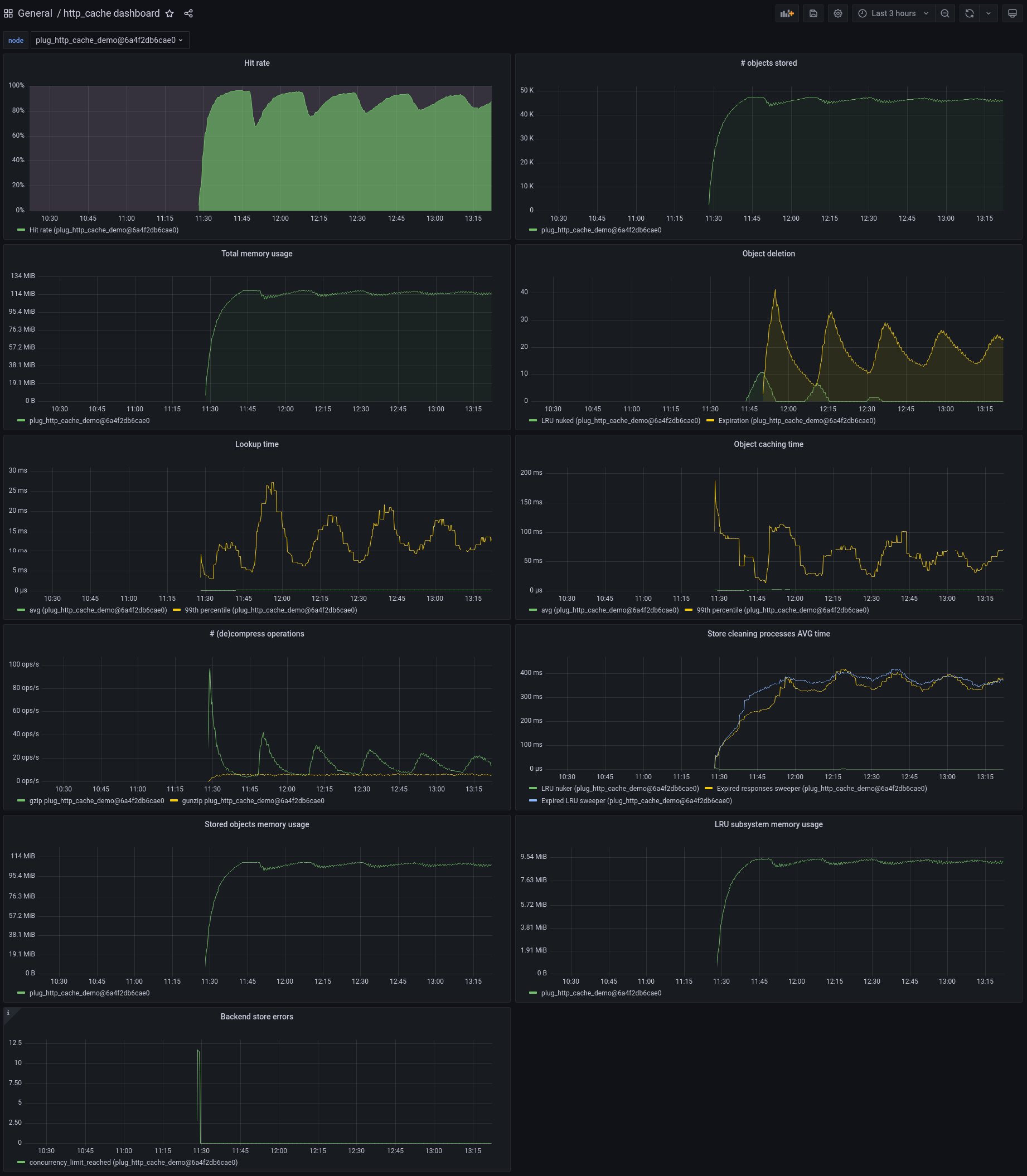
Screenshot from the plug_http_cache_demo
application.
Installation
def deps do
  [
    {:http_cache, "~> 0.4.0"},
    {:plug_http_cache, "~> 0.4.0"}
  ]
end
Configuration
In your plug pipeline, set the Plug for routes on which you want to enable caching:
router.ex
pipeline :cache do
  plug PlugHTTPCache, @caching_options
end

...

scope "/", PlugHTTPCacheDemoWeb do
  pipe_through :browser

  scope "/some_route" do
    pipe_through :cache

    ...
  end
end
You can also configure it for all requests by setting it in Phoenix's endpoint file:
endpoint.ex
defmodule MyApp.Endpoint do
  use Phoenix.Endpoint, otp_app: :plug_http_cache_demo

  % some other plugs

  plug Plug.RequestId
  plug Plug.Telemetry, event_prefix: [:phoenix, :endpoint]
  plug Plug.Parsers,
    parsers: [:urlencoded, :multipart, :json],
    pass: ["*/*"],
    json_decoder: Phoenix.json_library()
  plug Plug.Head
  plug Plug.Session, @session_options

  plug PlugHTTPCache, @caching_options

  plug PlugHTTPCacheDemoWeb.Router
end
Note that:
- caching chunked responses is not supported
-
some responses (called "cacheable by default") can be cached even when no
cache-controlheader is set. For instance, a 200 response to a get request is cached 2 minutes by default, unlesscache-controlheaders prohibit it -
Phoenix automatically sets the
"cache-control"header to"max-age=0, private, must-revalidate", so by default no response will ever be cached unless you override this header
You can also configure PlugHTTPCache.StaleIfError to return expired cached responses.
This is useful to continue returning something when the backend experiences failures
(for example if the DB crashed and while it's rebooting).
Plug options
Plug options are those documented by
:http_cache.opts/0.
The only required option is :store.
This plug sets the following default options:
:type::shared,:auto_compress:true,:auto_accept_encoding:true:stale_while_revalidate_supported:true
Stores
Responses have to be stored in a separate store backend (this library does not come with one), such as:
http_cache_store_memory: responses are stored in memory (ETS)http_cache_store_disk: responses are stored on disk. This library uses thesendfilesystem call and therefore benefits from the kernel's memory caching automatically
Both are cluster-aware.
To use it along with this library, just add it to your mix.exs file:
mix.exs
{:http_cache, "~> ..."},
{:plug_http_cache, "~> ..."},
{:http_cache_store_memory, "~> ..."},
Security considerations
Unlike many HTTP caches, http_cache allows caching:
-
responses to authorized request (with an
"authorization"header) - responses with cookies
In the first case, beware of authenticating before handling caching. In other words, don't:
PlugHTTPCache, @caching_options
MyPlug.AuthorizeUser
which would return a cached response to unauthorized users, but do instead:
MyPlug.AuthorizeUser
PlugHTTPCache, @caching_options
Beware of not setting caching headers on private responses containing cookies.
Useful libraries
PlugCacheControlcan be used to set cache-control headers in your Plug pipelines, or manually in your controllersPlugHTTPValidatorshould be used to set HTTP validators as soon as cacheable content is returned. See project documentation to figure out why
Telemetry events
The following events are emitted:
[:plug_http_cache, :hit]when a cached response is returned.[:plug_http_cache, :miss]when no cached response was found[:plug_http_cache, :stale_if_error]when a response was returned because an error occurred downstream (seePlugHTTPCache.StaleIfError)
conn is added to the events' metadata.
The http_cache, http_cache_store_memory and http_cache_store_disk emit other events about
the caching subsystems, including some helping with detecting normalization issues.
Normalization
The underlying http caching library may store different responses for the same URL,
following the directives of the "vary" header. For instance, if a response can
be returned in English or in French, both versions can be cached as long as the
"vary" header is correctly used.
This can unfortunately result in an explosion of stored responses if the headers
are not normalized. For instance, in this scenario where a site handles both these
languages, a response will be stored for any of these requests that include an
"accept-language" header:
- fr-CH, fr;q=0.9, en;q=0.8, de;q=0.7, *;q=0.5
- fr-CH, fr;q=0.9, en;q=0.8, de;q=0.7,*;q=0.5
- en
- de
- en, de
- en, de, fr
- en;q=1, de
- en;q=1, de;q=0.9
- en;q=1, de;q=0.8
- en;q=1, de;q=0.7
- en;q=1, de;q=0.6
- en;q=1, de;q=0.5
and so on, so potentially hundreds of stored responses for only 2 available responses (English and French versions).
In this case, you probably want to apply normalization before caching. This
could be done by a plug set before the PlugHTTPCache plug.
See Best practices for using the Vary header for more guidance regarding this issue.