Phoenix LiveView MultiSelect Component
This project implements an Elixir Phoenix LiveView component that has a capability of selecting multiple checkboxed items from a list.
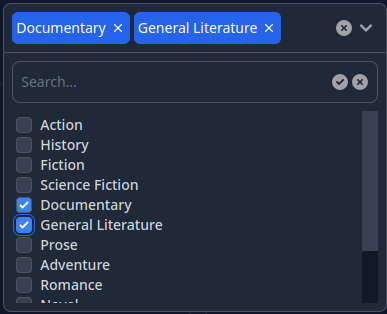
The component supports the following options:
- Selection of multiple items from the given list of options
- Limit the max number of selected items
- Ability to either wrap the selected tags in the main div of the component or collapse them in a single tag
- Ability to search in the list of options on the client side or on the server side
- Support of light/dark color themes
Here's a sample video illustrating what this component looks like in action.
This component is inspired by this article but is a complete rewrite with added features for usability.
Author
Serge Aleynikov
Installation
Include the project in the mix.exs as a dependency:
defp deps do
  [
    {:phoenix_multi_select, "~> 0.0"},
    ...
  ]
Run mix deps.get, and mix multi_select.install. This will modify the following
files:
assets/tailwind.config.js- to add the necessary color alias, and search pathassets/package.json- to add the tailwind scrollbar customizationassets/js/hooks/multi-select-hook.js- copied from the multi_select sourceassets/js/hooks/index.js- add the MultiSelectHook
Usage
In your project locate this file {{your_project}}_web.ex, and add:
  defp html_helpers do
    quote do
      ...
      use Phoenix.LiveView.Components.MultiSelect   ## <--- add this line
      ...
    end
  end
Now in the *.html.heex templates you can use the multi_select LiveView
component like this:
<.multi_select
  id="some-id"
  options={
    {id: 1, label: "Option1"},
    {id: 2, label: "Option2"},
    ...
  }
/>
For list of the available component's options see
Phoenix.LiveView.Components.MultiSelect.multi_select/1
Customization
- In order to add a custom class name to the
multi_selectcomponent so that it can be customized in your CSS files, add the following option toconfig.exs:
config.exs:
===========
...
config :live_view, :phoenix_multi_select,
  class_prefix: "some-class-name"
- You can also override the build-in CSS classes for every aspect of the
component's presentation by defining a custom callback module, that implements
a
apply_css/2function, which will be called to get a string of CSS classes for every part of the component. Here is an example where theprimarycolor is replaced bypink. See the@cssattribute in multi_select.ex for the list of permissibletagvalues passed to theapply_css/2function.
config.exs:
===========
...
config :live_view, :phoenix_multi_select,
  class_module: MyModule

my_module.ex:
=============
defmodule MyModule do
  def apply_css(_tag, def_css_classes), do:
    String.replace(def_css_classes, "primary", "pink")
end
Demo
The demo project is located in the examples/ directory, and can be compiled
and run with:
cd examples
make
make run
Now you can visit localhost:4000 from your browser.