PhoenixExRatatui


Run ExRatatui apps inside a Phoenix LiveView.
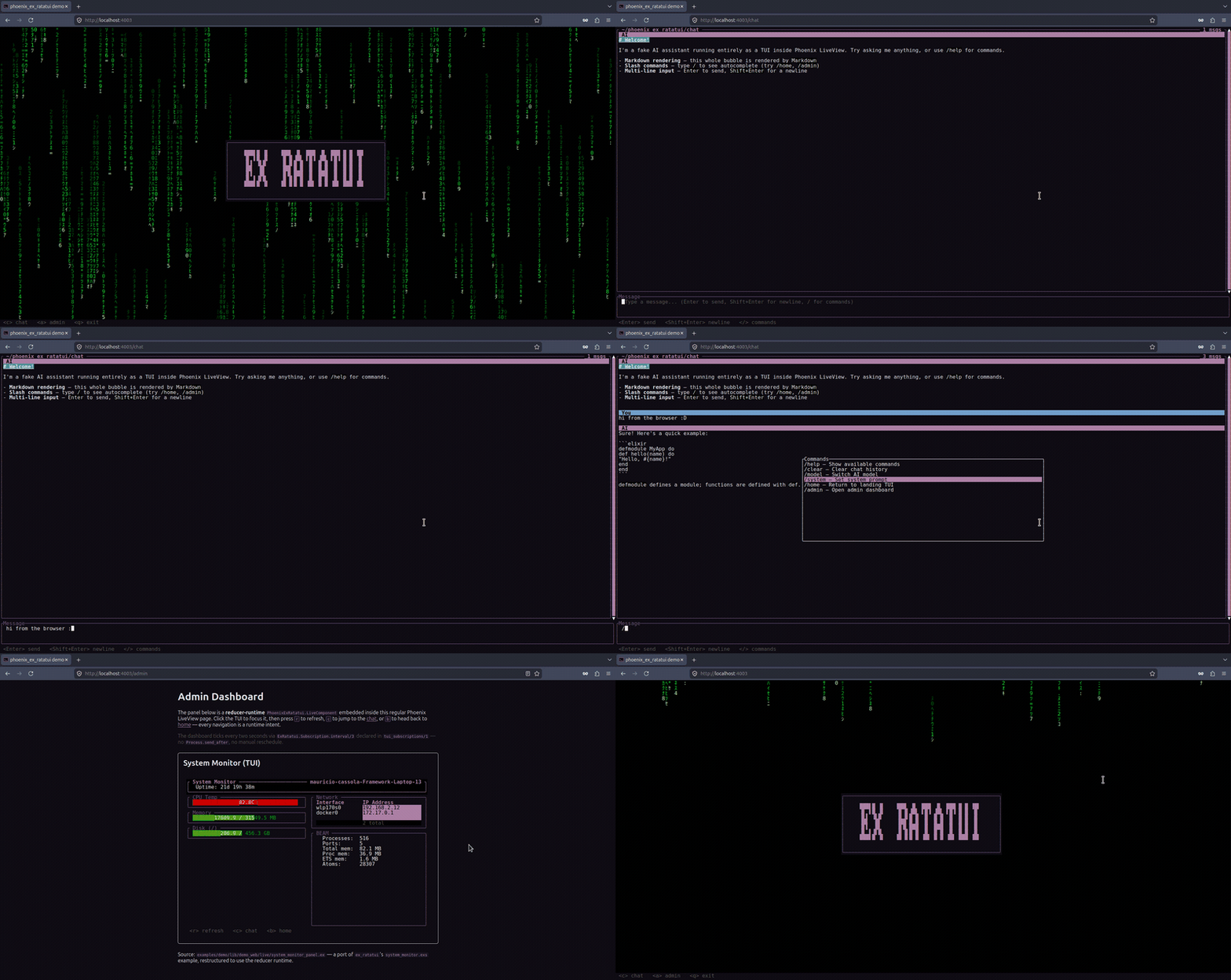
PhoenixExRatatui is the LiveView counterpart to kino_ex_ratatui: a thin transport that pipes the runtime's rendered cell buffer to the browser, where a small JS hook paints cells directly into the DOM as <span> elements. No terminal emulator, no ANSI on the wire — just structured cell deltas over the LiveView socket. Phones get real touch events.
Features
- Two unified-module APIs —
use PhoenixExRatatui.LiveViewfor a full-page TUI route,use PhoenixExRatatui.LiveComponentto embed a TUI inside an existing LiveView. The same module is both the Phoenix component and theExRatatui.Appdriving it; a hiddenModule.Runtimeproxy bridges the twohandle_info/2arities. - Callback and reducer runtimes —
runtime: :reduceropts into command/subscription-driven apps (tui_init/1+tui_update/2+tui_subscriptions/1); the default:callbacksruntime usestui_mount/1+tui_handle_event/2+tui_handle_info/2. - Cell-diff rendering over the socket — the rendered cell buffer ships as a structured
%{width, height, ops}payload of<span>-cell deltas. Arrays not objects, to roughly halve the wire size on full frames. - Tiny, dependency-free JS hook — ~4KB minified (vs. xterm.js's ~250KB). Measures the cell box, paints diffs by direct
cells[row][col]lookup, forwardskeydownas input events, and re-reports size viaResizeObserver. - Inter-page navigation via runtime intents — return
{:navigate, "/path"},:patch, or:redirect(internal or external) from any handler; the macro dispatches throughpush_navigate/2and friends. - Auto-focus on full-page TUIs — keystrokes flow without clicking the grid first. Embedded components deliberately don't steal focus.
:telemetryintegration — transport connect/disconnect spans, a per-frame render span, and input-forward events, layered above the eventsex_ratatuialready emits.- Full color and modifiers — named, RGB, and 256-color indexed; bold, italic, underline, and more, inherited straight from ExRatatui.
Examples
The examples/demo/ Phoenix app showcases the unified LV and LC side-by-side:
| View | Route | Demonstrates |
|---|---|---|
| Home | / | Full-page LiveView, callbacks runtime, navigation intents |
| Chat | /chat | Markdown, Textarea, Throbber, a slash-command popup, and scrollback |
| Admin | /admin | An embedded reducer-runtime LiveComponent with a live Gauge/Table system monitor |
Run it with mix deps.get && mix phx.server from inside examples/demo/.
Installation
Add phoenix_ex_ratatui to the deps in mix.exs:
def deps do
  [
    {:phoenix_ex_ratatui, "~> 0.1"}
  ]
end
Then fetch:
mix deps.get
Prerequisites
- Elixir 1.17+
- Phoenix LiveView 1.1+
phoenix_ex_ratatui pulls in ex_ratatui (~> 0.10) transitively, which ships a precompiled NIF — no Rust toolchain required.
Wiring the JS hook
The hook is resolved as a normal npm module. Add it to assets/package.json alongside Phoenix's own JS deps:
{
  "dependencies": {
    "phoenix": "file:../deps/phoenix",
    "phoenix_html": "file:../deps/phoenix_html",
    "phoenix_live_view": "file:../deps/phoenix_live_view",
    "phoenix_ex_ratatui": "file:../deps/phoenix_ex_ratatui"
  }
}
Run npm install (or cd assets && npm install), then import the hook in assets/js/app.js:
import { Socket } from "phoenix"
import { LiveSocket } from "phoenix_live_view"
import { PhoenixExRatatuiHook } from "phoenix_ex_ratatui"

const liveSocket = new LiveSocket("/live", Socket, {
  hooks: { PhoenixExRatatuiHook }
})
The hook sets sensible defaults on the container (monospace font, white-space: pre, line-height: 1) only when they aren't already supplied, so the grid stays themeable with CSS.
Quick Start
Both shapes are unified modules — the same module is both a Phoenix LiveView/LiveComponent and the ExRatatui.App driving it. The macro auto-generates a hidden Module.Runtime proxy that conforms to ExRatatui.App by delegating to the tui_* callbacks.
Full-page TUI route
defmodule MyAppWeb.MyTuiLive do
  use PhoenixExRatatui.LiveView

  def tui_mount(_opts), do: {:ok, %{count: 0}}

  def tui_render(state, frame) do
    alias ExRatatui.Layout.Rect
    alias ExRatatui.Widgets.Paragraph
    [{%Paragraph{text: "Count: #{state.count}"},
      %Rect{x: 0, y: 0, width: frame.width, height: frame.height}}]
  end

  def tui_handle_event(%ExRatatui.Event.Key{code: "+"}, state),
    do: {:noreply, %{state | count: state.count + 1}}

  def tui_handle_event(%ExRatatui.Event.Key{code: "q"}, state),
    do: {:stop, state}

  def tui_handle_event(_event, state), do: {:noreply, state}
end

# In the router (no special macro):
live "/tui", MyAppWeb.MyTuiLive
Embedded LiveComponent
defmodule MyAppWeb.AdminCounterPanel do
  use PhoenixExRatatui.LiveComponent

  def tui_mount(_opts), do: {:ok, %{n: 0}}
  def tui_render(state, frame), do: # ...
  def tui_handle_event(_event, state), do: {:noreply, state}
end

defmodule MyAppWeb.AdminLive do
  use Phoenix.LiveView

  def render(assigns) do
    ~H"""
    <h1>Admin Dashboard</h1>
    <.live_component module={MyAppWeb.AdminCounterPanel} id="admin-tui" />
    <p>Other admin content</p>
    """
  end
end
How It Works
┌─────────────────┐   tui_* callbacks   ┌──────────────────────┐
│  Your module    │ ◀────────────────── │  Module.Runtime      │  (hidden proxy,
│  (LiveView/LC)  │                     │  conforms to App     │   generated by macro)
└────────┬────────┘                     └──────────┬───────────┘
         │                                         │
         │ PhoenixExRatatui.Transport              │ ExRatatui.Server
         ▼                                         ▼
   CellSession  ──── %CellSession.Diff{} ────▶  Renderer.Html
                                                   │
                          push_event("phx_ex_ratatui:render", payload)
                                                   ▼
                                       JS hook paints <span> cells
   browser keydown ──── "phx_ex_ratatui:input" ────▶ back into the runtime
A CellSession plus a linked ExRatatui.Server drive the module. On each render the server hands a %CellSession.Diff{} to the transport, which forwards it to the LiveView; PhoenixExRatatui.Renderer.Html encodes it to a JSON-friendly payload and push_event/3s it to the browser. The hook paints the deltas and forwards keystrokes back as phx_ex_ratatui:input events. Because the Server is linked to the LiveView process, teardown is deterministic — when the LiveView exits, the session closes and disconnect telemetry fires.
Inter-page navigation via runtime intents
A TUI can navigate to another route by emitting a runtime intent from any handler:
def tui_handle_event(%Key{code: "enter"}, state) do
  {:noreply, state, intents: [{:navigate, "/dashboard"}]}
end

def tui_handle_event(%Key{code: "q"}, state) do
  {:noreply, state, intents: [{:redirect, "/login"}]}
end
Recognised intent shapes:
| Intent | Effect |
|---|---|
{:navigate, "/path"} | Phoenix.LiveView.push_navigate/2 |
{:patch, "/path"} | Phoenix.LiveView.push_patch/2 |
{:redirect, "/path"} | Phoenix.LiveView.redirect/2 (internal) |
{:redirect, [external: "https://…"]} | redirect/2 to an external URL |
Unrecognised intents are dropped (logged at warning) so a TUI stays portable across consumers — return whatever the runtime understands and the LV ignores the rest.
For the embeddable LiveComponent, intents bubble up to the parent LV via send/2 (Phoenix LV forbids redirects from inside LiveComponent.update/2). Add this clause to the parent LV:
def handle_info({:phoenix_ex_ratatui, :intent, intent}, socket) do
  {:noreply, PhoenixExRatatui.LiveView.dispatch_intent(socket, intent)}
end
Threading socket data into the App
LiveView assigns and TUI state live in different processes. The tui_mount_opts/1 callback is the bridge — it receives the LiveView socket and returns the keyword list passed as opts to tui_mount/1:
defmodule MyAppWeb.AdminTui do
  use PhoenixExRatatui.LiveView

  @impl Phoenix.LiveView
  def mount(_params, session, socket) do
    {:ok, socket} = super(nil, nil, socket)
    {:ok, assign(socket, :user_id, session["user_id"])}
  end

  def tui_mount_opts(socket), do: [user_id: socket.assigns.user_id]

  def tui_mount(opts), do: {:ok, %{user_id: opts[:user_id]}}
end
Guides
| Guide | Description |
|---|---|
| Getting Started | Extended walkthrough of both the full-page and embedded APIs, the JS hook wiring, and the typical project structure |
Module references:
PhoenixExRatatui.LiveView— the full-page macroPhoenixExRatatui.LiveComponent— the embeddable macroPhoenixExRatatui.Telemetry—:telemetryevents catalogue andTelemetry.Metricswiring example
Contributing
PhoenixExRatatui is built on ExRatatui, a general-purpose terminal UI library for Elixir. Contributions to the underlying rendering, widgets, or layout engine are very welcome there too. See CONTRIBUTING.md for the local-dev setup.
License
MIT — see LICENSE for details.