
PhiaUI
534 production-ready Phoenix LiveView components — the most complete UI library in the Elixir ecosystem.
PhiaUI is a copy-paste component library for Phoenix LiveView, inspired by shadcn/ui. Components are ejected directly into your project — you own the code, customise every detail, and never fight a black-box abstraction. Built on TailwindCSS v4 semantic tokens, every component ships with full WAI-ARIA accessibility, zero heavy npm runtime dependencies, and first-class dark mode out of the box.





Why PhiaUI?
| Feature | PhiaUI | Salad UI | Mishka Chelekom | Doggo | Primer Live | shadcn/ui |
|---|---|---|---|---|---|---|
| Platform | Phoenix LiveView | Phoenix LiveView | Phoenix LiveView | Phoenix LiveView | Phoenix LiveView | React |
| Components | 534 | ~40 | ~100 | ~40 | ~45 | ~50 |
| Copy-paste ownership | ✅ | ✅ | ✅ | ✅ | ❌ | ✅ |
LiveView-native (phx-*, streams) | ✅ | ✅ | ✅ | ✅ | ✅ | ❌ |
| Zero npm runtime deps | ✅ | ✅ | ✅ | ✅ | Partial | ❌ |
| Full WAI-ARIA on all interactive | ✅ | Partial | Partial | ✅ | Partial | ✅ |
| TailwindCSS v4 | ✅ | Partial | ✅ | ❌ | ❌ | Partial |
| Dark mode | ✅ | ✅ | ✅ | ✅ | ✅ | ✅ |
| Calendar & date/time suite | ✅ (33) | ❌ | Partial | ❌ | ❌ | Partial |
| Charts (SVG, zero-JS) | ✅ (16 types) | ❌ | ❌ | ❌ | ❌ | ❌ |
| Data Grid (sorting, pinning, export) | ✅ | ❌ | ❌ | ❌ | ❌ | ❌ |
| Drag & Drop | ✅ | ❌ | ❌ | ❌ | ❌ | ❌ |
| Rich text / code editors | ✅ | ❌ | ❌ | ❌ | ❌ | ❌ |
| Background patterns & animations | ✅ (37) | ❌ | ❌ | ❌ | ❌ | Partial |
Ecto FormField auto-integration | ✅ | Partial | ✅ | ✅ | ✅ | N/A |
| LiveBook tutorial | ✅ | ❌ | ❌ | ❌ | ❌ | N/A |
See it in action
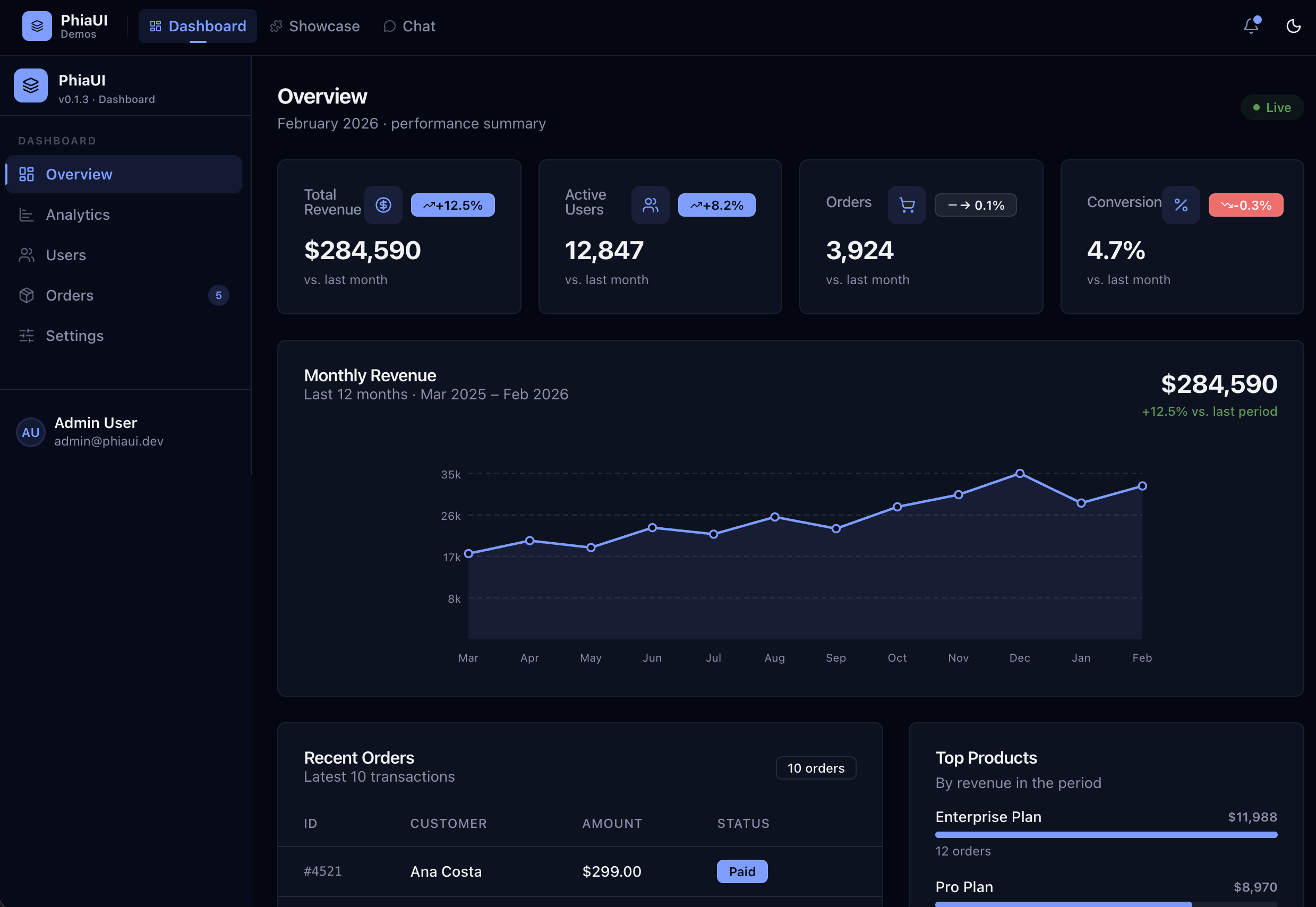
PhiaUI-samples — 16 complete Phoenix LiveView demo apps built entirely with PhiaUI components.
Quick Start
1. Add dependency
# mix.exs
def deps do
  [
    {:phia_ui, "~> 0.1.11"}
  ]
end
mix deps.get2. Install assets
mix phia.install
This copies all component .ex files into lib/your_app_web/components/ui/, JS hooks into assets/js/phia_hooks/, and the CSS theme into assets/css/.
3. Configure CSS
In assets/css/app.css:
@import "../../deps/phia_ui/priv/static/theme.css";
In assets/js/app.js, register hooks:
import { PhiaHooks } from "./phia_hooks"

let liveSocket = new LiveSocket("/live", Socket, {
  hooks: { ...PhiaHooks, ...YourHooks }
})
4. Use components
Import in your LiveView or layout module and start rendering:
defmodule MyAppWeb.PageLive do
  use MyAppWeb, :live_view
  import PhiaUi.Components.Buttons
  import PhiaUi.Components.Feedback
  import PhiaUi.Components.Inputs
end
<.button variant="default" phx-click="save">Save changes</.button>
<.alert variant="success">Saved successfully!</.alert>
<.input type="text" name="email" label="Email" placeholder="you@example.com" />Component Catalog
534 components across 18 categories. Click any category for full API docs and examples.
| Category | Components | Description |
|---|---|---|
| Animation | 22 | Marquee, typewriter, particles, text effects, motion primitives |
| Background | 15 | Mesh gradients, noise, dot grids, bokeh, animated patterns |
| Buttons | ~20 | Button, toggle, split, icon, social, fancy, action buttons |
| Calendar | 33 | Full date/time suite — pickers, schedulers, booking, streaks |
| Cards | 22 | Stat, article, profile, pricing, product, receipt, event cards |
| Data | ~80 | Charts (16 types), tables (9 types), data grid, trees, Kanban |
| Display | 27 | Icons, badges, avatars, timeline, utilities, dark mode |
| Editor | 19 | Toolbar, bubble menu, markdown editor, advanced rich-text editor |
| Feedback | 20 | Alerts, banners, toasts, loading, skeletons, empty states |
| Forms | 34 | Form layout, fieldsets, checkboxes, radio cards, cascaders |
| Inputs | 61 | Every input type — text, rich, OTP, upload, textarea variants |
| Interaction | 9 | Sortable lists, drag & drop, Kanban, draggable tree |
| Layout | 26 | Box, flex, grid, shell, accordion, resizable, scroll area |
| Media | 5 | Audio player, carousel, image comparison, QR code, watermark |
| Navigation | 33 | Sidebar, topbar, breadcrumb, tabs, command palette, TOC |
| Overlay | 9 | Dialog, drawer, sheet, dropdown, popover, tooltip, context menu |
| Surface | 22 | Glass, bento grid, animated borders, spotlight, overlays |
| Typography | 18 | Heading, prose, code block, gradient text, diff display |
Usage Examples
Data table with server-side sorting
defmodule MyAppWeb.UsersLive do
  use MyAppWeb, :live_view
  import PhiaUi.Components.Data

  def mount(_params, _session, socket) do
    {:ok, assign(socket, users: list_users(), sort_key: "name", sort_dir: "asc")}
  end

  def handle_event("sort", %{"key" => key, "dir" => dir}, socket) do
    {:noreply, assign(socket, users: sort_users(key, dir), sort_key: key, sort_dir: dir)}
  end
end
<.data_grid id="users-grid" rows={@users} sort_key={@sort_key} sort_dir={@sort_dir}>
<.data_grid_head sort_key="name" on_sort="sort">Name</.data_grid_head>
<.data_grid_head sort_key="email" on_sort="sort">Email</.data_grid_head>
<.data_grid_head sort_key="role" on_sort="sort">Role</.data_grid_head>
<:row :let={user}>
<.data_grid_cell><%= user.name %></.data_grid_cell>
<.data_grid_cell><%= user.email %></.data_grid_cell>
<.data_grid_cell>
<.badge variant={role_variant(user.role)}><%= user.role %></.badge>
</.data_grid_cell>
</:row>
</.data_grid>Ecto form with validation
defmodule MyAppWeb.ProfileLive do
  use MyAppWeb, :live_view
  import PhiaUi.Components.Inputs
  import PhiaUi.Components.Buttons

  def render(assigns) do
    ~H"""
    <.form for={@form} phx-change="validate" phx-submit="save">
      <.phia_input field={@form[:name]} label="Full name" required />
      <.phia_input field={@form[:email]} type="email" label="Email" />
      <.phia_input field={@form[:bio]} type="textarea" label="Bio" />
      <.button type="submit" variant="default">Save profile</.button>
    </.form>
    """
  end
end
Booking calendar with time slots
<.booking_calendar
  id="appt-calendar"
  available_dates={@available_dates}
  selected_date={@selected_date}
  on_select="select_date"
/>
<.time_slot_grid
  slots={@slots}
  selected_slot={@selected_slot}
  on_select="select_slot"
/>
Glassmorphism hero section
<div class="relative min-h-screen overflow-hidden">
  <.animated_gradient_bg from="#667eea" via="#764ba2" to="#f64f59" />
  <.bokeh_bg colors={["#f59e0b", "#6366f1", "#ec4899"]} count={6} />

  <div class="relative z-10 flex items-center justify-center min-h-screen">
    <.glass_card class="p-8 max-w-lg w-full">
      <.heading level={1}>Welcome to MyApp</.heading>
      <.paragraph class="text-muted-foreground mt-2">
        The fastest way to build beautiful UIs.
      </.paragraph>
      <.button variant="default" class="mt-6 w-full">Get started</.button>
    </.glass_card>
  </div>
</div>
Rich text editor
<.markdown_editor
  id="post-editor"
  name="post[body]"
  value={@post.body}
  toolbar={[:bold, :italic, :link, :code, :heading, :list]}
  phx-change="update_body"
/>
Documentation
Component References
| Page | Contents |
|---|---|
| Animation | All 22 animation primitives with timing and usage |
| Background | 15 background pattern components |
| Buttons | Button variants, groups, fancy buttons, action buttons |
| Calendar | Full date/time picker and scheduling system |
| Cards | 22 card variants for every use case |
| Data | Charts, tables, data grids, trees, Kanban |
| Display | Icons, badges, avatars, display utilities |
| Editor | Rich text and markdown editing components |
| Feedback | Notifications, progress, skeletons, error states |
| Forms | Form structure and advanced selects |
| Inputs | All 61 input variants with Ecto integration |
| Interaction | Drag & drop, sortable, Kanban |
| Layout | Page structure, shell, accordion, resizable |
| Media | Audio, carousel, image tools, QR |
| Navigation | Nav patterns, command palette, breadcrumbs |
| Overlay | Modals, drawers, dropdowns, tooltips |
| Surface | Glass, bento, animated surfaces |
| Typography | Text hierarchy, prose, code |
Tutorials
| Guide | What you build |
|---|---|
| LiveBook — Task Manager | Render PhiaUI components interactively in Livebook |
| Analytics Dashboard | Sidebar shell + KPI cards + chart + data grid |
| Booking Platform | Multi-step appointment wizard |
| CMS Editor | Article editor with rich text and media upload |
Design System
PhiaUI uses a CSS-first token system built on TailwindCSS v4 @theme. Every color, radius, shadow, and animation is expressed as a CSS variable so any theme change propagates instantly.
Color tokens: background, foreground, card, primary, secondary, muted, accent, destructive, border, ring
Dark mode: Class-based — add .dark to <html>. All components respond automatically.
Themes: Run mix phia.theme install zinc (or slate, stone, gray, red, rose, orange, blue, green, violet) to switch palettes.
/* Customise in your app.css */
@layer base {
  :root {
    --primary: oklch(0.55 0.24 262);
    --primary-foreground: oklch(0.98 0 0);
    --radius: 0.5rem;
  }
}
JS Hooks
PhiaUI ships 81 vanilla-JS hooks. All hooks are registered via PhiaHooks in assets/js/phia_hooks/index.js after running mix phia.install.
Hooks respect prefers-reduced-motion, clean up on destroyed(), and never require npm packages.
// assets/js/app.js
import { PhiaHooks } from "./phia_hooks"

let liveSocket = new LiveSocket("/live", Socket, {
  hooks: { ...PhiaHooks }
})
Elixir / Phoenix Requirements
| Requirement | Version |
|---|---|
| Elixir | ≥ 1.17 |
| Phoenix | ≥ 1.7 |
| Phoenix LiveView | ≥ 1.0 |
| TailwindCSS | v4 |
| Node.js (dev only) | ≥ 18 |
Contributing
Contributions are welcome. Please open an issue before submitting a large PR.
# Clone and set up
git clone https://github.com/your-org/phia_ui
cd phia_ui
mix deps.get
mix test

# Run a specific category
mix test test/phia_ui/components/data/
License
MIT © PhiaUI Contributors. See LICENSE.