Omni UI



Agent chat UI for Elixir — a ready-made LiveView interface for exploring, prototyping, and experimenting with Omni Agent powered agents.
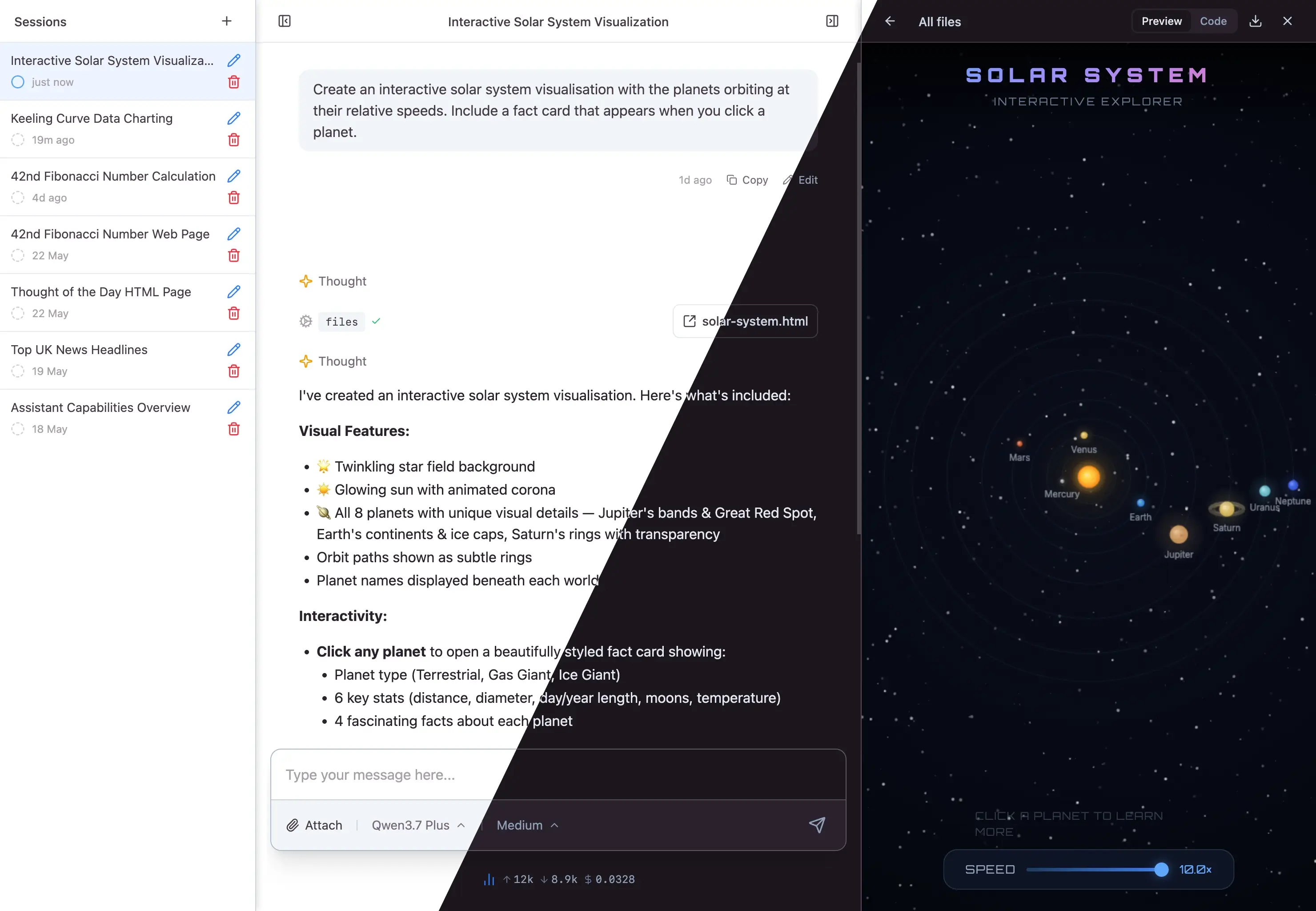
Features
- Built on Omni — multi-provider LLM support, streaming, tool use, structured output, persistent sessions, branching conversations, and pluggable storage — all inherited from Omni, Omni Agent, and Omni Tools
- Drop-in agent chat —
AgentLivemounts a complete interface with a files panel, Elixir REPL, and web tools wired up out of the box - Build your own —
use Omni.UIadds session plumbing to any LiveView; compose withChatUIandCoreUIcomponents for the rendering layer - Themeable — semantic colour tokens with light and dark mode support
Installation
Add Omni UI to your dependencies:
def deps do
  [
    {:omni_ui, "~> 0.1"}
  ]
end
Omni UI depends on omni, which provides the LLM API layer. Configure your provider API keys as described in the Omni README.
Requirements
Omni UI uses colocated CSS and JavaScript (extracted at compile time by the :phoenix_live_view compiler). This requires:
- Phoenix 1.8+
- Phoenix LiveView 1.2+
- Tailwind 4.2.3+
New Phoenix applications generated from 1.8.8 onwards are ready out of the box.
Assets
Omni UI ships its CSS and JavaScript as colocated assets — no static files to copy. Your application imports them from the phoenix-colocated build output.
In your CSS entry point, import the colocated stylesheet and add a @source directive so Tailwind can scan the component templates:
/* assets/css/app.css */
@import "phoenix-colocated/omni_ui/colocated.css";
@source "../../deps/omni_ui/lib";
In your JavaScript entry point, import the colocated hooks and spread them into your LiveSocket:
// assets/js/app.js
import {hooks as omniHooks} from "phoenix-colocated/omni_ui"

const liveSocket = new LiveSocket("/live", Socket, {
  hooks: {...omniHooks},
  // ...
})
Both require your bundler's module resolution to include Mix.Project.build_path(). For esbuild and Tailwind, this is configured via the NODE_PATH environment variable, which is the default for Phoenix 1.8+ applications.
The CSS defines OKLCH semantic colour tokens (--color-omni-bg, --color-omni-text, --color-omni-accent-1, etc.) with light and dark variants. Override any token in your own CSS to match your application's palette.
Syntax highlighting
Omni UI uses mdex for Markdown rendering with syntax highlighting powered by lumis. Enable it in your application config:
# config/config.exs
config :mdex_native, syntax_highlighter: :lumis
Quick start
The fastest way to see Omni running in your app. Mount the built-in AgentLive, add the session manager to your supervision tree, and you're done.
1. Configure
# config/config.exs
config :mdex_native, syntax_highlighter: :lumis

config :omni_ui, Omni.UI.Sessions,
  store: {Omni.Session.Stores.FileSystem, base_dir: "priv/sessions"},
  title_generator: {:anthropic, "claude-haiku-4-5"}

config :omni_ui, Omni.UI.AgentLive,
  providers: [:anthropic],
  default_model: {:anthropic, "claude-sonnet-4-6"}
2. Add it to your supervision tree
# application.ex
children = [
  # ... your other children
  Omni.UI.Sessions,
]
3. Mount in your router
# router.ex
scope "/" do
  pipe_through :browser
  live "/", Omni.UI.AgentLive
end

forward "/omni_files", Omni.UI.Files.Plug
Start your server and open the browser — you have a working agent chat with sessions, files, REPL, and web tools.
Build your own
When you want full control over the layout, tools, or event handling, skip AgentLive and use Omni.UI in your own LiveView. The macro injects session streaming, state management, and event routing — you bring the template and any custom behaviour.
defmodule MyAppWeb.ChatLive do
  use Phoenix.LiveView
  use Omni.UI

  def render(assigns) do
    ~H"""
    <.chat_interface>
      <.turn_list stream={@streams.turns} tool_components={@tool_components} />
      <.turn :if={@current_turn} turn={@current_turn} tool_components={@tool_components} />
      <:editor>
        <.editor model={@model} />
      </:editor>
    </.chat_interface>
    """
  end

  def mount(_params, _session, socket) do
    {:ok, init_session(socket, model: {:anthropic, "claude-sonnet-4-6"})}
  end

  def handle_params(params, _uri, socket) do
    {:noreply, attach_session(socket, id: params["session_id"])}
  end
end
See the Omni.UI module documentation for the full API — session lifecycle, custom agents, tool components, configuration, and the session_event callback.
Documentation
Full API reference is available on HexDocs.
License
This package is open source and released under the Apache-2 License.
© Copyright 2026 Push Code Ltd.