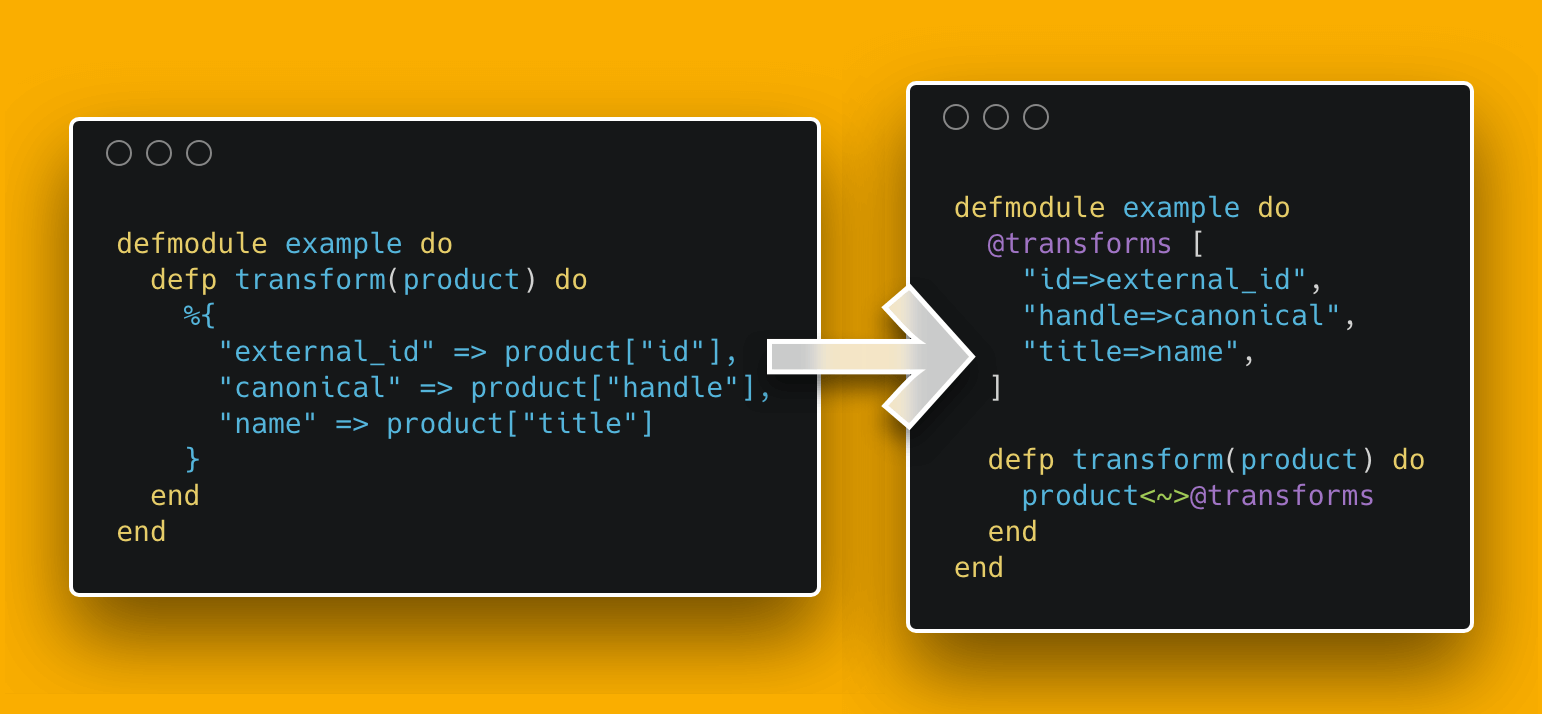



Syntactic sugar to simply bulk rekey maps. MapRewire takes two arguments, data (map) and transformation (list of transformations / string of transformations separated by whitespace).
Why did I do this?
Simply because I am super lazy, and writing out functions to take maps and convert them to different keys was boring (and irritating) the shit out of me.
IMHO rekeying maps with MapRewire is much nicer than having to write boilerplate like defp from_x_to_y(data), do: %{ "another_id" => data["id"], "name" => data["title"] }
TL;DR; Syntax
- Main Syntax:
left<~>right(content<~>transformation). Left value is the map that holds the data and keys you would like to update, Right value is an Elixir List that contains a string for each of the keys that you would like to update. - Transformation Syntax:
left=>right(from=>to). Left is the original key, right is the new key. - Return Syntax:
[left, right]([ original, rekeyed ]).leftis the original map.rightis the new, rekeyed, map.
Getting started
1. Add as a dependency
def deps do
  [
    {:map_rewire, "~> 0.1.1"}
  ]
end
2. Download
$ mix deps.get
3 (Optionally). Want to see inside MapRewire?
Add to config.exs
config :map_rewire,
  debug?: true
4. Run!
$ iex -S mix
Usage
Running in iex
Example 1: Inline example using a list transformation
 iex(1)> use MapRewire
 iex(2)> %{"id"=>"234923409", "title"=>"asdf"}<~>["title=>name", "id=>shopify_id"]
 [
   %{"id" => "234923409", "title" => "asdf"},
   %{"shopify_id" => "234923409", "name" => "asdf"}
 ]
Example 2: Inline example using a string transformation
 iex(1)> use MapRewire
 iex(2)> %{"id"=>"234923409", "title"=>"asdf"}<~>"title=>name id=>shopify_id"
 [
	 %{"id" => "234923409", "title" => "asdf"},
   %{"shopify_id" => "234923409", "name" => "asdf"}
 ]
Example 3: Mixed example with a string transformation
 iex(1)> use MapRewire
 iex(2)> content = %{
	 "id"=>"234923409",
	 "title"=>"asdf",
	 "body_html"=>"asdf"
 }
 iex(3)> content<~>"title=>name id=>shopify_id body_html=>desc no_match=>wow_much_field"
 [
   %{"id" => "234923409", "title" => "asdf", "body_html" => "asdf"},
   %{"shopify_id" => "234923409", "name" => "asdf", "desc" => "asdf"}
 ]
Example 4: Dynamic example with a string transformation
 iex(1)> use MapRewire
 iex(2)> content = %{
	 "id"=>"234923409",
	 "title"=>"asdf",
	 "body_html"=>"asdf"
 }
 iex(3)> transformation = "title=>name id=>shopify_id body_html=>desc no_match=>wow_much_field"
 iex(4)> content<~>transformation
 [
   %{"id" => "234923409", "name" => "title", "body_html" => "asdf"},
   %{"shopify_id" => "234923409", "name" => "asdf", "desc" => "asdf"}
 ]
Example 5: Dynamic example with a list transformation
 iex(1)> use MapRewire
 iex(2)> content = %{
	 "id"=>"234923409",
	 "title"=>"asdf",
	 "body_html"=>"asdf"
 }
 iex(3)> transformation = ["title=>name", "id=>shopify_id", "body_html=>desc"]
 iex(4)> content<~>transformation
 [
   %{"id" => "234923409", "name" => "asdf", "body_html" => "asdf"},
	 %{"shopify_id" => "234923409", "name" => "asdf", "desc" => "asdf"}
 ]
Running as part of a module
Example 1:
defmodule Foo do
  use MapRewire

  @becomes [
    "id=>shopify_id",
    "title=>name",
    "body_html=>description"
  ]

  def bar do
    fake_factory
    |> final
  end

  defp fake_factory do
    %{
      "id" => "234923409",
      "title" => "asdf",
      "body_html" => "asdfasdf"
    }
  end

  def final(data) do
    data<~>@becomes
  end
end
Calling Foo.bar() will result in the output:
 [
   %{"id" => "234923409", "title" => "asdf", "body_html" => "asdfasdf"},
   %{"shopify_id" => "234923409", "name" => "asdf", "description" => "asdfasdf"}
 ]
Example 2:
defmodule Foo do
  use MapRewire

  @becomes "age=>years_old languages=>technologies_known name=>this"

  def bar do
    fake_factory
    |> final
  end

  defp fake_factory do
    %{
      "age"=> 31,
      "languages"=> ["Erlang", "Ruby", "Elixir"],
      "name"=> "John"
    }
  end

  def final(data) do
    data<~>@becomes
  end
end
Calling Foo.bar() will result in the output:
[
   %{"age" => 31, "languages" => ["Erlang", "Ruby", "Elixir"], "name" => "John"},
   %{"years_old" => 31, "technologies_known" => ["Erlang", "Ruby", "Elixir"], "this" => "John"}
 ]