LotusWeb


A beautiful, lightweight web interface for Lotus - the SQL query runner and storage library for Elixir applications.
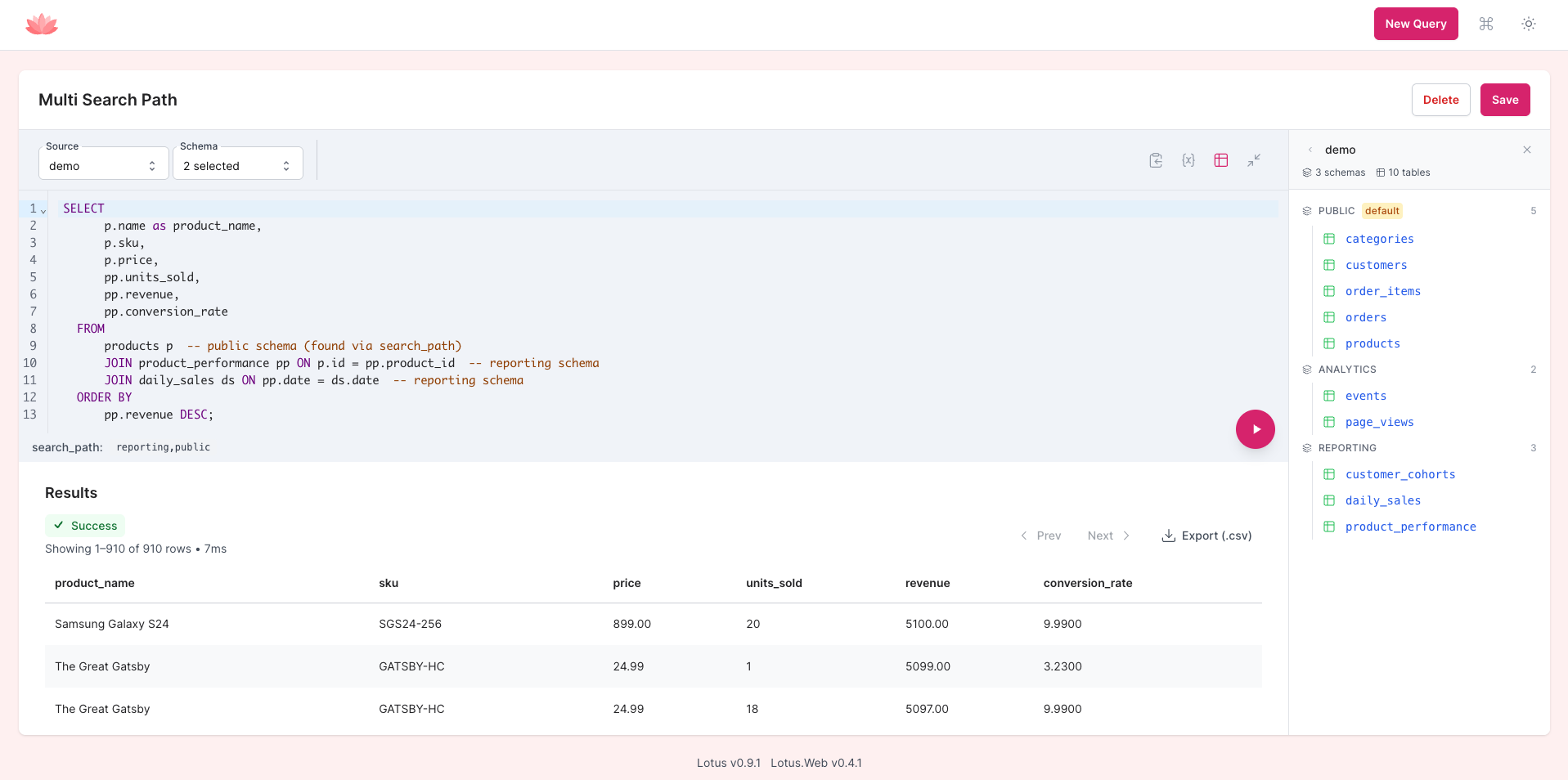
LotusWeb provides a free, easy-to-setup BI dashboard that you can mount directly in your Phoenix application. Perfect for technical and non-technical users who need to run SQL queries, create reports, and explore data without the complexity of a full BI solution.
🚧 While LotusWeb already has a solid feature set and its API surface is stabilizing, it’s still evolving. We’ll make a best effort to announce breaking changes, but we can’t guarantee backwards compatibility yet — especially as Lotus broadens its
Sourceabstraction to support more than SQL-backed data sources.
Production Use and UUID Caveats
LotusWeb is generally safe to use in production. It relies on Lotus’s read-only execution and session safety. We are running it in Accomplish successfully in production today, notwithanding being affected by the limitation described below.
If your application uses UUIDs or mixed ID formats, there are current limitations that affect how variables work in the LotusWeb UI:
-
Variable binding around UUID columns is constrained across different storage types and databases:
-
PostgreSQL
uuid -
MySQL
BINARY(16)vsCHAR(36|32) -
SQLite
TEXTvsBLOB
-
PostgreSQL
-
You can still get a lot of value from the UI, but filtering on UUID columns with
{{var}}will likely not work in Postgres as it warrants a special binary format that is not UI friendly (we convert to String for the UI but currently have no way to cast it back with runtime column inference).
We plan to improve this with column‑aware binding (Lotus will use schema metadata to deterministically cast/shape values). Once available, LotusWeb will take advantage of it automatically.
Why LotusWeb?
🎯 Lightweight Alternative to Complex BI Tools
- No additional servers required - mount directly in your Phoenix app
- Simpler than Livebook - no separate setup or deployment needed
- Free alternative to Blazer - inspired by the popular Ruby gem but built for Elixir
🔐 Secure by Default
- Read-only queries only - built on Lotus's safety-first architecture
- Table visibility controls - hide sensitive tables from the interface
- No direct database access - all queries go through Lotus's security layer
🏗️ Built for Phoenix
- LiveView-powered - real-time query execution and results
- Phoenix integration - follows Phoenix conventions and patterns
⚡ Developer & User Friendly
- SQL editor with syntax highlighting - powered by CoreMirror Editor
- Schema explorer - browse tables and columns interactively
- Query management - save, organize, and reuse queries
- Multiple database support - switch between configured repositories
- Export capabilities - download results as CSV (coming soon)
Current Features
- 🖥️ Web-based SQL editor with syntax highlighting and autocomplete
- 🗂️ Query management - create, edit, save, and organize SQL queries
- 🔍 Schema explorer - browse database tables, columns, and statistics
- 📊 Results visualization - clean, tabular display of query results
- 🏪 Multi-database support - execute queries against different configured repositories
- ⚡ Real-time execution - LiveView-powered query running
-
❓ Smart variables - parameterized queries with
{{variable}}syntax, configurable widgets, and SQL query-based dropdown options
What's planned?
- Export functionality - CSV, JSON, and Excel export options
- Query result caching - cache expensive queries for faster repeated access
- Dashboard builder - create custom dashboards with saved queries
- Query sharing - share query results via secure links
- Advanced permissions - role-based access to queries and databases
- Charts - render charts from queries
- Smart variables - parameterized queries with
{{variable}}syntax - SQL query-based dropdown options - populate variable dropdowns from database queries
- Schema exploration - interactive database schema browser
Installation
Add lotus_web to your list of dependencies in mix.exs:
def deps do
  [
    {:lotus_web, "~> 0.5.0"}
  ]
end
Requirements
- Elixir 1.16+ and OTP 25+
- Lotus 0.6+ - LotusWeb 0.3+ requires Lotus 0.6 or later
- Phoenix 1.7+ for LiveView compatibility
Version Compatibility Matrix
| LotusWeb Version | Required Lotus Version | Notes |
|---|---|---|
| 0.4.x | 0.9.0+ | Latest stable release |
| 0.3.x | 0.6.0+ | Legacy version |
The dependency constraint in
mix.exsautomatically ensures compatible versions are installed together.
Quick Setup
1. Configure Lotus (if not already done)
Add Lotus configuration to your config/config.exs:
config :lotus,
  ecto_repo: MyApp.Repo,        # Where Lotus stores queries
  default_repo: "main",         # Default repository for query execution
  data_repos: %{                # Where queries execute
    "main" => MyApp.Repo,
    "analytics" => MyApp.AnalyticsRepo
  }
2. Add Lotus migration (if not already done)
mix ecto.gen.migration create_lotus_tablesAdd the Lotus migration to your generated migration file:
defmodule MyApp.Repo.Migrations.CreateLotusTables do
  use Ecto.Migration

  def up do
    Lotus.Migrations.up()
  end

  def down do
    Lotus.Migrations.down()
  end
end
Run the migration:
mix ecto.migrate3. Configure Caching (Optional but Recommended)
Lotus supports result caching to improve query performance. To enable caching:
Add Lotus to your supervision tree:
# lib/my_app/application.ex
def start(_type, _args) do
  children = [
    MyApp.Repo,
    # Add Lotus for caching support
    Lotus,
    MyAppWeb.Endpoint
  ]

  opts = [strategy: :one_for_one, name: MyApp.Supervisor]
  Supervisor.start_link(children, opts)
end
Configure cache settings:
# config/config.exs
config :lotus,
  cache: [
    adapter: Lotus.Cache.ETS,
    namespace: "my_app_cache",
    profiles: %{
      results: [ttl_ms: 60_000],      # Cache query results for 1 minute
      schema: [ttl_ms: 3_600_000],    # Cache schemas for 1 hour
      options: [ttl_ms: 300_000]      # Cache dropdown options for 5 minutes
    }
]Note: Without adding Lotus to your supervision tree, all query functions will work normally but caching will be disabled.
4. Mount LotusWeb in your router
defmodule MyAppWeb.Router do
  use MyAppWeb, :router
  import Lotus.Web.Router

  # ... other routes

  scope "/", MyAppWeb do
    pipe_through [:browser, :require_authenticated_user] # 🔒 Important: Add authentication!

    lotus_dashboard "/lotus"
  end
end
⚠️ Security Notice: Always mount LotusWeb behind authentication in production. The dashboard provides powerful query capabilities and should only be accessible to authorized users.
Usage
Once mounted, visit /lotus in your application to access the dashboard:
Query Editor
- Write and execute SQL queries with syntax highlighting
- Switch between configured databases
- Real-time query execution
- Error handling with clear messages
Schema Explorer
- Browse available tables and their columns
- View table statistics and schema information
- Click to insert table/column names into queries (coming soon)
Query Management
- Save queries with descriptive names
- Edit and update existing queries
- Delete queries you no longer need
Configuration Options
Basic Configuration
# Mount with default options
lotus_dashboard "/lotus"
Custom Route Name
# Use a custom route name (default is :lotus_dashboard)
lotus_dashboard "/admin/queries", as: :admin_queries
WebSocket Configuration
# Customize WebSocket settings
lotus_dashboard "/lotus",
  socket_path: "/live",
  transport: "websocket"
Additional Mount Callbacks
# Add authentication or other mount logic
lotus_dashboard "/lotus",
  on_mount: [MyAppWeb.RequireAdmin, MyAppWeb.LogDashboardAccess]
Security Best Practices
1. Always Require Authentication
# ✅ Good - requires authentication
scope "/", MyAppWeb do
  pipe_through [:browser, :require_authenticated_user]
  lotus_dashboard "/lotus"
end

# ❌ Bad - no authentication required
scope "/", MyAppWeb do
  pipe_through [:browser]
  lotus_dashboard "/lotus"  # Anyone can access!
end
2. Use Table Visibility Controls
Configure Lotus to control access to database tables:
config :lotus,
  table_visibility: %{
    default: [
      allow: [
        "reports_users",
        "analytics_events",
        {"reporting", ~r/^daily_/}  # Allow reporting.daily_* tables
      ],
      deny: [
        "users",           # Block sensitive user data
        "admin_logs",      # Block admin tables
        {"public", ~r/^schema_/}  # Block schema tables
      ]
    ]
  }
Comparison with Alternatives
vs. Livebook
- ✅ Simpler setup - no separate deployment needed
- ✅ Integrated with your app - shares authentication and styling
- ❌ Less programmable - focused on SQL rather than general computation
vs. Full BI Solutions (Metabase, Grafana, etc.)
- ✅ No additional infrastructure - runs inside your Phoenix app
- ✅ Zero configuration - uses your existing database connections
- ✅ Free and open source - no licensing costs
- ❌ Less features - focused on essential SQL querying needs
- ❌ Not suitable for complex dashboards - simple tabular results only
vs. Ruby's Blazer Gem
- ✅ Built for Elixir/Phoenix - native LiveView implementation
- ✅ Multi-database support - can query different repos simultaneously
- ✅ More secure - Lotus's read-only architecture
- = Similar philosophy - embedded BI for developers and product owners
Development
Prerequisites
- Elixir 1.16+
- Phoenix 1.7+
- A Phoenix application with Lotus configured
Running Tests
mix testDevelopment Server
For initial setup when cloning the repository:
# Create required asset files and install dependencies
mkdir -p priv/static
touch priv/static/app.css && touch priv/static/app.js
npm install --prefix assets
mix dev
For subsequent runs:
mix devContributing
We welcome contributions!
Common ways to help:
- 🐛 Report bugs or issues
- 💡 Suggest new features
- 📚 Improve documentation
- 🎨 Enhance UI/UX
- ⚡ Performance improvements
Acknowledgments
LotusWeb owes significant inspiration to:
- ObanWeb - for the Phoenix mounting patterns and LiveView architecture
- Blazer - for proving the value of simple, embedded BI tools
- The Phoenix LiveView team - for making rich web interfaces simple to build
License
This project is licensed under the MIT License.
Portions of the code are adapted from Oban Web, © 2025 The Oban Team, licensed under the Apache License 2.0.