
Livebook is a web application for writing interactive and collaborative code notebooks. It features:
A deployable web app built with Phoenix LiveView where users can create, fork, and run multiple notebooks.
Each notebook is made of multiple sections: each section is made of Markdown and Elixir cells. Code in Elixir cells can be evaluated on demand. Mathematical formulas are also supported via KaTeX.
Persistence: notebooks can be persisted to disk through the
.livemdformat, which is a subset of Markdown. This means your notebooks can be saved for later, easily shared, and they also play well with version control.Sequential evaluation: code cells run in a specific order, guaranteeing future users of the same Livebook see the same output. If you re-execute a previous cell, following cells are marked as stale to make it clear they depend on outdated notebook state.
Custom runtimes: when executing Elixir code, you can either start a fresh Elixir process, connect to an existing node, or run it inside an existing Elixir project, with access to all of its modules and dependencies. This means Livebook can be a great tool to provide live documentation for existing projects.
Explicit dependencies: if your notebook has dependencies, they are explicitly listed and installed with the help of the
Mix.install/2command in Elixir v1.12+.Collaborative features allow multiple users to work on the same notebook at once. Collaboration works either in single-node or multi-node deployments - without a need for additional tooling.
There is a screencast by José Valim showing some of Livebook features. Otherwise, here is a peek at the "Welcome to Livebook" introductory notebook:
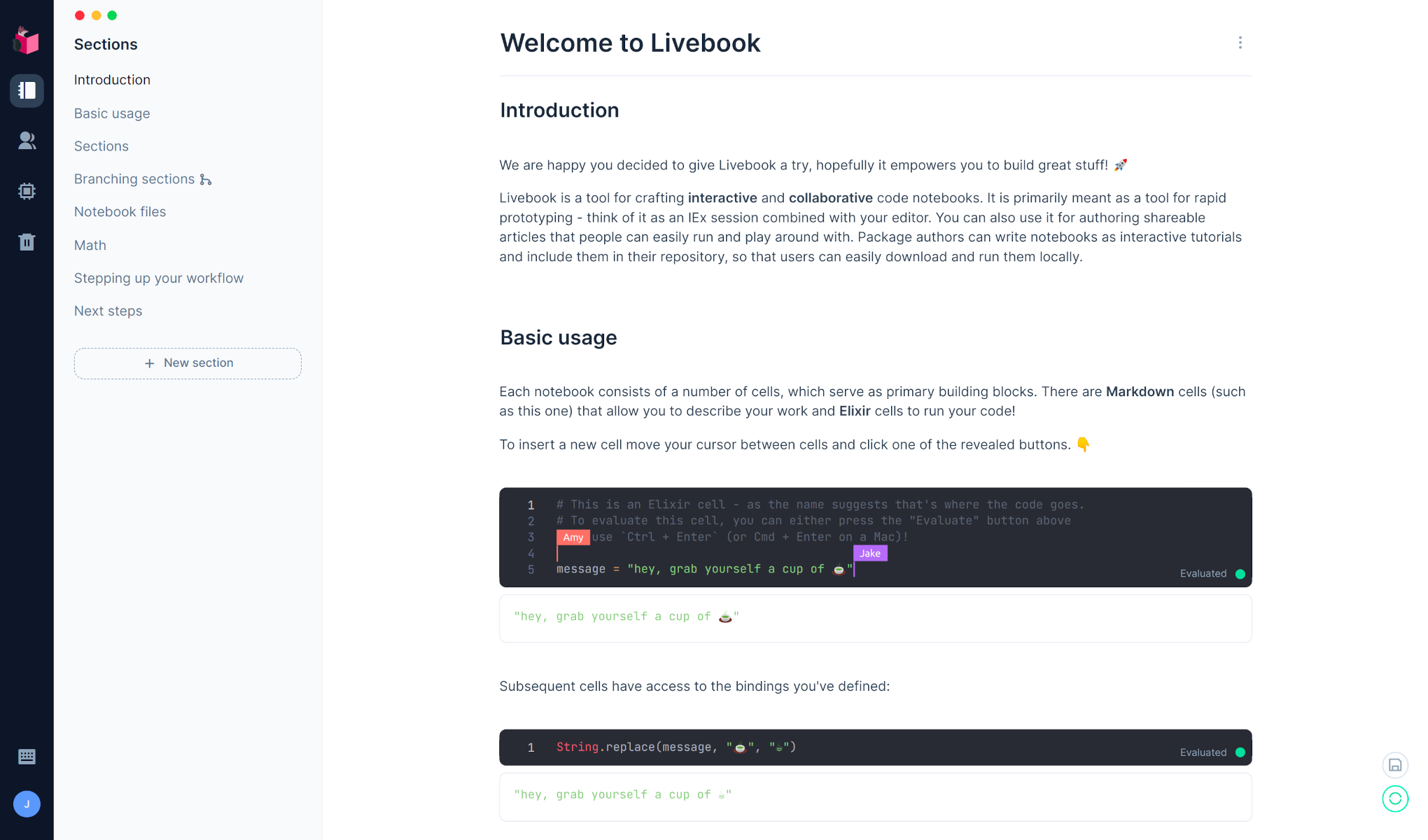
The current version provides only the initial step of our Livebook vision. Our plan is to continue focusing on visual, collaborative, and interactive features in the upcoming releases.
Usage
We provide several distinct methods of running Livebook, pick the one that best fits your use case.
You will need Elixir v1.12 or later.
Escript
Running Livebook using Escript makes for a very convenient option for local usage and provides easy configuration via CLI options.
mix escript.install hex livebook

# Start the Livebook server
livebook server

# See all the configuration options
livebook server --help
After you install the escript, make sure you add the directory where
Elixir keeps escripts to your $PATH.
If you installed Elixir with asdf, you'll need to run asdf reshim elixir.
once the Escript is built.
Docker
Running Livebook using Docker is a great option for cloud deployments and also for local usage in case you don't have Elixir installed.
# Running with the default configuration
docker run -p 8080:8080 livebook/livebook

# In order to access and save notebooks directly to your machine
# you can mount a local directory into the container.
# Make sure to specify the user with "-u $(id -u):$(id -g)"
# so that the created files have proper permissions
docker run -p 8080:8080 -u $(id -u):$(id -g) -v <LOCAL_DIR>:/data livebook/livebook

# You can configure Livebook using environment variables,
# for all options see the dedicated "Environment variables" section below
docker run -p 8080:8080 -e LIVEBOOK_PASSWORD="securesecret" livebook/livebook
Mix
You can run latest Livebook directly with Mix.
git clone https://github.com/elixir-nx/livebook.git
cd livebook
mix deps.get --only prod

# Run the Livebook server
MIX_ENV=prod mix phx.server
Security considerations
Livebook is built to document and execute code. Anyone with access to a Livebook instance will be able to access any file and execute any code in the machine Livebook is running.
For this reason, Livebook only binds to the 127.0.0.1, allowing access to happen only within the current machine. When running Livebook in the production environment - the recommended environment - we also generate a token on initialization and we only allow access to the Livebook if said token is supplied as part of the URL.
Environment variables
The following environment variables configure Livebook:
LIVEBOOK_COOKIE - sets the cookie for running Livebook in a cluster. Defaults to a random string that is generated on boot.
LIVEBOOK_DEFAULT_RUNTIME - sets the runtime type that is used by default when none is started explicitly for the given notebook. Must be either "standalone" (Elixir standalone) or "embedded" (Embedded). Defaults to "standalone".
LIVEBOOK_IP - sets the ip address to start the web application on. Must be a valid IPv4 or IPv6 address.
LIVEBOOK_PASSWORD - sets a password that must be used to access Livebook. Must be at least 12 characters. Defaults to token authentication.
LIVEBOOK_PORT - sets the port Livebook runs on. If you want multiple instances to run on the same domain but different ports, you also need to set 'LIVEBOOK_SECRET_KEY_BASE'. Defaults to 8080.
LIVEBOOK_ROOT_PATH - sets the root path to use for file selection.
LIVEBOOK_SECRET_KEY_BASE - sets a secret key that is used to sign and encrypt the session and other payloads used by Livebook. Must be at least 64 characters long and it can be generated by commands such as: 'openssl rand -base64 48'. Defaults to a random secret on every boot.
Development
Livebook is primarily a Phoenix web application and can be setup as such:
git clone https://github.com/elixir-nx/livebook.git
cd livebook
mix deps.get

# Run the Livebook server
mix phx.server

# To test escript
MIX_ENV=prod mix escript.build
./livebook server
License
Copyright (C) 2021 Dashbit
Licensed under the Apache License, Version 2.0 (the "License");
you may not use this file except in compliance with the License.
You may obtain a copy of the License at [http://www.apache.org/licenses/LICENSE-2.0](http://www.apache.org/licenses/LICENSE-2.0)

Unless required by applicable law or agreed to in writing, software
distributed under the License is distributed on an "AS IS" BASIS,
WITHOUT WARRANTIES OR CONDITIONS OF ANY KIND, either express or implied.
See the License for the specific language governing permissions and
limitations under the License.