Legion


An Elixir framework for building AI agents that write and execute code instead of making function calls.
Traditional agents call tools one at a time - fetch, wait, decide, fetch again - burning tokens and latency on every round-trip. Legion agents write Elixir code that fetches, filters, decides, and acts in a single step, running safely in a sandbox. Fewer LLM calls, smarter behavior, full language expressivity. Why code execution beats function calling.
Quick Start
1. Define your tools
Tools are regular Elixir modules. The LLM sees their source code and can call any public function.
defmodule MyApp.Tools.ScraperTool do
  use Legion.Tool

  @doc "Fetches recent posts from HackerNews"
  def fetch_posts do
    Req.get!("https://hn.algolia.com/api/v1/search_by_date").body["hits"]
  end
end

defmodule MyApp.Tools.DatabaseTool do
  use Legion.Tool

  @doc "Saves a post title to the database"
  def insert_post(title), do: Repo.insert!(%Post{title: title})
end
2. Define an agent
Agents are Elixir processes that receive tasks, write code to solve them, and maintain conversation state.
defmodule MyApp.ResearchAgent do
  @moduledoc """
  Fetch posts, evaluate their relevance and quality, and save the good ones.
  """
  use Legion.Agent

  def tools, do: [MyApp.Tools.ScraperTool, MyApp.Tools.DatabaseTool]
end
3. Run it
{:ok, result} = Legion.execute(MyApp.ResearchAgent, "Find cool Elixir posts about Advent of Code and save them")
# => {:ok, "Found 3 relevant posts and saved 2 that met quality criteria."}
How It Works
When you send "Find cool Elixir posts about Advent of Code and save them", the agent writes:
ScraperTool.fetch_posts()
|> Enum.filter(fn post ->
  title = String.downcase(post["title"] || "")
  String.contains?(title, "elixir") and String.contains?(title, "advent")
end)
It sees the results, decides which posts are worth saving, and writes:
["Elixir Advent of Code 2024 - Day 5 walkthrough", "My first AoC in Elixir!"]
|> Enum.each(&DatabaseTool.insert_post/1)
A traditional agent would need a separate LLM call for each filter decision and each insert. Legion handles filtering, judgment, and action in two steps - with the full power of Elixir's Enum, pattern matching, and pipelines available at every step.
Features
- Code generation over function calling - Agents write Elixir pipelines, not individual tool calls. Fewer tokens, fewer round-trips, smarter behavior.
- Sandboxed execution - Generated code runs in a restricted environment. Dangerous constructs (
defmodule,spawn,send,import) are blocked at the AST level. Module access is limited to stdlib + your tools. - Tools are just modules -
use Legion.Toolon any module to expose it. The LLM reads your source code and calls your functions. No schemas to write, no wrappers - reuse existing app logic directly. - Authorization via Vault - Set auth context before the agent starts, validate inside tools at runtime. LLM-generated code never touches credentials. See Vault.
- Long-lived agents - Start agents with
Legion.start_link/2and message them withcall/2andcast/2, just like a GenServer. Variables can persist across turns withbinding_scope: :conversation. - Multi-agent orchestration - Agents delegate to other agents via the built-in
AgentTool. Fan out withparallel/2, chain withpipeline/1. Sub-agents are linked processes - when a parent dies, children stop too. - Human in the loop - The built-in
HumanToolpauses agent execution until a human responds. It's just message passing - your handler receives a question and sends back an answer. - Structured output - Define a JSON Schema via
output_schema/0to get typed, validated responses. Or skip it and work with plain text. - Telemetry - Events for agent lifecycle, messages, iterations, LLM calls, and code evaluation. Plug into any monitoring stack.
- Process-native - Agents are BEAM processes. Supervision trees, process groups, hot code reloading, lightweight concurrency - all work out of the box.
Installation
Add legion to your dependencies:
def deps do
  [
    {:legion, "~> 0.3"}
  ]
end
Configure your LLM provider (all options):
# config/runtime.exs
config :req_llm, openai_api_key: System.get_env("OPENAI_API_KEY")
Long-lived Agents
# Start an agent that maintains context
{:ok, pid} = Legion.start_link(MyApp.AssistantAgent)

# Send follow-up messages
{:ok, response} = Legion.call(pid, "Now filter for items over $100")

# Or fire-and-forget
Legion.cast(pid, "Also check the reviews")
Multi-Agent Systems
Agents orchestrate other agents through the built-in AgentTool:
defmodule MyApp.OrchestratorAgent do
  @moduledoc "Coordinates research and writing sub-agents to produce finished content."
  use Legion.Agent

  def tools, do: [Legion.Tools.AgentTool, MyApp.Tools.DatabaseTool]
  def tool_config(Legion.Tools.AgentTool), do: [agents: [MyApp.ResearchAgent, MyApp.WriterAgent]]
end
The orchestrator's generated code can then delegate:
{:ok, research} = AgentTool.call(MyApp.ResearchAgent, "Find info about Elixir 1.18")
{:ok, draft} = AgentTool.call(MyApp.WriterAgent, "Write a blog post using: #{research}")
Run independent tasks in parallel or chain them sequentially:
{:ok, [posts, trends]} = Legion.parallel([
  {MyApp.ResearchAgent, "Find recent Elixir posts"},
  {MyApp.AnalysisAgent, "Summarize Elixir trends"}
])

{:ok, result} = Legion.pipeline([
  {MyApp.ResearchAgent, "Find Elixir blog posts from this week"},
  {MyApp.WriterAgent, &"Summarize these posts: #{&1}"}
])
Authorization
Set auth context before starting the agent. Tools read it at runtime via Vault. LLM-generated code has no access to Vault.
Vault.init(current_user: %{id: user.id})
{:ok, result} = Legion.execute(MyApp.PostsAgent, "Find my posts from today and summarize them")
defmodule MyApp.Tools.PostsTool do
use Legion.Tool
def get_my_posts do
%{id: user_id} = Vault.get(:current_user)
Repo.all(from p in Post, where: p.user_id == ^user_id)
end
endHuman in the Loop
The HumanTool pauses agent execution and sends a question to your handler process:
defmodule MyApp.AssistantAgent do
  @moduledoc "An assistant that can ask the user questions."
  use Legion.Agent

  def tools, do: [Legion.Tools.HumanTool]
  def tool_config(Legion.Tools.HumanTool), do: [handler: MyApp.ChatHandler, timeout: 30_000]
end
Your handler receives {:human_request, ref, from_pid, question, meta} and replies with {:human_response, ref, answer}.
Configuration
config :legion, :config, %{
  model: "openai:gpt-4o-mini",
  max_iterations: 10,
  max_retries: 3,
  sandbox_timeout: 60_000,
  binding_scope: :turn,
  max_message_length: 20_000
}| Option | Description |
|---|---|
max_iterations | Successful execution steps before the agent is stopped. |
max_retries | Consecutive failures (bad code, tool errors) before giving up. Resets after each success. |
binding_scope | :iteration (fresh each step), :turn (persist within a message, default), or :conversation (persist across messages). |
max_message_length |
Byte limit for any single message. Longer content is truncated. Set to :infinity to disable. |
Agents override global config by defining config/0:
defmodule MyApp.DataAgent do
  @moduledoc "Fetches and processes data from HTTP APIs."
  use Legion.Agent

  def tools, do: [MyApp.HTTPTool]
  def config, do: %{model: "anthropic:claude-sonnet-4-20250514", max_iterations: 5}
end
Agent Callbacks
All optional with sensible defaults:
| Callback | Default | Description |
|---|---|---|
tools/0 | [] | Tool modules available to the agent |
output_schema/0 | %{"type" => "string"} | JSON Schema for structured output |
tool_config/1 | [] | Per-tool keyword config (accessible via Vault) |
system_prompt/0 | auto-generated | Override the entire system prompt |
config/0 | %{} | Model, timeouts, limits |
action_types/0 | all four actions | Restrict which actions the LLM can take |
Third-Party Modules as Tools
Expose any module - even third-party ones like Req or Jason - without writing a wrapper:
# config/config.exs
config :legion, extra_source_modules: [Req, Jason]
defmodule MyApp.APIAgent do
@moduledoc "Fetches data from JSON APIs and decodes responses."
use Legion.Agent
def tools, do: [Req, Jason]
endThe LLM receives the module's full source and can call any public function in the sandbox.
For large libraries or when you want a curated interface, write a thin facade instead:
defmodule MyApp.Tools.JSONTool do
  use Legion.Tool

  def description do
    """
    JSONTool - encode and decode JSON.

    ## Functions
    - `encode!(term)` - returns a JSON string
    - `decode!(binary)` - returns a decoded term
    """
  end

  defdelegate encode!(term), to: Jason
  defdelegate decode!(binary), to: Jason
end
Agent Pools
Agents are BEAM processes - use :pg for pooling with zero external infrastructure:
for _ <- 1..5 do
  {:ok, pid} = Legion.start_link(SupportAgent)
  :pg.join(:support_pool, pid)
end

defp handle_ticket(ticket) do
  agent = :pg.get_members(:support_pool) |> Enum.random()
  Legion.cast(agent, "Handle this support ticket: #{ticket}")
end
Telemetry
Legion.Telemetry.attach_default_logger()Events emitted at every level:
[:legion, :agent, :started | :stopped]- agent lifecycle[:legion, :agent, :message, :start | :stop | :exception]- per-message[:legion, :iteration, :start | :stop | :exception]- each execution step[:legion, :llm, :request, :start | :stop | :exception]- LLM API calls[:legion, :sandbox, :eval, :start | :stop | :exception]- code evaluation
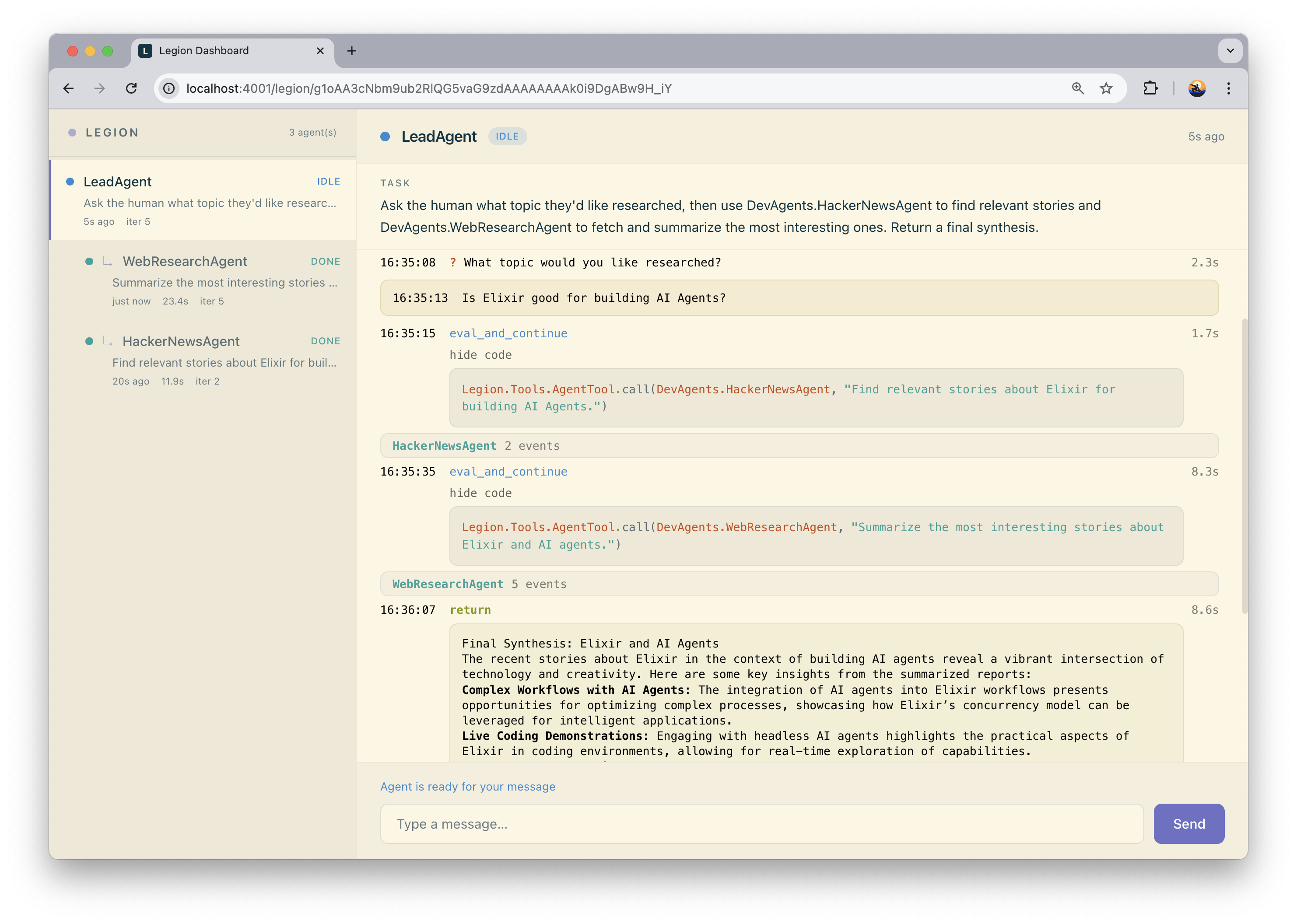
Web Dashboard
legion_web provides a real-time Phoenix LiveView dashboard for monitoring agents, viewing conversation traces, and inspecting generated code.
Limitations
Sandboxing
Legion's sandbox restricts what LLM-generated code can do, but it is not full process isolation. Generated code runs inside the same BEAM VM as your application.
What the sandbox does:
-
Blocks dangerous constructs at the AST level:
defmodule,import,spawn,send,receive,apply, and others - Restricts module access to an explicit allowlist (stdlib + your tools)
-
Kills evaluation if it exceeds
sandbox_timeout
What it does not do yet:
- Isolate memory - runaway allocations affect the whole VM
-
Prevent atom table exhaustion -
String.to_atom/1is available and atoms are never garbage collected - Restrict access to BEAM node name, process pid, or refs
Legion is built for trusted code generators (your own LLM-backed agents with controlled tool access), not for running arbitrary code from unknown sources. If your threat model requires full isolation, run agents in a separate BEAM instance.
License
MIT License - see LICENSE for details.