KinoExRatatui


Run ExRatatui apps inside Livebook notebooks.
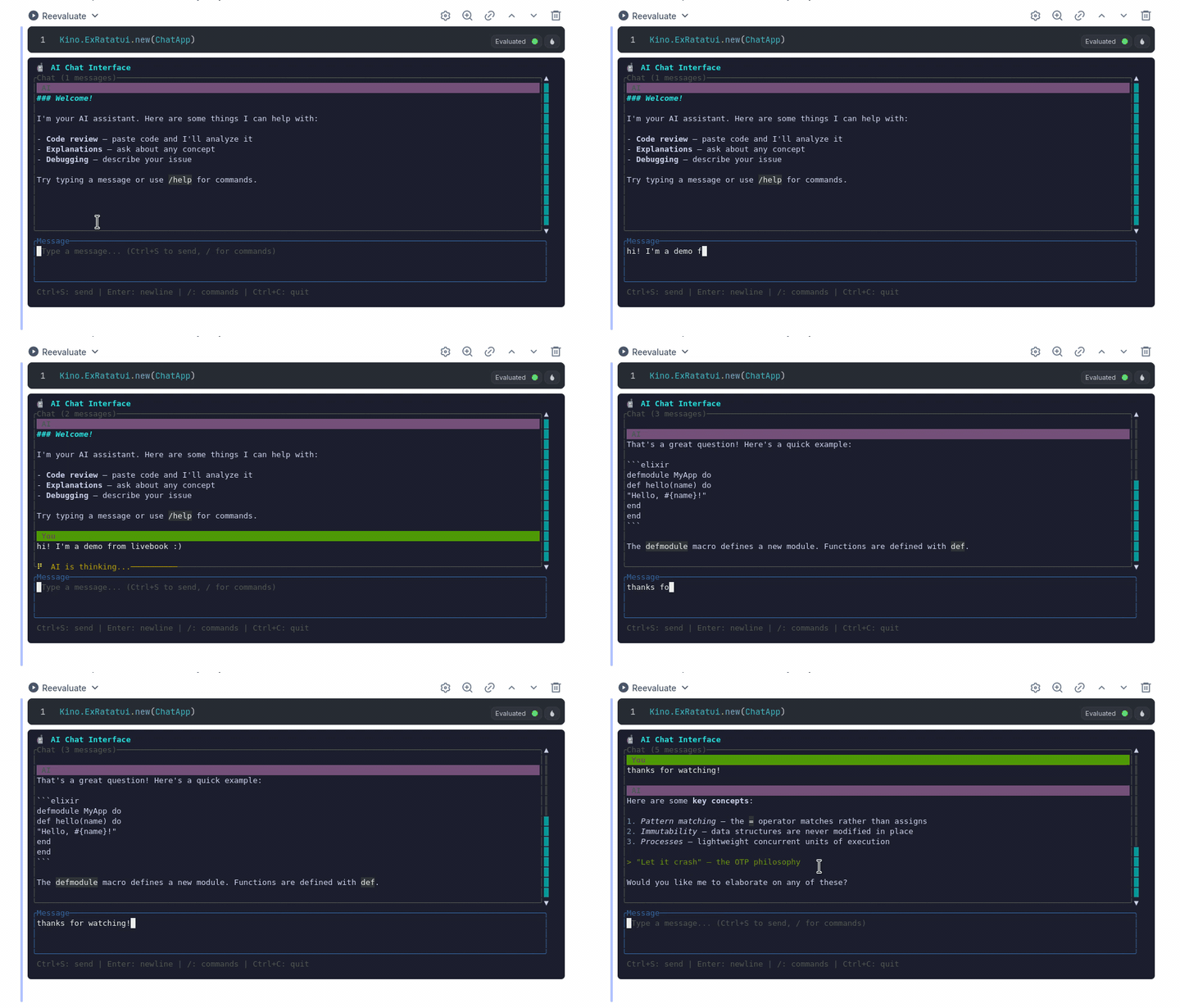
KinoExRatatui is a byte-stream transport that pipes the runtime's rendered ANSI through xterm.js and forwards keypresses and resize events back. Implemented as a Kino.JS.Live widget on top of ExRatatui.Transport.ByteStream.
Features
- Same App, same surface — any module implementing
ExRatatui.Appruns unchanged. - Responsive sizing — xterm.js's
FitAddonderives cell dimensions and reports resize events; the App sees them as%ExRatatui.Event.Resize{}inhandle_event/2. - Static frames —
Kino.ExRatatui.frame/2renders a one-shot[{widget, rect}, ...]list and ships the bytes to xterm.js. Useful for documentation, side-by-side comparisons viaKino.Layout.grid/1, screenshots, etc. - Themeable — pass
:theme,:font_family,:font_size,:height,:cursor_blink,:scrollback, and:stopped_messagetonew/2(or the static-friendly subset toframe/2) to override the defaults per cell. The:thememap is the full xterm.jsITheme— 16 ANSI colors, selection, cursor accents, the lot. Use the:dark/:light/:livebookatom shorthands to pick a bundled palette;:livebookfollows the user'sprefers-color-schemeand live-switches. - Global defaults —
Kino.ExRatatui.configure/1writes display defaults to the:kino_ex_ratatuiApplication environment. Per-instance opts still win key-by-key. See the Configuration guide. - Accessible stopped state — when the runtime exits the widget renders a
role="status"aria-live="polite"DOM overlay over the xterm container. Screen readers announce it; sighted users see a clean italic message instead of the frozen final frame. Customise the text with:stopped_message. - Zero browser-side state on cell re-eval — re-running the cell tears the runtime down and starts a fresh one, matching every other
Kino.JS.Livewidget. - Telemetry —
[:kino_ex_ratatui, :transport, :connect | :disconnect],[:kino_ex_ratatui, :render, :frame],[:kino_ex_ratatui, :input, :forward], and[:kino_ex_ratatui, :resize]events sit one layer aboveex_ratatui's own runtime/render telemetry. See the Telemetry guide for the full event catalogue and aTelemetry.Metricsexample.
Examples
Four notebook examples live under examples/ — open them in Livebook and run the cells. See the catalog for a one-liner per notebook and a recommended starting point.
Installation
Add kino_ex_ratatui to your Livebook setup cell (or your project's mix.exs):
Mix.install([
  {:kino_ex_ratatui, "~> 0.2"}
])
Prerequisites
- Elixir 1.17+
- Livebook 0.13+
Quick Start
defmodule Counter do
  use ExRatatui.App

  alias ExRatatui.Event.Key
  alias ExRatatui.Layout.Rect
  alias ExRatatui.Widgets.{Block, Paragraph}

  def mount(_), do: {:ok, %{n: 0}}

  def render(state, frame) do
    [
      {%Paragraph{
         text: "Count: #{state.n}\n\n+ increment   - decrement   q quit",
         block: %Block{title: "counter"}
       },
       %Rect{x: 0, y: 0, width: frame.width, height: frame.height}}
    ]
  end

  def handle_event(%Key{code: "+"}, s), do: {:noreply, %{s | n: s.n + 1}}
  def handle_event(%Key{code: "-"}, s), do: {:noreply, %{s | n: s.n - 1}}
  def handle_event(%Key{code: "q"}, s), do: {:stop, s}
  def handle_event(_, s),                do: {:noreply, s}
end

Kino.ExRatatui.new(Counter)
Static frames
alias ExRatatui.Layout.Rect
alias ExRatatui.Widgets.{Block, Paragraph}

Kino.ExRatatui.frame(
  [
    {%Paragraph{
       text: "Hello from a static frame!",
       block: %Block{title: "demo"}
     },
     %Rect{x: 0, y: 0, width: 40, height: 5}}
  ],
  cols: 40,
  rows: 5
)
frame/2 renders the widget list once via ExRatatui.Session, ships the resulting ANSI to xterm.js, and stops. No event loop, no runtime server.
How it works
KinoExRatatui implements ExRatatui.Transport as a byte-stream transport — the same shape as the built-in SSH transport. The wiring:
xterm.js (iframe)            Kino.ExRatatui (Kino.JS.Live)         ExRatatui.Server
─────────────────            ─────────────────────────────         ────────────────
onData(bytes)         ──>    handle_event("input", _)        ──>   {:ex_ratatui_event, _}
ResizeObserver        ──>    handle_event("resize", _)       ──>   {:ex_ratatui_resize, _, _}
xterm.write(bytes)    <──    broadcast_event("ansi", _)      <──   writer_fn.(bytes)
The runtime server starts lazily on the first "resize" event so the ExRatatui.Session opens at the exact dimensions xterm.js's FitAddon settled on. From there, input bytes round-trip through ExRatatui.Transport.ByteStream.forward_input/3 (which absorbs synthesized Event.Resize events and dispatches everything else as {:ex_ratatui_event, _}). When the App returns {:stop, _}, the live widget catches the runtime's :DOWN and broadcasts a stop state message.
If you want to write your own transport, the Custom Transports guide walks through the contract in full.
Contributing
See CONTRIBUTING.md for development setup and guidelines.
KinoExRatatui is built on ExRatatui, a general-purpose terminal UI library for Elixir. If you're interested in improving the underlying rendering, widgets, or layout engine, contributions to ExRatatui are very welcome as well.
License
MIT — see LICENSE.