HareMq
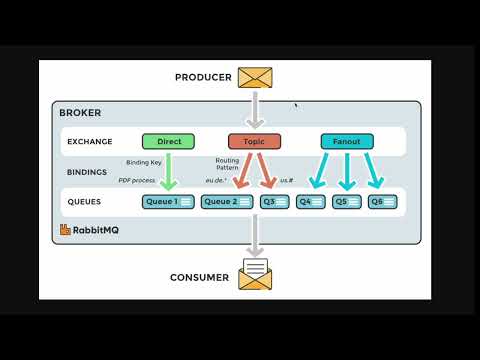
HareMq is an Elixir library for interacting with AMQP (Advanced Message Queuing Protocol) systems, such as RabbitMQ. It provides modules for configuring connections, declaring queues and exchanges, publishing messages, and handling message retries.
Watch video tutorial
Introduction
Learn the basics of HareMq and how it can simplify your interaction with AMQP systems.
Totorial
Dive deeper into the features and capabilities of HareMq with our step-by-step tutorial.
Getting Started
To use HareMq in your Elixir project, follow these steps:
Install the required dependencies by adding them to your mix.exs file:
defp deps do
  [
    {:hare_mq, "~> 1.0.0"}
  ]
end
Publisher
defmodule MyApp.MessageProducer do
  use HareMq.Publisher,
    routing_key: "routing_key",
    exchange: "exchange"

  # Function to send a message to the message queue.
  def send_message(message) do
    # Publish the message using the HareMq.Publisher behavior.
    publish_message(message)
  end
end
Consumer
defmodule MyApp.MessageConsumer do
  use HareMq.Consumer,
    queue_name: "queue_name",
    routing_key: "routing_key",
    exchange: "exchange"

  # Function to process a received message.
  def consume(message) do
    # Log the beginning of the message processing.
    IO.puts("Processing message: #{inspect(message)}")
  end
end
The consumer_count: 10 option indicates that it should run 10 worker processes.
Dynamic Consumer
defmodule MyApp.MessageConsumer do
  use HareMq.DynamicConsumer,
    queue_name: "queue_name",
    routing_key: "routing_key",
    exchange: "exchange",
    consumer_count: 10

  # Function to process a received message.
  def consume(message) do
    # Log the beginning of the message processing.
    IO.puts("Processing message: #{inspect(message)}")
  end
end
Usage in Application: MyApp.Application
defmodule MyApp.Application do
  use Application

  def start(_type, _args) do
    children = [
      # Start the message consumer.
      MyApp.MessageConsumer,

      # Start the message producer.
      MyApp.MessageProducer,
    ]

    opts = [strategy: :one_for_one, name: MyApp.Supervisor]
    Supervisor.start_link(children, opts)
  end
end
Configuration
config :hare_mq,
  :amqp,
    host: "localhost",
    url: "amqp://guest:guest@myhost:12345",
    user: "guest",
    password: "guest"

config :hare_mq, :configuration,
  delay_in_ms: 10_000,
  retry_limit: 15,
  message_ttl: 31_449_600
Rate Us:
If you enjoy using HareMq, please consider giving us a star on GitHub! Your feedback and support are highly appreciated.
Modules
HareMq.Configuration
The HareMq.Configuration module defines a configuration structure for AMQP connections and queues. It provides a function to retrieve queue configurations.
HareMq.Connection
The HareMq.Connection module manages the connection to the AMQP server using the GenServer behavior. It handles connection monitoring and reconnects in case of failures.
HareMq.Queue
The HareMq.Queue module provides functions for declaring and configuring queues, including binding, declaring regular, delayed, and dead-letter queues.
HareMq.Exchange
The HareMq.Exchange module offers functions for declaring and binding exchanges, allowing users to set up routing between queues.
HareMq.Publisher
The HareMq.Publisher module defines a behavior for publishing messages to an AMQP system. It includes connection handling, channel retrieval, and message publishing with a retry mechanism.
HareMq.RetryPublisher
The HareMq.RetryPublisher module handles the republishing of messages with retry logic. It tracks the retry count in message headers and decides whether to republish to a delay queue or a dead letter queue.
HareMq.Consumer
The HareMq.Consumer module defines a behavior for consuming messages from an AMQP system. It includes connection setup, channel declaration, and message consumption with error handling and retry mechanisms.
Contributing and Testing
We welcome contributions to improve and expand this project. If you’re interested in contributing, please follow these steps:
Writing Tests
To ensure the stability and reliability of the project, we strongly encourage writing tests for any new features or bug fixes. Tests are crucial for maintaining the quality of the codebase and catching issues early in the development process.
We use ExUnit for testing in Elixir. You can find the test files in the test/ directory. Follow the existing test patterns and write new tests to cover the functionality you’re adding or modifying.
Running Tests
To run the tests, execute the following command in your terminal:
mix test