
Interface with a Gogs instance from Elixir.







Why? 💡
We needed an easy way to interact
with our Gogs (GitHub Backup) Server
from our Elixir/Phoenix App.
This package is that interface.
Note: We were briefly tempted to write this code inside the Phoenix App that uses it, however we quickly realized that having it separate was better for testability/maintainability. Having a separate module enforces a separation of concerns with a strong "API contract". This way we know this package is well-tested, documented and maintained. And can be used and extended independently of any
Elixir/Phoenixapp. TheElixir/Phoenixapp can treatgogsas a logically separate/independent entity with a clear interface.
What? 📦
A library for interacting with gogs (git)
from our Elixir apps.
Hopefully this diagram explains how we are using the package:

For the complete list of functions, please see the docs: https://hexdocs.pm/gogs 📚
Who? 👤
This library is used by our (Phoenix) GitHub Backup App.
If you find it helpful for your project,
please ⭐ on GitHub:
github.com/dwyl/gogs
How? 💻
There are a couple of steps to get this working in your project.
It should only take 2 mins if you already have your
Gogs Serverdeployed (or access to an existing instance).
Install ⬇️
Install the package from hex.pm,
by adding gogs to the list of dependencies in your mix.exs file:
def deps do
  [
    {:gogs, "~> 0.8.0"}
  ]
end
Once you've saved the mix.exs file,
run:
mix deps.get
Setup 🔧
For gogs to work
in your Elixir/Phoenix App,
you will need to have
a few environment variables defined.
There are 3 required and 2 optional. Make sure you read through the next section to determine if you need the optional ones.
Required Environment Variables
See:
.env_sample
There are 3 required environment variables:
GOGS_URL- the domain where your Gogs Server is deployed, without the protocol, e.g:gogs-server.fly.devGOGS_ACCESS_TOKEN- the REST API Access Token See: https://github.com/dwyl/gogs-server#connect-via-rest-api-httpsGOGS_SSH_PRIVATE_KEY_PATH- absolute path to theid_rsafile on yourlocalhostorPhoenixserver instance.
@SIMON: this last env var currently not being picked up. So it will just use
~/simon/id_rsaYou will need to add yourpublickey to the Gogs instance for this to work on yourlocalhostsee: https://github.com/dwyl/gogs-server#add-ssh-key
Optional Environment Variables
GOGS_SSH_PORT
If your Gogs Server is configured
with a non-standard SSH port,
then you need to define it:
GOGS_SSH_PORT
e.g: 10022 for our
Gogs Server deployed to Fly.io
You can easily discover the port by either visiting your
Gogs Server Config page: https://your-gogs-server.net/admin/config
e.g: https://gogs-server.fly.dev/admin/config
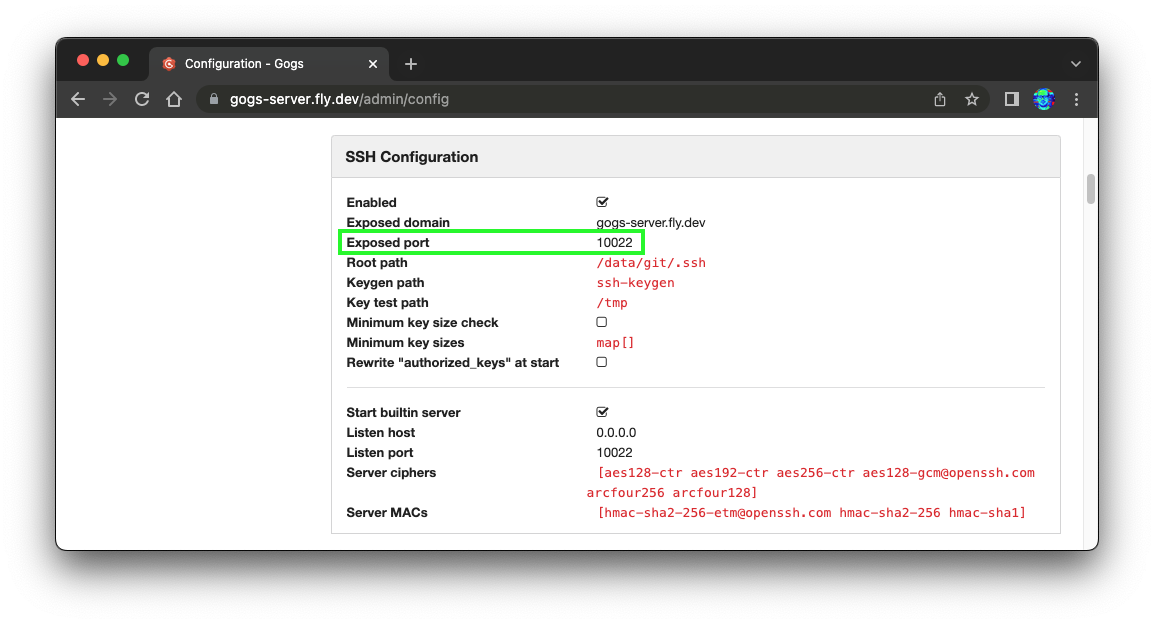
Or if you don't have admin access to the config page,
simply view the ssh clone link on a repo page,
e.g: https://gogs-server.fly.dev/nelsonic/public-repo
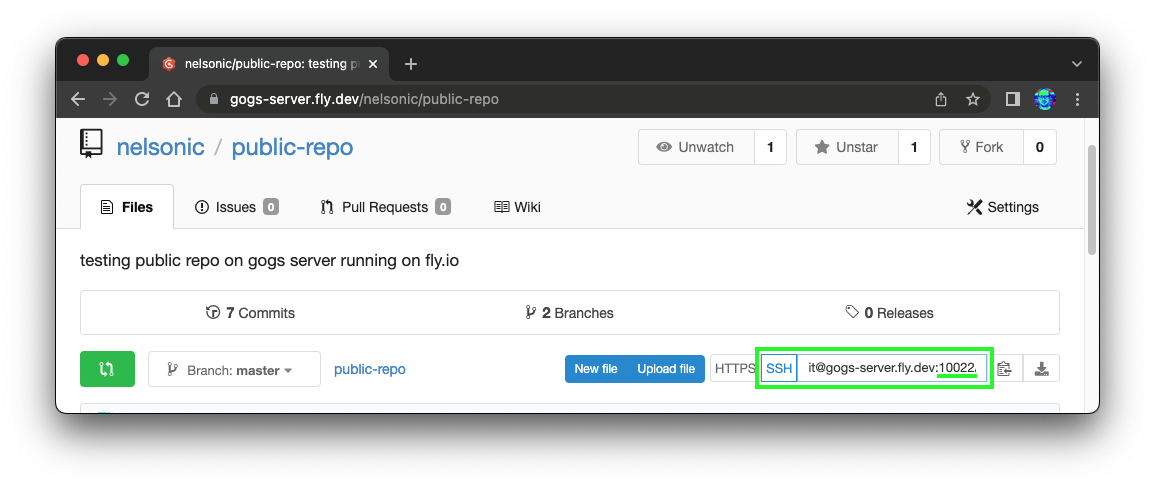
In our case the GOGS_SSH_PORT e.g: 10022.
If you don't set it, then gogs will assume TCP port 22.
GIT_TEMP_DIR_PATH
If you want to specify a directory where
you want to clone git repos to,
create a GIT_TEMP_DIR_PATH environment variable.
e.g:
export GIT_TEMP_DIR_PATH=tmp
Note: the directory must already exist. (it won't be created if it's not there ...)
Usage
If you just want to read
the contents of a file hosted on
a Gogs Server,
write code similar to this:
org_name = "myorg"
repo_name = "public-repo"
file_name = "README.md"
{:ok, %HTTPoison.Response{ body: response_body}} =
  Gogs.remote_read_raw(org_name, repo_name,file_name)
# use the response_body (plaintext data)
This is exactly the use-case presented in our demo app: dwyl/gogs-demo#4-create-function
Here's a more real-world scenario in 7 easy steps:
1. Create Repo
# Define the params for the remote repository:
org_name = "myorg"
repo_name = "repo-name"
private = false # boolean
# Create the repo!
Gogs.remote_repo_create(org_name, repo_name, private)
⚠️ WARNING: there is currently no way to create an Organisation on the
GogsServer viaREST APIso theorg_namemust already exists. e.g: https://gogs-server.fly.dev/myorg We will be figuring out a workaround shortly ... https://github.com/dwyl/gogs/issues/17
2. Clone Repo
git_repo_url = GogsHelpers.remote_url_ssh(org_name, repo_name)
Gogs.clone(git_repo_url)
Provided you have setup the environment variables, and your
Elixir/PhoenixApp has write access to the filesystem, this should work without any issues. We haven't seen any in practice. But if you get stuck at this step, open an issue
3. Read Contents of Local File
Once you've cloned the Git Repo from the Gogs Server
to the local filesystem of the Elixir/Phoenix App,
you can read any file inside it.
org_name = "myorg"
repo_name = "public-repo"
file_name = "README.md"
{:ok, text} == Gogs.local_file_read(org_name, repo_name, file_name)
4. Write to File
file_name = "README.md"
text = "Your README.md text"
Gogs.local_file_write_text(org_name, repo_name, file_name, text)
This will create a new file if it doesn't already exist.
5. Commit Changes
{:ok, msg} = Gogs.commit(repo_name,
  %{message: "your commit message", full_name: "Al Ex", email: "alex@dwyl.co"})
6. Push to Gogs Remote
# Push to Gogs Server!
Gogs.push(repo_name)
7. Confirm the File was Update on the Remote repo
# Confirm the README.md was updated on the remote repo:
{:ok, %HTTPoison.Response{ body: response_body}} =
    Gogs.remote_read_raw(org_name, repo_name, file_name)
"Your README.md text"
Full Function Reference / Docs? 📖
Rather than duplicate all the docs here, please read the complete function reference, on hexdocs: https://hexdocs.pm/gogs/Gogs.html
I'm Stuck! 🤷
As always, if anything is unclear or you are stuck getting this working, please open an issue! github.com/dwyl/gogs/issues We're here to help!
Running the Tests!
By default, the tests run with "mocks".
⚠️ Disclaimer!
This package is provided "as is".
We make no guarantee/warranty that it works.
We cannot be held responsible
for any undesirable effects of it's usage.
e.g: if you use the Gogs.delete/1
it will permanently/irrecoverablydelete the repo.
Use it with caution!
That being said, We are using this package in "production". We rely on it daily and consider it "mission critical". It works for us an and we have made every effort to document, test & maintain it. If you want to use it, go for it! But please note that we cannot "support" your usage beyond answering questions on GitHub.
If you spot anything that can be improved, please open an issue, we're very happy to discuss!
