
Interface with a Gogs instance from Elixir.






Why? 💡
We needed a way of easily to interact
with our Gogs (GitHub Backup) Server
from our Elixir / Phoenix Applications.
This package is that interface.
Note: We were briefly tempted to write this code inside the Phoenix App that uses it, however we quickly realized that having it separate was better for testability/maintainability. Having a separate module enforces a separation of concerns with a strong "API contract". This way we know this package is well-tested, documented and maintained. And can be used and extended independently of any
Elixir/Phoenixapp. TheElixir/Phoenixapp can treatgogsas a logically separate/independent entity with a clear interface.
What? 📦
A library for interacting with gogs
from our Elixir.
For the complete list of functions,
see the docs: https://hexdocs.pm/gogs 📚

Who? 👤
This library is used by our (Phoenix) GitHub Backup App.
If you find it helpful for your project,
please ⭐ on GitHub:
github.com/dwyl/gogs
How? 💻
There are a couple of steps to get this working in your project.
Install ⬇️
Install the package from hex.pm,
by adding gogs to your list of dependencies in mix.exs:
def deps do
  [
    {:gogs, "~> 0.5.0"}
  ]
end
Once you've saved your mix.exs file,
run:
mix deps.get
Setup 🔧
For gogs to work
in your Elixir/Phoenix App,
you will need to have
a few environment variables defined.
Required Environment Variables
See:
.env_sample
There are 3 required environment variables:
GOGS_URL- the domain where your Gogs Server is deployed, without the protocol, e.g:gogs-server.fly.devGOGS_ACCESS_TOKEN- the REST API Access Token See: https://github.com/dwyl/gogs-server#connect-via-rest-api-httpsGOGS_SSH_PRIVATE_KEY_PATH- absolute path to theid_rsafile on yourlocalhostorPhoenixserver instance.
@SIMON: this last env var currently not being picked up. So it will just use
~/simon/id_rsaYou will need to add yourpublickey to the Gogs instance for this to work on yourlocalhostsee: https://github.com/dwyl/gogs-server#add-ssh-key
Optional Environment Variables
GOGS_SSH_PORT
If your Gogs Server is configured
with a non-standard SSH port,
then you need to define it:
GOGS_SSH_PORT e.g: 10022 for our
Gogs Server deployed to Fly.io
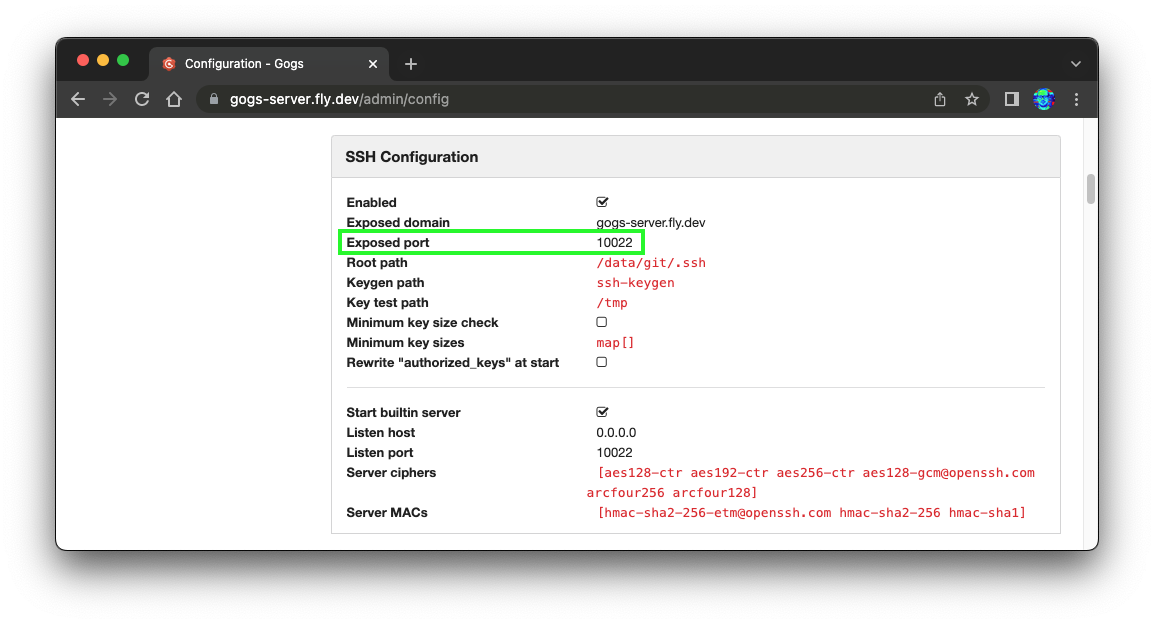
You can easily discover the port by either visiting your
Gogs Server Config page: https://your-gogs-server.net/admin/config
e.g: https://gogs-server.fly.dev/admin/config
Or if you don't have admin access to the config page,
simply view the ssh clone link on a repo page,
e.g: https://gogs-server.fly.dev/nelsonic/public-repo
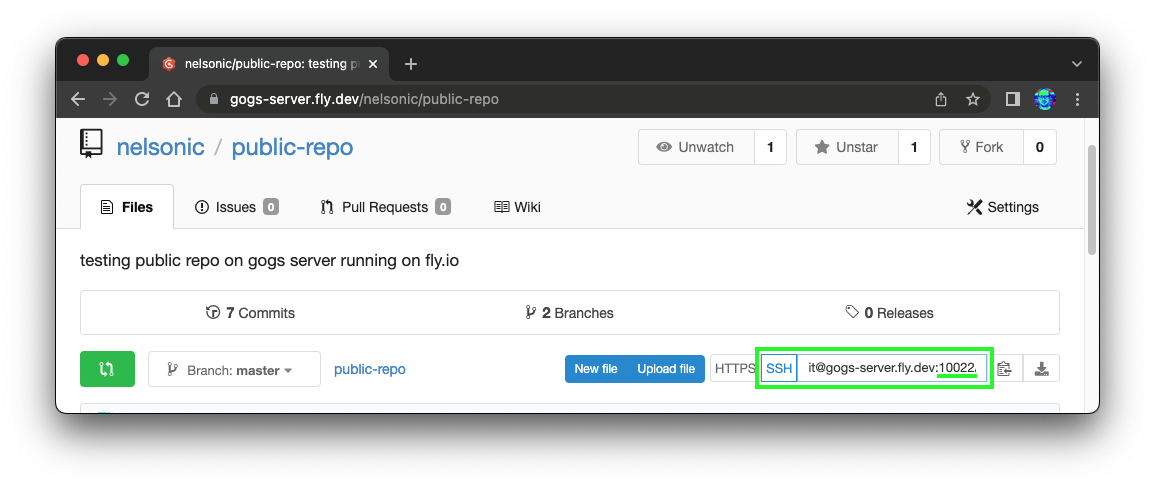
In our case the GOGS_SSH_PORT e.g: 10022.
If you don't set it, then gogs will assume TCP port 22.
GIT_TEMP_DIR_PATH
If you want to specify a directory where
you want to clone git repos to,
create a GIT_TEMP_DIR_PATH environment variable.
e.g:
export GIT_TEMP_DIR_PATH=/tmp/
Note: the directory must already exist.
Usage
Here's basic usage example:
1. Create Repo
# Define the params for the remote repository:
org_name = "myorg"
repo_name = "pepsico-contract1234"
private = false # boolean
# Create the repo!
Gogs.remote_repo_create(org_name, repo_name, private)
⚠️ WARNING: there is currently no way to create an Organisation on the
GogsServer viaREST APIso theorg_namemust already exists. e.g: https://gogs-server.fly.dev/myorg We will be figuring out a workaround shortly ... https://github.com/dwyl/gogs/issues/17
2. Clone Repo
git_repo_url = GogsHelpers.remote_url_ssh(org_name, repo_name)
Gogs.clone(git_repo_url)
3. Write to File
4. Commit Changes
5. Push
Function Reference / Docs? 📖
Rather than duplicate all the docs here, please read the complete function reference, on hexdocs: https://hexdocs.pm/gogs/Gogs.html
I'm Stuck! 🤷
As always, if anything is unclear or you are stuck getting this working, please open an issue! github.com/dwyl/gogs/issues We're here to help!