
Interface with a Gogs instance from Elixir.






Why? 🤷
We needed a way of easily to interact
with our Gogs (GitHub Backup) Server
from our Elixir / Phoenix Applications.
This package is that interface.
Note: We were briefly tempted to write this code inside the Phoenix App that uses it, however we quickly realized that having it separate was better for testability/maintainability. Having a separate module enforces a separation of concerns with a strong "API contract". This way we know this package is well-tested, documented and maintained. And can be used and extended independently of any
Elixir/Phoenixapp. TheElixir/Phoenixapp can treatgogsas a logically separate/independent entity with a clear interface.
What? 📦
A library for interacting with gogs
from our Elixir.
For the complete list of functions,
see the docs: https://hexdocs.pm/gogs 📚

Who? 👤
This library is used by our (Phoenix) GitHub Backup App.
If you find it helpful for your project,
please ⭐ on GitHub:
github.com/dwyl/gogs
How? 💻
There are a couple of steps
Install ⬇️
Install the package from hex.pm,
by adding gogs to your list of dependencies in mix.exs:
def deps do
  [
    {:gogs, "~> 0.5.0"}
  ]
end
Once you've saved your mix.exs, run: mix deps.get.
Setup 🔧
For gogs to work
in your Elixir/Phoenix App,
you will need to have
Required Environment Variables
See:
.env_sample
There are 3 required environment variables:
GOGS_URL- the domain where your Gogs Server is deployed, without the protocol, e.g:gogs-server.fly.devGOGS_ACCESS_TOKEN- the REST API Access Token See: https://github.com/dwyl/gogs-server#connect-via-rest-api-https
Optional
If your Gogs Server is configured
with a non-standard SSH port,
then you need to define it:
GOGS_SSH_PORT e.g: 10022 for our
Gogs Server deployed to Fly.io
Without this you will not be able to interact with the server!
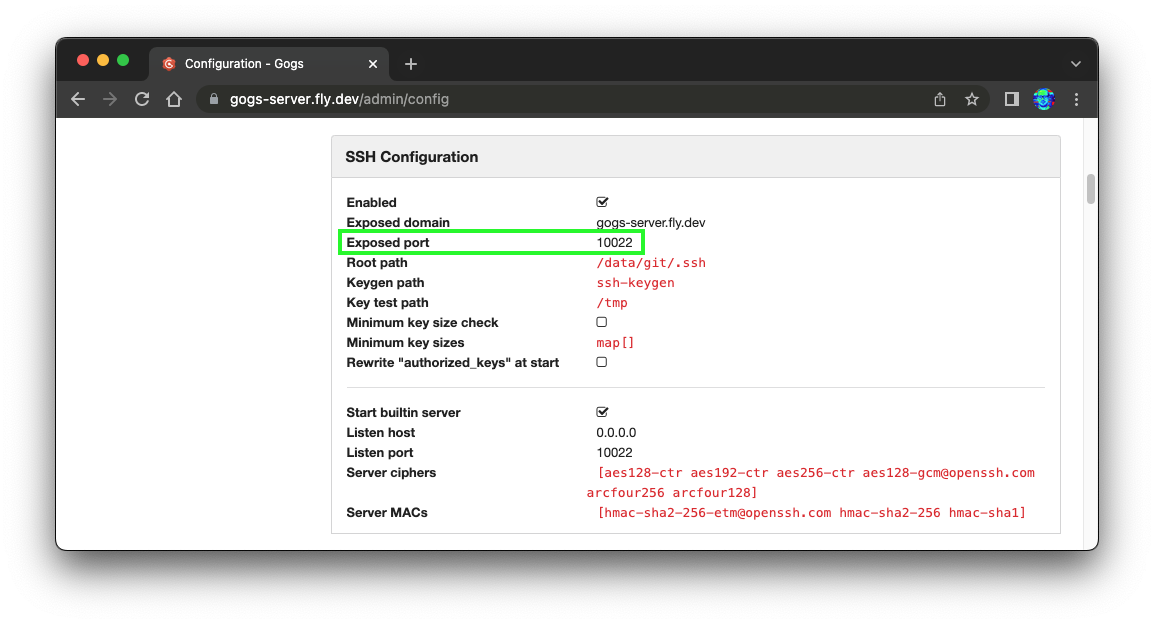
You can easily discover the port by either visiting your
Gogs Server Config page: your-gogs-server.net/admin/config
e.g: https://gogs-server.fly.dev/admin/config
Or if you don't have admin access to view the config,
view the ssh clone link on a repo page,
e.g: https://gogs-server.fly.dev/nelsonic/public-repo
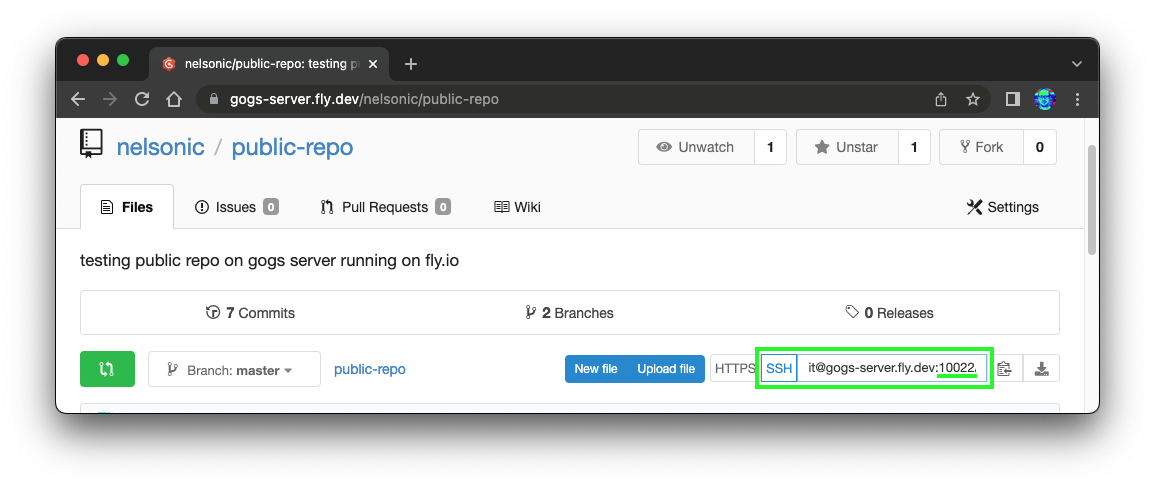
In our case the GOGS_SSH_PORT e.g: 10022.
SSH Private Key
In order to use Gogs.push/1
to the remote Gogs Server,
you will need to have an SSH Private Key.
Usage
Here's basic usage example:
1. Create Repo
2. Clone Repo
3. Write to File
4. Commit Changes
5. Push
Function Reference / Docs?
Complete function reference, see: https://hexdocs.pm/gogs/Gogs.html
I'm Stuck! 😕
As always, if anything is unclear or you are stuck getting this working, please open an issue! github.com/dwyl/gogs/issues We're here to help!