Glazer



Very fast Erlang NIF encoder/decoder for JSON, YAML, and CSV,
built around hand-rolled recursive-descent decoders and direct
term-to-text encoders that produce/consume native Erlang terms in a
single pass. The JSON implementation was inspired by the
glaze C++ library; glazer has
since matured into a standalone implementation with no external C++
dependencies, and extended the same approach to YAML and CSV, with
performance and features unmatched by other existing libraries for these
formats.
Performance
- JSON: faster than every other library benchmarked on
both encoding and decoding — consistently ~25–40% ahead of
torque(Rustsonic-rsNIF), and well ahead ofsimdjsone,jiffy, and the pure-Elixir librariesjason,thoas,euneus, and OTP's built-injson. - YAML: 2–7× faster than
yaml_rustlerandfast_yaml, and ~25–75× faster than the pure-Erlangyamerl/ymlr. - CSV: 4–12× faster than
nimble_csv, and tens to hundreds of times faster thancsvanderl_csv(which time out on large inputs).
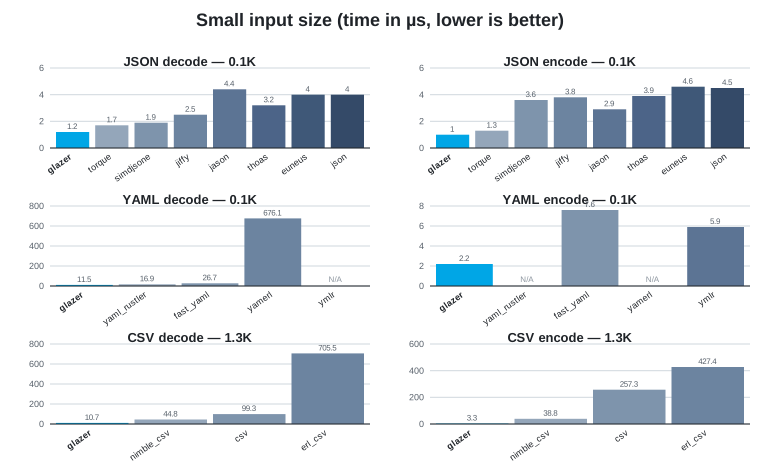
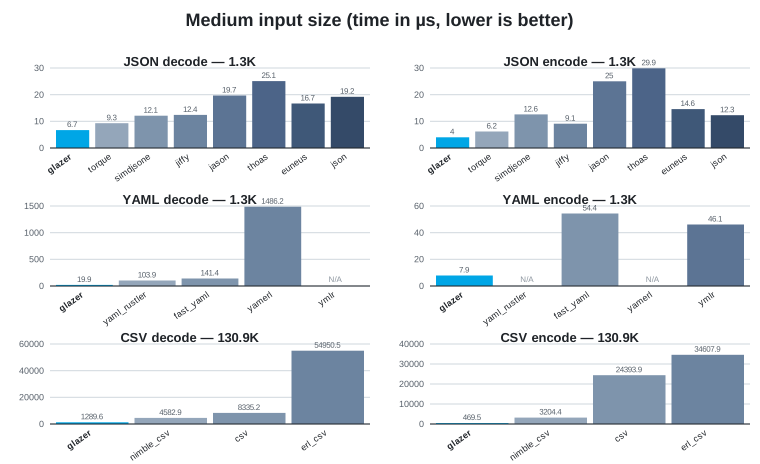
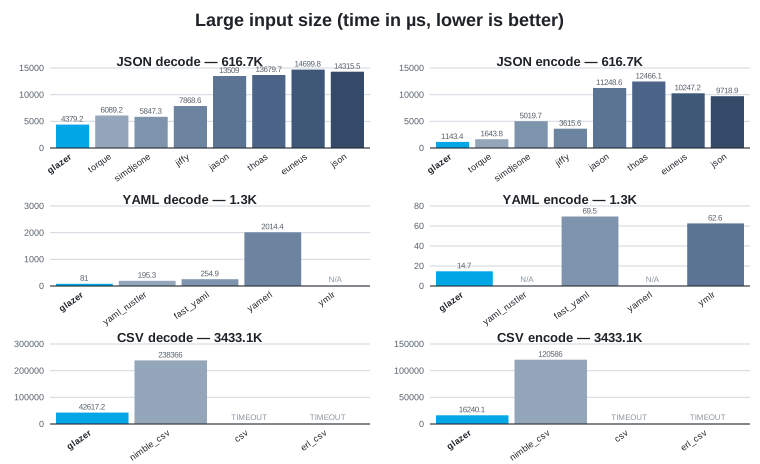
Each chart compares glazer against other libraries for JSON/YAML/CSV
decode and encode on a representative small/medium/large file. Charts are
generated from the tables below via scripts/gen_bench_charts.py.
Benchmark tables:
Features
JSON
- Decoding straight to Erlang terms: maps, lists, binaries, integers
(including bignums), floats, booleans, and
null - Encoding Erlang terms straight to JSON, including big integers
- Incremental/streaming decoding of partial input (e.g. NDJSON over a
socket) via
stream_decoder/0,1,stream_feed/2,stream_eof/1 - Configurable representation of JSON
nulland JSON object keys minify/1andprettify/1helpers- Standalone big-integer encode/decode helpers
(
encode_integer/1,decode_integer/1,try_decode_integer/1) query/2,3: run a jq filter over a JSON document, returning decoded Erlang terms (requiresglazerto be built withlibjqavailable — see jq filter support)glazer:find/2andglazer:compile_path/1: look up value(s) in a decoded term using a small subset of jq path syntax (.a.b[].c[0]), with nolibjqdependency
YAML
- Decoding YAML mappings/sequences/scalars to Erlang maps/lists/scalars, including big integers
- Encoding Erlang terms to YAML in block style
- Configurable representation of YAML
nulland mapping keys, with optional YAML 1.1 boolean compatibility (yes/no/on/off)
CSV
- RFC 4180 CSV encoding/decoding via
decode/1,2andencode/1,2, with optional header-row support - Incremental/streaming CSV decoding via
stream_decoder/0,1,stream_feed/2,stream_eof/1
Scope
glazer targets formats that map naturally onto a tree of Erlang
maps/lists/scalars — JSON and YAML both fit this model directly, so a
single decode/encode pair can convert losslessly between the format and
native terms. XML is intentionally not planned: its data model
(tagged elements, attributes, mixed text/element content, namespaces,
processing instructions, entities) has no single natural Erlang term
representation, and any choice (xmerl-style tuples, JSON-like maps with
@attr/#text keys, etc.) is a lossy or awkward fit compared to formats
that are already trees of scalars and collections. Erlang's standard
library already ships xmerl for XML; there's little value in
duplicating it here with a different, opinionated term shape.
Installation
Erlang (rebar.config):
{deps, [
  {glazer, "~> 0.5"}
]}.
Elixir (mix.exs):
def deps do
  [
    {:glazer, "~> 0.5"}
  ]
end
Building
Building the NIF requires a C++23 compiler (GCC 12+ or Clang 16+) and
make. There are no external C++ library dependencies — all C++ code is
self-contained in c_src/. A plain
make
builds priv/glazer.so and compiles the Erlang sources. For the fastest
performance, run a Profile-Guided Optimisation (PGO) build instead:
make optimize
or
OPTIMIZE=1 make
This performs three steps automatically: compiles an instrumented binary,
runs the test suite to collect real branch-frequency data, then recompiles
with those profiles applied. The resulting .so typically outperforms a
plain -O3 build by 5–15% on realistic JSON workloads.
glazer is an Erlang application with a Rebar-based C++ NIF build;
mix invokes the same top-level Makefile/rebar3 compile path
described above, so the same C++23 compiler requirement applies.
Once compiled, call it via the :glazer module from Elixir:
Erlang:
1> glazer_json:decode(~"{\"a\":1,\"b\":[true,null,3.5]}")
#{<<"a">> => 1,<<"b">> => [true,null,3.5]}
Elixir:
iex> :glazer_json.encode(%{"a" => 1, "b" => [true, :null, 3.5]})
"{\"a\":1,\"b\":[true,null,3.5]}"
Use the use_nil/{null_term, nil} option (see
Null term configuration below) to get idiomatic
Elixir nil instead of the atom :null.
JSON
Usage
1> glazer_json:decode(<<"{\"a\":1,\"b\":[true,null,3.5]}">>).
#{<<"a">> => 1, <<"b">> => [true, null, 3.5]}

2> glazer_json:encode(#{<<"a">> => 1, <<"b">> => [true, null, 3.5]}).
<<"{\"a\":1,\"b\":[true,null,3.5]}">>

3> glazer_json:encode(#{a => 1}, [pretty]).
<<"{\n  \"a\": 1\n}">>

4> glazer_json:minify(<<" { \"a\" : 1 } ">>).
{ok, <<"{\"a\":1}">>}

5> glazer_json:prettify(<<"{\"a\":1}">>).
{ok, <<"{\n  \"a\": 1\n}">>}
Streaming
For input that arrives in chunks — e.g. reading a large document
incrementally, or consuming newline-delimited JSON (NDJSON) from a
socket or file — stream_decoder/0,1 provides a small stateful
wrapper that buffers partial input and decodes each JSON value as soon
as it's complete, without re-parsing bytes you've already seen:
1> D0 = glazer_json:stream_decoder(),
2> {Vals1, D1} = glazer_json:stream_feed(D0, <<"{\"a\":1} {\"b\":">>),
3> Vals1.
[#{<<"a">> => 1}]

4> {Vals2, D2} = glazer_json:stream_feed(D1, <<"2}">>),
5> Vals2.
[#{<<"b">> => 2}]

6> glazer_json:stream_eof(D2).
{ok, []}
stream_feed/2 returns the list of values completed by the chunk just
fed (possibly empty, possibly more than one if the chunk completes
several values) along with the updated decoder state to pass to the
next call. Once the input is exhausted, call stream_eof/1 to flush
any trailing bare scalar (numbers, strings, etc. have no closing
delimiter of their own) and surface an error if the buffer holds an
incomplete value:
1> D0 = glazer_json:stream_decoder(),
2> {[], D1} = glazer_json:stream_feed(D0, <<"   42">>),
3> glazer_json:stream_eof(D1).
{ok, [42]}
stream_decoder/1 accepts the same options as decode/2 (e.g.
{keys, atom}, use_nil) and applies them to every decoded value.
A typical read loop calls stream_feed/2 for each chunk while more data
may still arrive, and stream_eof/1 once the socket closes to flush any
trailing value:
loop(Socket, D0) ->
  case gen_tcp:recv(Socket, 0) of
    {ok, Chunk} ->
      {Vals, D1} = glazer_json:stream_feed(D0, Chunk),
      handle_values(Vals),
      loop(Socket, D1);
    {error, closed} ->
      case glazer_json:stream_eof(D0) of
        {ok, Trailing}  -> handle_values(Trailing);
        {error, Reason} -> handle_truncated_stream(Reason)
      end
  end.
Efficiency
stream_feed/2 only scans for value boundaries incrementally —
the scanner carries a small resumable cursor (scan_state()) that
remembers how far it has already looked (nesting depth, whether it's
inside a string, escape state, …), so each call to scan/2 resumes
from where the previous one left off rather than re-walking the whole
buffer from byte zero. Once a complete value's end offset is known,
that slice is decoded exactly once via the same NIF-backed decoder
used by decode/2 — there's no intermediate tokenization or tree
representation, and no byte is ever scanned or decoded twice. The only
buffering cost is concatenating newly-arrived chunks onto the
not-yet-complete tail of the input.
This makes stream_feed/2 well suited to byte-at-a-time or
small-chunk feeding (e.g. consuming a gen_tcp/gen_statem socket
buffer as it fills) without the quadratic-rescan cost a naive
"concatenate and retry full decode" loop would incur on large or
slow-arriving documents.
Under the hood, stream_feed/2 is built on scan/1,2 — a low-level
primitive that scans a buffer for the byte offset where the next JSON
value ends (or reports that more input is needed) without doing a full
decode. It's exposed directly for callers that want to implement their
own framing/buffering strategy:
1> glazer_json:scan(<<"{\"a\":1} {\"b\":2}">>).
{complete, 7}

2> glazer_json:scan(<<"{\"a\":">>).
{incomplete, ScanState}

3> glazer_json:scan(<<"{\"a\":1}">>, ScanState).
{complete, 7}
stream_decoder/0,1, stream_feed/2, stream_eof/1 and
scan/1,2 are JSON-only — see YAML streaming and
CSV streaming below for the other formats.
Null term configuration
By default, JSON/YAML null decodes to (and null encodes from) the atom
null, and this same atom is used as the default null term throughout the
library (e.g. for the CSV on_failure => null field option). This can be
overridden:
Application-wide, via the
nullenvironment key — set this once in the application's config and every call uses it as the default:Erlang (
rebar.config):{glazer, [{null, nil}]}Elixir (
config.exs):config :glazer, null: nilPer call, with the
use_nilshorthand or the{null_term, Atom}option (see Decode options below). Per-call options always take precedence over the application-wide default.
Decode options (glazer_json:decode/2)
| Option | Description |
|---|---|
object_as_tuple | Decode JSON objects as {[{Key, Value}]} proplist tuples (jiffy-style) instead of maps (default) |
use_nil | Use the atom nil for JSON null |
{null_term, Atom} | Use Atom for JSON null |
{keys, atom} | Decode object keys as atoms (via binary_to_atom/2-equivalent) |
{keys, existing_atom} | Decode object keys as existing atoms, falling back to binaries for unknown atoms |
{keys, binary} | Decode object keys as binaries (default) |
dedupe_keys | With object_as_tuple, eliminate duplicate object keys, keeping the last occurrence's value (and position) |
1> glazer_json:decode(<<"{\"a\":1}">>, [object_as_tuple]).
{[{<<"a">>, 1}]}

2> glazer_json:decode(<<"{\"a\":1}">>, [{keys, atom}]).
#{a => 1}

3> glazer_json:decode(<<"null">>, [use_nil]).
nil

4> glazer_json:decode(<<"null">>, [{null_term, undefined}]).
undefined

5> glazer_json:decode(<<"{\"a\":1,\"a\":2}">>).
#{<<"a">> => 2}

6> glazer_json:decode(<<"{\"a\":1,\"a\":2}">>, [object_as_tuple]).
{[{<<"a">>, 1}, {<<"a">>, 2}]}

7> glazer_json:decode(<<"{\"a\":1,\"a\":2}">>, [object_as_tuple, dedupe_keys]).
{[{<<"a">>, 2}]}
Note
A JSON object with duplicate keys cannot be represented as an Erlang map,
so decoding to maps (the default) and {keys, atom | existing_atom} always
dedupe duplicate keys, last value wins, regardless of dedupe_keys. With
object_as_tuple, duplicate keys are preserved as-is unless dedupe_keys
is given.
Encode options (glazer_json:encode/2)
| Option | Description |
|---|---|
pretty | Pretty-print the JSON output with two-space indentation |
uescape | Escape non-ASCII characters as \uXXXX sequences |
force_utf8 | Sanitize invalid UTF-8 byte sequences before encoding |
use_nil | Encode the atom nil as JSON null |
{null_term, Atom} | Encode Atom as JSON null |
1> glazer_json:encode(#{a => 1}, [pretty]).
<<"{\n  \"a\": 1\n}">>

2> glazer_json:encode(<<"héllo"/utf8>>, [uescape]).
<<"\"h\\u00e9llo\"">>

3> glazer_json:encode(nil, [use_nil]).
<<"null">>
jq filter support
If libjq and its headers (jq.h/jv.h) are
available when glazer is built, query/2,3 runs a jq filter
program against a JSON document and returns one Erlang term per value
produced by the filter (decoded using the same options as
decode/2):
1> glazer_json:query(<<"{\"a\":[1,2,3]}">>, <<".a[]">>).
{ok, [1, 2, 3]}

2> glazer_json:query(<<"{\"a\":1}">>, <<".b">>).
{ok, [null]}

3> glazer_json:query(<<"{\"a\":{\"b\":2}}">>, <<".">>, [{keys, atom}]).
{ok, [#{a => #{b => 2}}]}

4> glazer_json:query(<<"not json">>, <<".">>).
{error, invalid_input}

5> glazer_json:query(<<"{\"a\":1}">>, <<"bad syntax (((">>).
{error, jq_decode_error}
If libjq was not available at build time, query/2,3 returns
{error, jq_not_available}. Build detection is automatic — make probes
for jq.h/libjq and only enables this feature if found, so glazer
still builds and works without libjq installed.
API
All functions below are in glazer_json.
| Function | Description |
|---|---|
decode/1, decode/2 | Decode a JSON binary or iolist to an Erlang term |
try_decode/1, try_decode/2 | Decode a JSON binary or iolist, returning {ok, Term} or {error, {parse_error, Msg}} instead of raising |
encode/1, encode/2 | Encode an Erlang term to a JSON binary |
minify/1 | Remove unnecessary whitespace from a JSON document |
prettify/1 | Pretty-print a JSON document with two-space indentation |
read_file/1, read_file/2 | Read a file and decode its contents as JSON |
write_file/2, write_file/3 | Encode a term to JSON and write it to a file |
scan/1, scan/2 | Scan a buffer for the end offset of the next complete JSON value |
stream_decoder/0, stream_decoder/1 | Create an incremental-decode state for chunked input |
stream_feed/2 | Feed a chunk to a stream decoder, returning completed values |
stream_eof/1 | Flush a stream decoder at end-of-input |
query/2, query/3 | Run a jq filter over a JSON document, returning {ok, [Term]} (requires libjq) |
Benchmarking JSON
A comparison benchmark against other JSON libraries (simdjsone,
jiffy, jason, thoas, euneus, OTP's built-in json, and
torque) is available via:
$ PARALLEL=2 make bench-json
==> Running benchmarks with parallelism: 2

(numbers in µs)
JSON        twitter (616.7K)   twitter2 (758.0K)     openrtb (1.2K)       esad (1.3K)         small (0.1K)
            decode   encode     decode   encode     decode   encode     decode   encode     decode   encode
-------------------------------------------------------------------------------------------------------------
glazer      4379.2   1143.4     5132.9   2586.7        7.5      8.7        6.7      4.0        1.2      1.0
torque      6089.2   1643.8     8087.6   3091.0       10.7      9.8        9.3      6.2        1.7      1.3
simdjsone   5847.3   5019.7     8719.8   8620.6       14.4     17.7       12.1     12.6        1.9      3.6
jiffy       7868.6   3615.6     9779.9   6532.6       16.8     15.2       12.4      9.1        2.5      3.8
jason      13509.0  11248.6    25267.6  20837.6       33.5     30.0       19.7     25.0        4.4      2.9
thoas      13679.7  12466.1    25638.7  22607.2       31.2     33.0       25.1     29.9        3.2      3.9
euneus     14699.8  10247.2    18646.5  16886.6       29.1     25.2       16.7     14.6        4.0      4.6
json       14315.5   9718.9    17844.3  16473.5       28.3     25.3       19.2     12.3        4.0      4.5
(requires the bench/dev Mix dependencies — see mix.exs).
Performance
glazer is faster than all competitors on both encoding and decoding.
On decoding it leads torque (Rust sonic-rs NIF) by ~25–40% across every
benchmarked workload, and on encoding by ~10–30%. Both sit well ahead of
the remaining contenders (simdjsone, jiffy, and the pure-Elixir libraries
jason, thoas, euneus, and OTP's built-in json).
Where glazer has an edge over torque:
- No tuple-of-binaries intermediate representation.
glazerdecodes straight to native Erlang terms (maps, lists, binaries, numbers) and encodes straight from them, in a single pass, with no generic JSON-tree staging step — minimizing allocation and copying on both the decode and encode paths. - Big integer support. JSON numbers that overflow 64 bits decode to
Erlang bignums (and encode back to their exact decimal form) — see
Big integers.
torquedoes not support this. - Configurable
nulland object-key representation.null_term/use_niland{keys, atom | existing_atom | binary}let you tailor the decoded shape to your application without a post-processing pass. uescape/force_utf8encode options for\uXXXX-escaping non-ASCII output and sanitizing invalid UTF-8 — useful when targeting strict JSON consumers or transports that aren't UTF-8 clean.- Standalone
minify/1/prettify/1and big-integer helpers (encode_integer/1/decode_integer/1/try_decode_integer/1) that don't require a full decode/encode round-trip. - No external C++ dependencies. The NIF is fully self-contained —
no CMake, no
FetchContent, no vendored third-party library to pull at build time — vs.torque's reliance on a Rust toolchain andsonic-rs, which adds a second language/toolchain to the build.
Performance optimizations
A few implementation techniques in c_src/glazer_nif.cpp account for most
of the gap over the slower contenders:
Single-pass, zero-copy decode/encode. As noted above, there's no intermediate generic JSON tree — the decoder builds Erlang terms directly from the input bytes (string keys/values are views into the original binary whenever no escaping is needed) and the encoder writes JSON bytes directly from Erlang terms. This removes a whole staging allocate-and-copy pass that tree-based decoders pay for.
Inline, growable output buffer (
OutBuf). Encoding writes into a 4 KB stack-allocated buffer first; only documents that exceed that spill to the heap, growing geometrically viamalloc/realloc(the latter resizes in place when possible, avoiding a copy on every growth — a plainnew[]/delete[]doubling strategy can't do this).Key cache for repeated object keys (
KeyCache). Real-world JSON documents reuse the same small set of key strings heavily (e.g. a Twitter feed has ~13K key occurrences across only ~94 distinct keys).KeyCacheis an open-addressed hash table (power-of-two size, linear probing, FNV-1a hash with a precomputed-hash fast-reject before thememcmp) that lets a repeated key reuse the same already-builtERL_NIF_TERMbinary instead of payingenif_make_new_binary+memcpyagain. It's only engaged for inputs above a size threshold (KEY_CACHE_MIN_SIZE), since small payloads (RPC-sized messages) rarely repeat keys enough to amortize the lookup cost.Epoch-counter lazy clearing. Both
KeyCacheand the scratch buffers it touches need to start "empty" on every decode call, but zero-initializing a multi-KB table for every single call — including tiny documents that never populate it — would cost more than the cache saves. Instead each cache entry carries a generation/epochtag; a slot is considered live only if itsepochmatches the cache's currentm_epoch(itself seeded from a process-wide monotonically-increasing counter, so leftover garbage from a prior stack frame can never coincidentally look live). This makes cache construction effectively free, regardless of table size.SIMD string scanning. The JSON string decoder and encoder use an AVX2 → SSE2 → SWAR cascade to skip over clean byte spans 32, 16, or 8 bytes at a time. The decoder scans for
"and\(the only stop bytes in clean strings); the encoder additionally detects control characters (c < 0x20) via a bias trick that maps unsigned< 0x20to a signed comparison, avoiding a branch-per-byte table lookup for the common all-ASCII case. The same cascade is used by the CSV unquoted-field scanner (delimiter | LF | CR) and the YAML double-quoted scalar scanner (",\,LF,CR), as well as single-character finders consolidated inglazer_common.hpp(find_byte). On AVX2 hardware (Haswell+) this processes up to 32 bytes per iteration instead of 1.SWAR whitespace skipping.
skip_wschecks the next byte before paying for any wider load, then — for runs of whitespace — scans 8 bytes at a time using branch-free bit-twiddling ("SIMD within a register") to find the first non-whitespace byte. Minified JSON (the overwhelmingly common case) has little or no structural whitespace, so the single-byte fast path dominates; the 8-byte path handles pretty-printed inputs.Table-driven string escaping with bulk copies. JSON string escaping locates the next byte needing escaping in bulk (via the SIMD scanner above), copies the clean prefix in one
memcpy, then falls into a per-byte switch only for the rare characters that actually need an escape sequence.Fast integer formatting. Integers are written to JSON using a lookup-table-based digit-pair algorithm (avoiding division for small values) with a vendored
lltoafallback for larger numbers — faster than routing every integer throughsnprintf.
YAML
Usage
decode/1,2 decodes a YAML document to an Erlang term — mappings
become maps, sequences become lists, and scalars become the matching
Erlang type (binaries, numbers, booleans, or null):
1> glazer_yaml:decode(<<"a: 1\nb:\n  - true\n  - null\n  - 3.5\n">>).
#{<<"a">> => 1, <<"b">> => [true, null, 3.5]}

2> glazer_yaml:encode(#{<<"a">> => 1, <<"b">> => [true, null, 3.5]}).
<<"a: 1\nb:\n  - true\n  - null\n  - 3.5\n">>
encode/1,2 encodes an Erlang term to YAML in block style
(2-space indentation, sequences at the same indentation as the mapping
key that owns them).
Streaming
There is no incremental YAML decoder. YAML's block styles have no
closing delimiter — a mapping or sequence simply ends at a dedent or
end-of-input — so there is no way to scan a partial buffer for "is this
value complete yet?" the way scan/1,2 does for
JSON's bracket-balanced syntax. Decode full YAML documents with
decode/1,2 once they are fully buffered.
Decode options (glazer_yaml:decode/2)
| Option | Description |
|---|---|
use_nil | Use the atom nil for YAML null/~/empty values |
{null_term, Atom} | Use Atom for YAML null/~/empty values |
{keys, atom} | Decode mapping keys as atoms |
{keys, existing_atom} | Decode mapping keys as existing atoms, falling back to binaries for unknown atoms |
{keys, binary} | Decode mapping keys as binaries (default) |
yaml_1_1_bools | Additionally treat yes/no/on/off (and case variants) as booleans, per the YAML 1.1 core schema. By default (YAML 1.2 core schema) only true/false are recognized as booleans |
1> glazer_yaml:decode(<<"a: ~\n">>, [use_nil]).
#{<<"a">> => nil}

2> glazer_yaml:decode(<<"a: 1\n">>, [{keys, atom}]).
#{a => 1}

3> glazer_yaml:decode(<<"a: yes\n">>, [yaml_1_1_bools]).
#{<<"a">> => true}
Encode options (glazer_yaml:encode/2)
| Option | Description |
|---|---|
use_nil | Treat the atom nil as YAML null |
{null_term, Atom} | Treat Atom as YAML null |
1> glazer_yaml:encode(#{<<"a">> => nil}, [use_nil]).
<<"a: null\n">>
API
All functions below are in glazer_yaml.
| Function | Description |
|---|---|
decode/1, decode/2 | Decode a YAML binary or iolist to an Erlang term |
try_decode/1, try_decode/2 | Decode YAML, returning {ok, Term} or {error, Msg} instead of raising |
encode/1, encode/2 | Encode an Erlang term to a YAML binary in block style |
read_file/1, read_file/2 | Read a file and decode its contents as YAML |
write_file/2, write_file/3 | Encode a term to YAML and write it to a file |
Benchmarking YAML
$ PARALLEL=2 make bench-yaml
==> Running benchmarks with parallelism: 2

(numbers in µs)
YAML             openrtb (1.3K)       esad (1.3K)         small (0.1K)
                decode   encode     decode   encode     decode   encode
-------------------------------------------------------------------------
glazer            81.0     14.7       19.9      7.9       11.5      2.2
yaml_rustler     195.3      n/a      103.9      n/a       16.9      n/a
fast_yaml        254.9     69.5      141.4     54.4       26.7      7.6
yamerl          2014.4      n/a     1486.2      n/a      676.1      n/a
ymlr               n/a     62.6        n/a     46.1        n/a      5.9
CSV
Usage
decode/1,2 decodes an RFC 4180 CSV document to #{headers => nil|[...], data => Rows}, where Rows is a list of rows, each row a list of binary
fields by default:
1> glazer_csv:decode(<<"name,age\nAlice,30\nBob,25\n">>).
#{headers => nil,
  data    => [[<<"name">>,<<"age">>],[<<"Alice">>,<<"30">>],[<<"Bob">>,<<"25">>]]}

2> glazer_csv:encode([[<<"name">>, <<"age">>], [<<"Alice">>, 30]]).
<<"name,age\r\nAlice,30\r\n">>
With the headers option, the first row is captured as column names in
headers and each subsequent row decodes to a map when combined with
{return, map}; encode/2 with headers does the reverse, deriving the
header row from the first map's keys:
1> glazer_csv:decode(<<"name,age\nAlice,30\n">>, [headers, {return, map}]).
#{headers => [<<"name">>,<<"age">>],
  data    => [#{<<"name">> => <<"Alice">>, <<"age">> => <<"30">>}]}

2> glazer_csv:encode([#{<<"name">> => <<"Alice">>, <<"age">> => 30}], [headers]).
<<"name,age\r\nAlice,30\r\n">>
Fields containing the delimiter, a double quote, or a line break are
quoted automatically on encode (with embedded quotes doubled), and
unquoted on decode. The delimiter defaults to , and can be changed via
{delimiter, Char}; the encoded line ending defaults to \r\n per
RFC 4180 and can be changed to \n via {line_ending, lf}.
Streaming
For input that arrives in chunks, stream_decoder/0,1 provides the
same kind of stateful wrapper as JSON streaming: it buffers
partial input and decodes each row as soon as its terminating line break
is seen, via decode/2 on that single row. A small scanner tracks
whether the cursor is inside a quoted field across chunks, so a \n/\r\n
inside a quoted field doesn't end the row:
1> D0 = glazer_csv:stream_decoder(),
2> {Rows1, D1} = glazer_csv:stream_feed(D0, <<"a,b\n1,2\n3,">>),
3> Rows1.
[[<<"a">>,<<"b">>],[<<"1">>,<<"2">>]]

4> {Rows2, D2} = glazer_csv:stream_feed(D1, <<"4\n">>),
5> Rows2.
[[<<"3">>,<<"4">>]]

6> glazer_csv:stream_eof(D2).
{ok, []}
stream_feed/2 returns the rows completed by the chunk just fed
(possibly empty, possibly more than one) along with the updated decoder
state. Once the input is exhausted, call stream_eof/1 to flush a
trailing row that has no terminating line break, or surface an error if
the buffered bytes don't form a valid row:
1> D0 = glazer_csv:stream_decoder(),
2> {Rows1, D1} = glazer_csv:stream_feed(D0, <<"a,b\n1,2">>),
3> Rows1.
[[<<"a">>,<<"b">>]]

4> glazer_csv:stream_eof(D1).
{ok, [[<<"1">>,<<"2">>]]}
stream_decoder/1 accepts the same options as decode/2. With
the headers option, the first complete row is captured as the header and
used to decode every subsequent row (as a map when combined with
{return, map}); no row is emitted for the header itself. Blank lines are
skipped, matching decode/2.
Decode options (glazer_csv:decode/2)
| Option | Description |
|---|---|
{delimiter, Char} | Field delimiter (default $,) |
headers | Treat the first row as column names (shorthand for {headers, binary}) |
{headers, [Name, ...]} | Use the given list of atoms or binaries as column names; the first data row is not consumed as a header |
{headers, binary} | First row → binary column names (same as bare headers) |
{headers, string} | Alias for {headers, binary} |
{headers, existing_atom} | First row → existing-atom column names, falling back to binaries for unknown atoms |
{headers, charlist} | First row → column names as lists of Unicode codepoints |
{keys, atom} | (Legacy) With headers, decode column names as atoms |
{keys, existing_atom} | (Legacy) With headers, decode column names as existing atoms, falling back to binaries for unknown atoms |
{keys, binary} | (Legacy) With headers, decode column names as binaries (default) |
{return, list} | Data rows are lists of field values (default) |
{return, tuple} | Data rows are tuples of field values |
{return, map} | Data rows are maps keyed by column names; requires headers or {headers, ...}. Raises duplicate_header on duplicate column names |
{fields, Specs} | Convert each column's field from a binary, positionally — see Field type conversion |
{skip, N} | Skip the first N data rows (after any header row) |
{skip, {From, To}} | Process only data rows From..To (1-based inclusive); equivalent to {skip, From-1} plus {limit, To-From+1} |
{limit, N} | Process at most N data rows (after skipping) |
{null_term, Atom} | Use Atom as the value produced by on_failure => null (default null) |
Field type conversion
The {fields, Specs} decode option converts each column's field from a
binary to the given Erlang type. Specs is a list applied positionally —
the Nth spec applies to the Nth column, regardless of whether headers is
set. Columns beyond the end of Specs are left as binaries.
1> glazer_csv:decode(<<"name,age,active,joined\nAlice,30,true,2024-01-15T10:30:00Z\n">>,
..                    [headers, {fields, [binary, integer, boolean,
..                                         {datetime, <<"%Y-%m-%dT%H:%M:%SZ">>}]}]).
[#{<<"name">> => <<"Alice">>, <<"age">> => 30, <<"active">> => true,
   <<"joined">> => 1705314600}]
Each element of Specs is either a Type directly, or a map
#{type => Type, default => Term, on_failure => OnFailure} for more
control (see below). Type is one of:
| Type | Description |
|---|---|
integer | Parse the field as an integer |
{float, Precision} | Parse the field as a float, rounded to Precision decimal digits |
boolean | Parse "true"/"false" (any case) as true/false |
{datetime, InputFormat} | Parse with a strptime-like format string and convert to Unix epoch seconds (UTC) |
binary | Leave the field as a binary (default) |
charlist | Convert the field to a list of Unicode code points |
existing_atom | Convert to an existing atom, falling back to a binary if no such atom exists |
{atom, ExistingAtoms} | Convert to an atom only if the field's text matches (and exists as) one of ExistingAtoms, falling back to a binary otherwise |
InputFormat supports the directives %Y %y %m %d %H %M %S %f %z (and
%% for a literal %); any other character must match the input
literally, and a space matches a run of one-or-more whitespace characters.
%z accepts Z, +HHMM, or +HH:MM-style offsets; fractional seconds
(%f) are parsed but discarded. The result is always in UTC.
default and on_failure
Using the map form #{type => Type, default => Term, on_failure => OnFailure}:
default(when given) is used in place of the converted value whenever the raw CSV field is empty.on_failurecontrols what happens when a non-empty field fails to convert toType(defaultbinary):on_failureBehavior binaryLeave the field as the original binary (default) raiseRaise {invalid_field_value, Row, Column}(1-based), or return{error, Reason}fromtry_decode/2defaultUse the spec's defaultvalue (falls back tobinaryif nodefaultis given)nullUse the configured null term: {null_term, Atom}if given, otherwise the library-wide null term (see Null term configuration and{null_term, Atom}below)
1> glazer_csv:decode(<<"1\nbad\n">>,
..                    [{fields, [#{type => integer, on_failure => raise}]}]).
** exception error: {invalid_field_value,2,1}

2> glazer_csv:decode(<<"1\nbad\n">>,
..                    [{fields, [#{type => integer, default => 0, on_failure => default}]}]).
[[1],[0]]

3> glazer_csv:decode(<<"1\nbad\n">>,
..                    [{null_term, nil},
..                     {fields, [#{type => integer, on_failure => null}]}]).
[[1],[nil]]
{null_term, Atom} only affects on_failure => null for that call. Without
it, on_failure => null falls back to the library-wide null term — null
by default, or whatever atom is configured via the
Null term configuration
application env var ({glazer, [{null, Atom}]}).
Encode options (glazer_csv:encode/2)
| Option | Description |
|---|---|
{delimiter, Char} | Field delimiter (default $,) |
headers | Input is a list of maps; the first map's keys become the header row, and subsequent maps are encoded as rows in that column order (missing keys produce empty fields) |
{line_ending, lf | crlf} | Line terminator (default crlf, per RFC 4180) |
API
All functions below are in glazer_csv.
| Function | Description |
|---|---|
decode/1, decode/2 | Decode a CSV binary or iolist to a list of rows (or maps with headers) |
try_decode/1, try_decode/2 | Decode CSV, returning {ok, Rows} or {error, Reason} instead of raising |
encode/1, encode/2 | Encode a list of rows (or maps with headers) to a CSV binary |
read_file/1, read_file/2 | Read a file and decode its contents as CSV |
write_file/2, write_file/3 | Encode rows to CSV and write them to a file |
stream_decoder/0, stream_decoder/1 | Create an incremental CSV decode state for chunked input |
stream_feed/2 | Feed a chunk to a CSV stream decoder, returning completed rows |
stream_eof/1 | Flush a CSV stream decoder at end-of-input |
Benchmarking CSV
$ PARALLEL=2 make bench-csv
==> Running benchmarks with parallelism: 2

(numbers in µs)
CSV               small (1.3K)          medium (130.9K)         large (3433.1K)
                decode     encode       decode     encode       decode     encode
-----------------------------------------------------------------------------------
glazer            10.7        3.3       1289.6      469.5      42617.2    16240.1
nimble_csv        44.8       38.8       4582.9     3204.4     238366.4   120585.9
csv               99.3      257.3       8335.2    24393.9      TIMEOUT    TIMEOUT
erl_csv          705.5      427.4      54950.5    34607.9      TIMEOUT    TIMEOUT
Big integers
JSON/YAML/CSV numbers that don't fit into a 64-bit integer are decoded as Erlang big integers (and big integers are encoded back to their exact decimal representation).
API
| Function | Description |
|---|---|
encode_integer/1 | Encode an integer to its JSON decimal-string representation |
decode_integer/1 | Decode a JSON number string to an Erlang integer, raising on invalid input |
try_decode_integer/1 | Decode a JSON number string to an Erlang integer, returning {ok, Int} or {error, invalid_number_format} |
encode_integer/1 and decode_integer/1/try_decode_integer/1 expose the
same conversion routines directly, independent of JSON/YAML/CSV parsing/encoding:
1> glazer:encode_integer(123456789012345678901234567890).
<<"123456789012345678901234567890">>

2> glazer:decode_integer(<<"123456789012345678901234567890">>).
123456789012345678901234567890

3> glazer:try_decode_integer(<<"not a number">>).
{error, invalid_number_format}
See the module's documentation (src/glazer.erl) for full type
specs and details.
Limitations
Nesting depth
The JSON and YAML decoders both cap recursion at 256 levels of nesting (arrays/objects for JSON; mappings/sequences for YAML). Inputs that exceed this limit are rejected with a decode error rather than crashing the VM by overflowing the C stack.
| Format | Limit | Error returned |
|---|---|---|
| JSON | 256 | {error, <<"exceeded maximum nesting depth at offset N">>} |
| YAML | 256 | {error, <<"exceeded maximum nesting depth at offset N">>} |
256 levels is sufficient for any reasonable real-world document; it is deliberately not configurable, because the limit exists to protect the Erlang VM process (the NIF runs on the scheduler thread) from runaway recursive descent on adversarial input.
Testing
make test
runs the EUnit test suite via rebar3 eunit.
License
MIT License — see LICENSE for details.