 Garph
Garph
Graphical algorithm result processing helper
Garph is a simple way to implement complex decision trees by using graphs.
Features
- Simplifies decision trees by breaking them down into single function calls.
- Easy documentation of complex decision graphs through DOT file export.
Installation
Add garph hex package to your list of dependencies in mix.exs:
def deps do
  [{:garph, "~> 0.0.1"}]
end
Alternatively you can also require it directiy from github, of course:
def deps do
  [{:garph, git: "https://github.com/faber-lotto/garph"}]
end
Usage
Garph can be enabled by importing the Garph module:
defmodule YourModule do
  import  Garph
  ...
end
Defining graph structure
First we need to describe the graph itself, that should be used by garph to call functions. We can achieve this by creating a nested keyword list with 2 levels as a module variable.
defmodule Sports do
  import  Garph

  @play_tennis [
                 outlook:
                   [
                     rainy: :wind,
                     overcast: "yes",
                     sunny: :humidity
                   ],
                 humidity:
                   [
                     normal: "yes",
                     high: :temperature
                   ],
                 wind:
                   [
                     strong: "no",
                     weak: "yes"
                   ],
                 temperature:
                   [
                     low: "yes",
                     high: "no"
                   ]
               ]
This will result in the following graph:
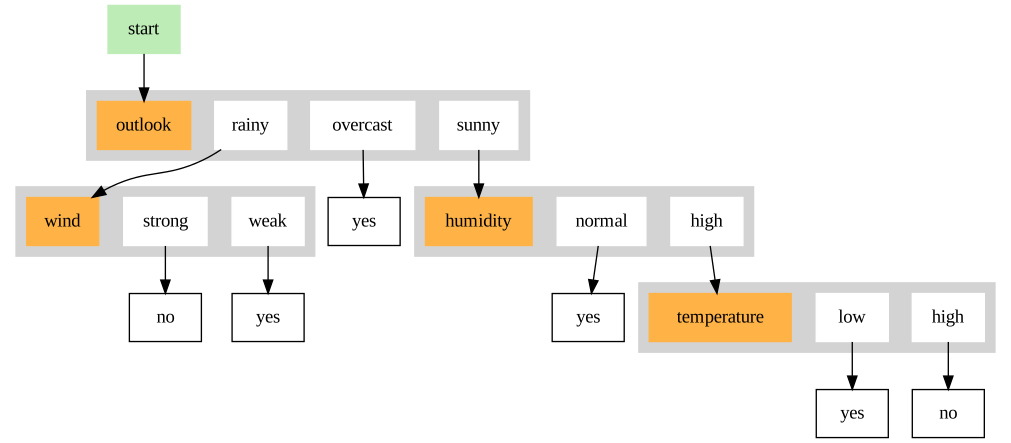
Please note, that there are two kinds of keys here. The keys on the first level represent the name of the functions wich may be called according to the graphs instructions. The first key is identical to the first function called, when traversing the graph. In this case this would be the function outlook().
The second level keys represent the possible results of a certain function. If the value for that key is an atom eg. :rainy and matches the result tuple coming from outlook() , eg. {:rainy, attributes}, another function named wind(*attributes) will be called. If the value is a string no further functions will be called and it will be just used as an informational tag, when the graph is plotted.
Defining functions
As mentioned before the first level keys of @play_tennis represent the minimum set of functions we need to define in order to get the graph up and running.
def outlook(outlook, humidity, wind, temperature) do
  cond do
    outlook >= 0 && outlook <= 0.25 -> {:rainy, [wind]}
    outlook > 0.25 && outlook <= 0.75 -> {:result, true}
    outlook > 0.75 && outlook <= 1 -> {:sunny, [humidity, temperature]}
  end
end
Results and attributes
A function used by garph always needs to return a result tuple, wich allows it to decide if the end of the graph has been reached, or if a further function call is required. In the latter case the first tuple element contains the name of that function as an atom. The second tuple element is a list of attributes that are passed as the functions parameters. So the whole result tuple has the form .
...
outlook > 0.25 && outlook <= 0.75 -> {:result, true}
outlook > 0.75 && outlook <= 1 -> {:sunny, [humidity, temperature]}
...
In the example above the result :sunny combined with the graph instructions from @playtennis leads to calling _humidity(humidity, temperature).
Please note, that :result is a reserved key for garph result tuples. Using it will cause garph to assume that the end of the graph has been reached and return the given payload. In this case true.
Putting it all together
defmodule Sports do
  use Garph

  @play_tennis [
                 outlook:
                   [
                     rainy: :wind,
                     overcast: "yes",
                     sunny: :humidity
                   ],
                 humidity:
                   [
                     normal: "yes",
                     high: :temperature
                   ],
                 wind:
                   [
                     strong: "no",
                     weak: "yes"
                   ],
                 temperature:
                   [
                     low: "yes",
                     high: "no"
                   ]
               ]

  def play_tennis?(outlook, humidity, wind, temperature) do
    evaluate @play_tennis, [outlook, humidity, wind, temperature]
  end

  def export_dot do
    {:ok, file} = File.open "play_tennis.dot", [:write]
    IO.binwrite file, Testmod.to_dot(@play_tennis)
  end

  def outlook(outlook, humidity, wind, temperature) do
    cond do
      outlook >= 0 && outlook <= 0.25 -> {:rainy, [wind]}
      outlook > 0.25 && outlook <= 0.75 -> {:result, true}
      outlook > 0.75 && outlook <= 1 -> {:sunny, [humidity, temperature]}
    end
  end

  def humidity(humidity, temperature) do
    cond do
      humidity >= 0 && humidity <= 0.6 -> {:result, true}
      humidity > 0.6 && humidity <= 1 -> {:high, [temperature]}
    end
  end

  def wind(value) do
    cond do
      value >= 0 && value < 7 -> {:result, true}
      value >= 7 -> {:result, false}
    end
  end

  def temperature(value) do
    cond do
      value <= 22 -> {:result, true}
      value > 22 -> {:result, false}
    end
  end
end
In this example all necessary functions have been implemented. To start the traversal process garph provides evaluate(graph, attributes). It uses a graphs description and initial parameters to begin the traversal process starting with the graphs first node. You may encapsulate the function call in order to make it easily accessible.
def play_tennis?(outlook, humidity, wind, temperature) do
  evaluate @play_tennis, [outlook, humidity, wind, temperature]
end
Now we are able to ask the graph if we should play tennis just by calling
Sports.play_tennis?(outlook, humidity, wind, temperature)Documentation / Plotting
Sometimes, you may want to plot the graph, eg. for documentational purposes. To achieve this you may just implement a function that exports the graphs data to the dot format:
def export_dot do
  {:ok, file} = File.open "play_tennis.dot", [:write]
  IO.binwrite file, Sports.to_dot(@play_tennis)
end
Running
Sports.export_dot()will result in a file play_tennis.dot which can be used with graphviz to plot it through the console command:
dot -Tpng play_tennis.dot > play_tennis.pngCredits
Special thanks to:
Copyright and License
Copyright (c) 2016, Faber Lotto GmbH.
Garph source code is licensed under the MIT License.