ExkPasswd
ExkPasswd generates strong passwords by combining random words with numbers, symbols, and various transformations. This creates passwords that are both cryptographically secure and easier to remember than random character strings.







Try It Interactively
Explore ExkPasswd with interactive Livebook notebooks:

- Quick Start - Basic usage and examples
- Advanced Usage - Custom configurations and transformations
- Security Analysis - Entropy, strength, and cryptographic properties
- Benchmarks - Performance metrics and comparisons
- Chinese i18n - 中文密码生成 (Chinese password generation with Pinyin)
- Japanese i18n - 日本語パスワード生成 (Japanese password generation with Romaji)
History & Inspiration
The concept of using random words for passwords was popularized by Randall Munroe's XKCD comic #936, which illustrated why long, memorable passphrases can be more effective than short, complex passwords.
XKCD #936: Password Strength - "Through 20 years of effort, we've successfully trained everyone to use passwords that are hard for humans to remember, but easy for computers to guess."
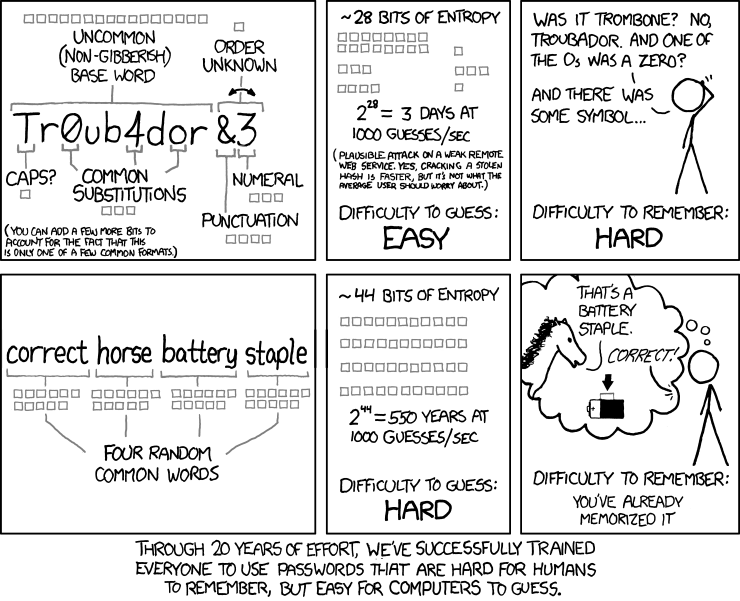
This comic inspired Bart Busschots to create the original Perl module Crypt::HSXKPasswd, which implements a secure and flexible password generation system based on this principle. The concept was later ported to JavaScript, and subsequently to Elixir by Michael Westbay.
ExkPasswd builds upon this foundation with a ground-up rewrite in Elixir, enhanced with the EFF Large Wordlist for maximum security and memorability, cryptographically secure random number generation, and modern Elixir features.
Why Word-Based Passwords?
Traditional password advice suggests random strings like x4$9Kp2m, but these have problems:
- Hard to remember → people write them down (insecure)
- Hard to type → increased friction and errors
- Short to be memorable → limited entropy
Word-based passwords like correct-horse-battery-staple offer:
- Easy to remember (no need to write down)
- Easy to type (real words)
- Long enough for high entropy (more characters = exponentially more secure)
- Still unpredictable when generated with cryptographic randomness
Features
Core Features
- Cryptographically Secure - Uses
:crypto.strong_rand_bytes/1for all randomness - EFF Large Wordlist - 7,826 carefully curated words (12.9 bits entropy per word)
- Zero Runtime Dependencies - Only uses Elixir stdlib and
:crypto - Multiple Presets - 7 built-in presets for different use cases
- Fully Customizable - Fine-grained control over all generation parameters
Advanced Features
- Efficient Performance - Tuple-based constant-time word lookups
- Entropy Analysis - Blind and seen entropy calculations
- Strength Feedback - Password strength reports
- Character Substitutions - Leetspeak-style transformations for additional entropy
- Custom Dictionaries - Load and use your own word lists via ETS
- Batch Generation - Optimized generation of multiple passwords
- Parallel Generation - Multi-core support for large batches
- Pre-computed Transformations - Cached case transformations for efficiency
Installation
Add exk_passwd to your dependencies in mix.exs:
def deps do
  [
    {:exk_passwd, "~> 0.1.1"}
  ]
end
Then run:
mix deps.getQuick Start
Basic Usage
# Generate a password with default settings
ExkPasswd.generate()
#=> "45?clever?FOREST?mountain?89"

# Use a preset
ExkPasswd.generate(:xkcd)
#=> "correct-horse-battery-staple-forest-cloud"

# Use preset as string
ExkPasswd.generate("wifi")
#=> "2847-happy-CLOUD-forest-WINTER-gentle-SUMMER-4839???????????????????"
Custom Configuration
# Using keyword list
ExkPasswd.generate(
  num_words: 4,
  word_length: 5..7,
  case_transform: :capitalize,
  separator: "-",
  digits: {3, 3},
  padding: %{char: "!", before: 1, after: 1}
)
#=> "!389-Happy-Forest-Guitar-Cloud-472!"

# Or create a Config struct
config = ExkPasswd.Config.new!(
  num_words: 4,
  word_length: 5..7,
  case_transform: :capitalize,
  separator: "-",
  digits: {3, 3},
  padding: %{char: "!", before: 1, after: 1}
)

ExkPasswd.generate(config)
#=> "!389-Happy-Forest-Guitar-Cloud-472!"
Available Presets
:default
Balanced security and memorability. 3 words with alternating case, random separator, 2 digits before/after, and 2 padding characters.
ExkPasswd.generate(:default)
#=> "45?clever?FOREST?mountain?89"
:xkcd
Similar to the famous XKCD comic. 5 words, lowercase, separated by hyphens, no padding. Great balance of security and memorability.
ExkPasswd.generate(:xkcd)
#=> "correct-horse-battery-staple-amazing"
:web32
For websites allowing up to 32 characters. 4 words, compact format.
ExkPasswd.generate(:web32)
#=> "!29-word-CLOUD-tree-HAPPY-847@"
:web16
For websites with 16 character limits. Not recommended - too short for good security. Only use if absolutely required.
ExkPasswd.generate(:web16)
#=> "word!TREE@word#4"
:wifi
63-character WPA2 keys (most routers allow 64, but some only 63).
ExkPasswd.generate(:wifi)
#=> "2847-happy-CLOUD-forest-WINTER-gentle-SUMMER-4839???????????????????"
:apple_id
Meets Apple ID password requirements. Uses only symbols from iOS keyboard for easy mobile typing.
ExkPasswd.generate(:apple_id)
#=> ":45-Word-CLOUD-Forest-89:"
:security
For fake security question answers. Natural sentence-like format.
ExkPasswd.generate(:security)
#=> "word cloud forest happy guitar mountain."
Configuration Options
All configuration is done via the ExkPasswd.Config struct, or by passing keyword lists:
# Using keyword list (recommended)
ExkPasswd.generate(
  num_words: 3,              # Number of words (1-10)
  word_length: 4..8,         # Word length range
  case_transform: :alternate, # :none | :alternate | :capitalize | :invert | :lower | :upper | :random
  separator: "-",            # Separator between words (string or random from charset)
  digits: {2, 2},            # {before, after} - digits before/after words (0-5 each)
  padding: %{                # Padding configuration
    char: "!",               # Padding character (string or random from charset)
    before: 2,               # Padding chars before (0-5)
    after: 2,                # Padding chars after (0-5)
    to_length: 0             # If > 0, pad/truncate to exact length (overrides before/after)
  },
  dictionary: :eff,          # :eff (default) | custom atom for loaded dictionaries
  meta: %{                   # Metadata and extensions
    transforms: []           # Custom Transform protocol implementations
  }
)

# Or create Config struct explicitly
config = ExkPasswd.Config.new!(
  num_words: 3,
  word_length: 4..8,
  separator: "-"
)
Case Transformations
:none- No transformation (words as-is from dictionary):alternate- Alternating case:word,WORD,word,WORD:capitalize- Capitalize first letter:Word,Word,Word:invert- Invert case:wORD(lowercase first, uppercase rest):lower- All lowercase:word,word,word:upper- All uppercase:WORD,WORD,WORD:random- Each word randomly uppercase or lowercase
Security
Cryptographic Randomness
All random operations use :crypto.strong_rand_bytes/1, which provides cryptographically secure randomness backed by your operating system's secure random number generator. This ensures passwords are unpredictable and suitable for security-critical applications.
Never use Enum.random/1 or the :rand module for password generation - they use predictable pseudo-random number generators.
Password Strength
Password strength is measured in bits of entropy:
- < 28 bits: Very weak (avoid)
- 28-35 bits: Weak (acceptable only for low-value accounts)
- 36-59 bits: Fair (acceptable for most accounts)
- 60-127 bits: Strong (recommended for sensitive accounts)
- 128+ bits: Very strong (suitable for encryption keys)
ExkPasswd's default preset generates passwords with high entropy while remaining memorable.
Dictionary & Security Model
ExkPasswd uses the EFF Large Wordlist containing 7,826 carefully curated words:
- Memorability - Common, recognizable English words
- Typability - No complex spellings or rare words
- Length variety - 3-9 characters per word
- Safety - No offensive or problematic words
- High entropy - 12.9 bits of entropy per word
Security comes from entropy and cryptographic randomness, not from secret words.
The EFF wordlist provides exceptional security:
- 4 words: ~51.6 bits (adequate for most accounts)
- 5 words: ~64.5 bits (strong)
- 6 words: ~77.5 bits (very strong - EFF recommendation)
- 7+ words: ~90+ bits (excellent, suitable for master passwords)
All random selection uses :crypto.strong_rand_bytes/1 for cryptographic security, ensuring passwords are unpredictable even if the word list is known.
References:
API Reference
Main Functions
ExkPasswd.generate/0
Generates a password using default settings.
ExkPasswd.generate()
#=> "45?clever?FOREST?mountain?89"
ExkPasswd.generate/1
Generates a password with a preset (atom), keyword list, or Config struct.
# With preset atom
ExkPasswd.generate(:xkcd)
#=> "correct-horse-battery-staple-amazing"

# With keyword list (new!)
ExkPasswd.generate(num_words: 2, separator: "_")
#=> "45_HAPPY_forest_23"

# With Config struct
config = ExkPasswd.Config.new!(num_words: 2, separator: "_")
ExkPasswd.generate(config)
#=> "45_HAPPY_forest_23"
ExkPasswd.generate/2
Generates a password with a preset and keyword list overrides.
# Start with xkcd preset, override num_words
ExkPasswd.generate(:xkcd, num_words: 7)
#=> "correct-horse-battery-staple-amazing-forest-cloud"
ExkPasswd.Config.Presets.all/0
Returns list of all available preset configurations.
ExkPasswd.Config.Presets.all()
#=> [%ExkPasswd.Config{...}, ...]
ExkPasswd.Config.Presets.get/1
Gets a specific preset by name (atom or string).
ExkPasswd.Config.Presets.get(:xkcd)
#=> %ExkPasswd.Config{...}

ExkPasswd.Config.Presets.get("wifi")
#=> %ExkPasswd.Config{...}

ExkPasswd.Config.Presets.get(:nonexistent)
#=> nil
ExkPasswd.Config.Presets.register/2
Register a custom preset at runtime.
custom = ExkPasswd.Config.new!(num_words: 8, separator: "_")
ExkPasswd.Config.Presets.register(:super_strong, custom)

# Now use it
ExkPasswd.generate(:super_strong)
#=> "45_word_CLOUD_forest_HAPPY_guitar_MOUNTAIN_test_89"
Config Validation
ExkPasswd.Config.new/1
Creates and validates a Config struct, returns {:ok, config} or {:error, message}.
ExkPasswd.Config.new(num_words: 4)
#=> {:ok, %ExkPasswd.Config{num_words: 4, ...}}

ExkPasswd.Config.new(num_words: 0)
#=> {:error, "num_words must be between 1 and 10, got: 0"}
ExkPasswd.Config.new!/1
Like new/1 but raises ArgumentError on failure.
ExkPasswd.Config.new!(num_words: 4)
#=> %ExkPasswd.Config{num_words: 4, ...}

ExkPasswd.Config.new!(num_words: 0)
#=> ** (ArgumentError) num_words must be between 1 and 10, got: 0
Advanced Features
Batch Generation
Generate multiple passwords efficiently:
# Generate 100 passwords (optimized)
ExkPasswd.generate_batch(100)
#=> ["45?clever?FOREST?...", "23@happy@CLOUD@...", ...]

# Generate unique passwords only
ExkPasswd.generate_unique_batch(50)
#=> Guarantees all 50 passwords are unique

# Parallel generation (uses all CPU cores)
ExkPasswd.generate_parallel(1000)
#=> Fastest for large batches
Entropy Calculation
Analyze password strength with comprehensive entropy analysis:
password = "45?clever?FOREST?mountain?89"
config = ExkPasswd.Config.new!()

# Calculate entropy
ExkPasswd.calculate_entropy(password, config)
#=> %{
#     blind: 125.4,  # Brute-force resistance in bits
#     seen: 72.3,    # Knowledge-based attack resistance
#     status: :good, # :excellent | :good | :fair | :weak
#     blind_crack_time: "5.4 billion years",
#     seen_crack_time: "75.2 millennia",
#     details: %{...}  # Detailed breakdown
#   }
Strength Analysis
Get user-friendly strength feedback:
password = "correct-horse-battery-staple"
config = ExkPasswd.Config.new!(num_words: 4)

# Get strength rating
ExkPasswd.strength_rating(password, config)
#=> :good

# Get detailed analysis
ExkPasswd.analyze_strength(password, config)
#=> %{
#     rating: :good,
#     score: 72,  # 0-100 scale
#     entropy_bits: 51.6
#   }
Transform Protocol (Extensibility)
ExkPasswd supports custom transformations via the Transform protocol:
# Use built-in substitution transform
config = ExkPasswd.Config.new!(
  num_words: 3,
  meta: %{
    transforms: [
      %ExkPasswd.Transform.Substitution{
        map: %{"a" => "@", "e" => "3", "i" => "!", "o" => "0", "s" => "$"},
        mode: :random  # Randomly apply per word for extra entropy
      }
    ]
  }
)

ExkPasswd.generate(config)
#=> "45?cl3v3r?FOREST?m0unt@!n?89"

# Example 1: Japanese Romaji Transform (Built-in)
# ExkPasswd includes a production-ready Modified Hepburn romanization transform
# with full support for modern Japanese including Katakana loanwords

# Load Japanese dictionary (Hiragana and Katakana)
ExkPasswd.Dictionary.load_custom(:japanese, [
  "さくら", "やま", "うみ", "そら", "おちゃ", "きょうと",  # Traditional Hiragana
  "コーヒー", "ファイル", "ウィンドウ", "パーティー"      # Modern Katakana loanwords
])

config = ExkPasswd.Config.new!(
  num_words: 3,
  dictionary: :japanese,
  word_length: 2..8,
  word_length_bounds: 1..15,
  separator: "-",
  meta: %{
    transforms: [%ExkPasswd.Transform.Romaji{}]
  }
)

ExkPasswd.generate(config)
#=> "45-sakura-koohii-fairu-89"  # さくら, コーヒー, ファイル romanized
# Features:
# - Modified Hepburn with Wāpuro IME conventions (きょうと → kyouto, おちゃ → ocha)
# - Sokuon gemination (がっこう → gakkou, まっちゃ → matcha)
# - Palatalization (しゃしん → shashin, ちゃ → cha)
# - N before labials (さんぽ → sampo, しんぶん → shimbun)
# - Long vowel markers (コーヒー → koohii, ラーメン → raamen)
# - Extended Katakana (ファイル → fairu, ウィンドウ → windou, ヴァイオリン → vaiorin)
# - Full Unicode support for Hiragana, Katakana, and extended sounds

# Example 2: NATO Phonetic Alphabet Transform
defmodule MyApp.PhoneticTransform do
  @moduledoc """
  Converts password words to NATO phonetic alphabet for unambiguous verbal communication.

  Useful for passwords communicated over radio, phone, or in high-noise
  environments where clarity is critical (aviation, military, emergency response).
  """
  defstruct [:format]  # :full | :abbreviated

  @nato_phonetic %{
    "a" => "Alpha", "b" => "Bravo", "c" => "Charlie", "d" => "Delta",
    "e" => "Echo", "f" => "Foxtrot", "g" => "Golf", "h" => "Hotel",
    "i" => "India", "j" => "Juliet", "k" => "Kilo", "l" => "Lima",
    "m" => "Mike", "n" => "November", "o" => "Oscar", "p" => "Papa",
    "q" => "Quebec", "r" => "Romeo", "s" => "Sierra", "t" => "Tango",
    "u" => "Uniform", "v" => "Victor", "w" => "Whiskey", "x" => "X-ray",
    "y" => "Yankee", "z" => "Zulu"
  }

  defimpl ExkPasswd.Transform do
    def apply(%{format: format}, word, _config) do
      word
      |> String.downcase()
      |> String.graphemes()
      |> Enum.map(fn char ->
        phonetic = Map.get(@nato_phonetic, char, char)
        if format == :abbreviated, do: String.slice(phonetic, 0, 3), else: phonetic
      end)
      |> Enum.join("-")
    end

    def entropy_bits(%{format: _}, _config) do
      # Phonetic transform is deterministic, no entropy change
      # Primary benefit is unambiguous verbal communication
      0.0
    end
  end
end

# Use NATO phonetic for radio communication
config = ExkPasswd.Config.new!(
  num_words: 2,
  word_length: 4..5,
  meta: %{
    transforms: [%MyApp.PhoneticTransform{format: :abbreviated}]
  }
)

ExkPasswd.generate(config)
#=> "Cha-Ech-Ech-Kil-Oscar (spoken: Charlie-Echo-Echo-Kilo-Oscar)"
See ExkPasswd.Transform documentation for more examples including:
- Prefix/suffix transforms
- Case transforms
- Unicode normalization
- Chaining multiple transforms
Custom Dictionaries
Use your own word lists:
# Load custom dictionary
custom_words = ["apple", "banana", "cherry", "date", "elderberry"]
ExkPasswd.Dictionary.load_custom(:fruits, custom_words)

# Use custom dictionary
config = ExkPasswd.Config.new!(
  num_words: 3,
  dictionary: :fruits
)

ExkPasswd.generate(config)
#=> "45?apple?CHERRY?date?89"
Development
Quick Reference
# Setup
mix setup              # Install and compile dependencies

# Testing
mix test               # Run tests with coverage
mix test.watch         # Run tests in watch mode

# Code Quality
mix format             # Format code
mix credo --strict     # Run linter
mix check              # Run format, credo, and tests
mix check.all          # Run all checks including dialyzer

# Benchmarks
mix bench              # Run all benchmarks
mix bench.password     # Benchmark password generation
mix bench.dict         # Benchmark dictionary operations

# Documentation
mix docs               # Generate documentation

# Security
mix hex.audit          # Check for vulnerable dependencies
mix deps.audit         # Run mix_audit security scan
Running Tests
mix test               # Run all tests
mix coveralls.html     # Run with coverage
mix test.watch         # Run in watch mode
Code Quality
mix format             # Format code
mix credo --strict     # Run Credo analysis
mix dialyzer           # Run Dialyzer
mix check              # Run all checks (format, credo, tests)
mix check.all          # Run all checks including dialyzer
Building Documentation
mix docs               # Generate documentation
open doc/index.html    # ..then open in browser
Running Benchmarks
mix bench              # Run all benchmarks
mix bench.password     # Password generation benchmarks
mix bench.dict         # Dictionary operations benchmarks
mix bench.batch        # Batch generation benchmarks
Benchmarks measure:
- Password generation performance across different presets
- Dictionary lookup performance (constant-time tuple indexing)
- Case transformation overhead
- Batch vs individual generation performance
Benchmark Results:
Contributing
We welcome contributions!
Development Setup
- Fork the repository
-
Clone your fork:
git clone https://github.com/futhr/exk_passwd.git -
Install dependencies:
mix deps.get -
Run tests:
mix test - Make your changes
- Submit a pull request
Releasing
This project uses git_ops for automated releases.
mix release              # Bumps version, updates CHANGELOG, commits, and tags
git push --follow-tags   # Pushes commit and tag
CI (publish.yml) triggers on v* tag → runs checks → mix hex.publish
License
BSD-2-Clause License - see LICENSE file for details.
Resources
Acknowledgments
- Original concept from the XKCD "Password Strength" comic
- Based on Crypt::HSXKPasswd by Bart Busschots
- Based on westbaystars/exk_passwd by Michael Westbay
- Word list from the EFF Large Wordlist by the Electronic Frontier Foundation
Built with Elixir ❤️ Secure by Design