ExRatatui


Elixir bindings for the Rust ratatui terminal UI library, via Rustler NIFs.
Build rich terminal UIs in Elixir with ratatui's layout engine, widget library, and styling system — without blocking the BEAM.
Features
- 16 built-in widgets (and counting!): Paragraph, Block, List, Table, Gauge, LineGauge, Tabs, Scrollbar, Checkbox, TextInput, Clear, Markdown, Textarea, Throbber, Popup, WidgetList
- Constraint-based layout engine (percentage, length, min, max, ratio)
- Non-blocking keyboard, mouse, and resize event polling
- OTP-supervised TUI apps via
ExRatatui.Appbehaviour with LiveView-inspired callbacks - Built-in SSH transport — serve any
ExRatatui.Appas a remote TUI, standalone or undernerves_ssh - Erlang distribution transport — attach to a remote TUI over Erlang distribution with zero NIF on the app node
- Full color support: named, RGB, and 256-color indexed
- Text modifiers: bold, italic, underlined, and more
- Headless test backend for CI-friendly rendering verification
- Precompiled NIF binaries — no Rust toolchain needed
- Runs on BEAM's DirtyIo scheduler — never blocks your processes
Examples
| Example | Run | Description |
|---|---|---|
hello_world.exs | mix run examples/hello_world.exs | Minimal paragraph display |
counter.exs | mix run examples/counter.exs | Interactive counter with key events |
counter_app.exs | mix run examples/counter_app.exs |
Counter using ExRatatui.App behaviour |
system_monitor.exs | mix run examples/system_monitor.exs | Linux system dashboard — CPU, memory, disk, network, BEAM stats (Linux/Nerves only). Also runs over SSH and Erlang distribution — see below. |
widget_showcase.exs | mix run examples/widget_showcase.exs | Interactive showcase: tabs, progress bars, checkboxes, text input, scrollable logs |
task_manager.exs | mix run examples/task_manager.exs | Full task manager with tabs, table, scrollbar, line gauge, and more |
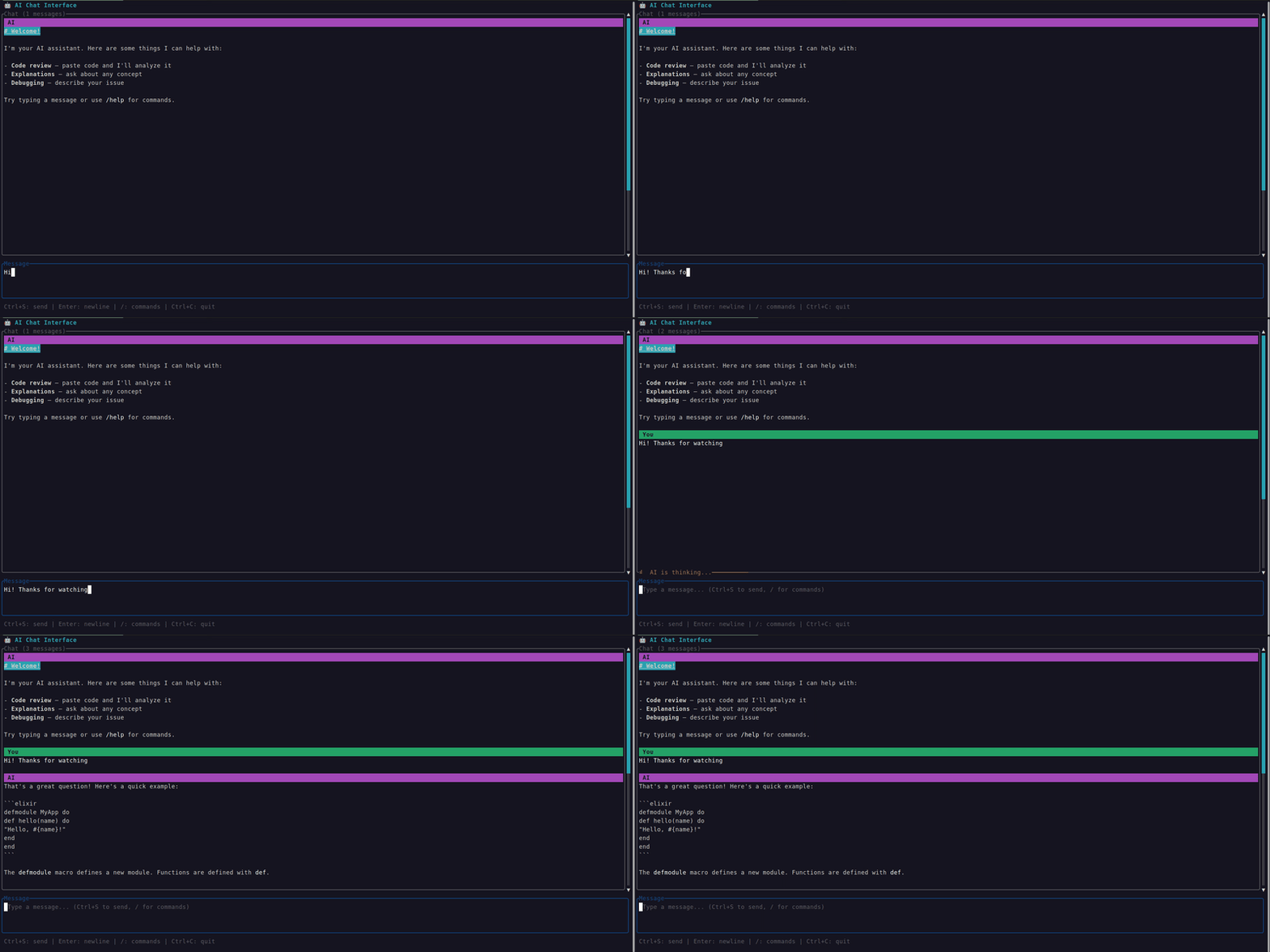
chat_interface.exs | mix run examples/chat_interface.exs | AI chat interface — markdown, textarea, throbber, popup, slash commands |
task_manager/ | See README | Supervised Ecto + SQLite CRUD app — also runs over SSH, multiple clients share one DB |
Try an example over SSH
Two of the examples ship with a one-flag switch to serve them over SSH instead of your local terminal — great for testing multi-client behaviour or previewing Nerves-style remote TUIs.
system_monitor.exs (standalone script, --ssh flag):
mix run --no-halt examples/system_monitor.exs --ssh
# in another terminal:
ssh demo@localhost -p 2222      # password: demo
task_manager/ (Mix project, TASK_MANAGER_SSH env var):
cd examples/task_manager
mix deps.get && mix ecto.setup   # first time only
TASK_MANAGER_SSH=1 mix run --no-halt
# in one or more other terminals:
ssh demo@localhost -p 2222      # password: demo
Every SSH client for task_manager gets its own isolated TUI session but they all read and write the same SQLite database — add a task in one window, see it appear in the others. See the SSH transport guide for how this all works.
Try an example over Erlang Distribution
The system_monitor.exs example also supports a --distributed flag to serve the TUI over Erlang distribution — useful when the app node has no terminal (Nerves, containers, daemon releases).
# Terminal 1 — start the app node
elixir --sname app --cookie demo -S mix run --no-halt examples/system_monitor.exs --distributed

# Terminal 2 — attach from another node
iex --sname local --cookie demo -S mix
iex> ExRatatui.Distributed.attach(:"app@hostname", SystemMonitor)
See the distribution transport guide for how this all works.
Built with ExRatatui
- ash_tui — Interactive terminal explorer for Ash domains, resources, attributes, actions, and more.
- nerves_ex_ratatui_example — Example Nerves project demonstrating ExRatatui on embedded hardware, with a system monitor and LED control TUI.
- phoenix_ex_ratatui_example — Example Phoenix 1.8 project demonstrating an admin TUI served over SSH alongside a public LiveView, sharing PubSub between the browser and the terminal so messages posted in the web app stream live into every connected SSH session.
Installation
Add ex_ratatui to your dependencies in mix.exs:
def deps do
  [
    {:ex_ratatui, "~> 0.6"}
  ]
end
Then fetch and compile:
mix deps.get && mix compileA precompiled NIF binary for your platform will be downloaded automatically.
Prerequisites
- Elixir 1.17+
Precompiled NIF binaries are available for Linux (x86_64, aarch64, armv6/hf, riscv64), macOS (x86_64, aarch64), and Windows (x86_64). No Rust toolchain needed.
To compile from source instead, install the Rust toolchain and set:
export EX_RATATUI_BUILD=trueQuick Start
alias ExRatatui.Layout.Rect
alias ExRatatui.Style
alias ExRatatui.Widgets.{Block, Paragraph}

ExRatatui.run(fn terminal ->
  {w, h} = ExRatatui.terminal_size()

  paragraph = %Paragraph{
    text: "Hello from ExRatatui!\n\nPress any key to exit.",
    style: %Style{fg: :green, modifiers: [:bold]},
    alignment: :center,
    block: %Block{
      title: " Hello World ",
      borders: [:all],
      border_type: :rounded,
      border_style: %Style{fg: :cyan}
    }
  }

  ExRatatui.draw(terminal, [{paragraph, %Rect{x: 0, y: 0, width: w, height: h}}])

  # Wait for a keypress, then exit
  ExRatatui.poll_event(60_000)
end)
Try the examples for more, e.g. mix run examples/hello_world.exs.
OTP App Behaviour
For supervised TUI applications, use the ExRatatui.App behaviour — a LiveView-inspired callback interface that manages the terminal lifecycle under OTP:
defmodule MyApp.TUI do
  use ExRatatui.App

  @impl true
  def mount(_opts) do
    {:ok, %{count: 0}}
  end

  @impl true
  def render(state, frame) do
    alias ExRatatui.Widgets.Paragraph
    alias ExRatatui.Layout.Rect

    widget = %Paragraph{text: "Count: #{state.count}"}
    rect = %Rect{x: 0, y: 0, width: frame.width, height: frame.height}
    [{widget, rect}]
  end

  @impl true
  def handle_event(%ExRatatui.Event.Key{code: "q"}, state) do
    {:stop, state}
  end

  def handle_event(%ExRatatui.Event.Key{code: "up"}, state) do
    {:noreply, %{state | count: state.count + 1}}
  end

  def handle_event(_event, state) do
    {:noreply, state}
  end
end
Add it to your supervision tree:
children = [{MyApp.TUI, []}]
Supervisor.start_link(children, strategy: :one_for_one)
Callbacks
| Callback | Description |
|---|---|
mount/1 |
Called once on startup. Return {:ok, initial_state} |
render/2 |
Called after every state change. Receives state and %Frame{} with terminal dimensions. Return [{widget, rect}] |
handle_event/2 |
Called on terminal events. Return {:noreply, state} or {:stop, state} |
handle_info/2 |
Called for non-terminal messages (e.g., PubSub). Optional — defaults to {:noreply, state} |
terminate/2 | Called on shutdown with reason and final state. Optional — default is a no-op |
See the task_manager example for a full Ecto-backed app using this behaviour.
Running Over SSH
Any ExRatatui.App module can also be served as a remote TUI over SSH. The transport is pure OTP :ssh — no extra processes, no external sshd, no native code beyond what ExRatatui already uses. See the Running TUIs over SSH guide for the full options reference, auth setup, and troubleshooting tips.
Drop ExRatatui.SSH.Daemon into your supervision tree:
children = [
  {ExRatatui.SSH.Daemon,
   mod: MyApp.TUI,
   port: 2222,
   system_dir: ~c"/etc/ex_ratatui/host_keys",
   auth_methods: ~c"password",
   user_passwords: [{~c"admin", ~c"s3cret"}]}
]

Supervisor.start_link(children, strategy: :one_for_one)
Then connect from another machine:
ssh admin@your-host -p 2222Each client gets its own isolated session with its own state and screen size. A single daemon can serve many concurrent TUIs.
See phoenix_ex_ratatui_example for a complete Phoenix 1.8 application doing exactly this — an admin TUI served over SSH alongside a public LiveView, sharing PubSub between the browser and the terminal.
Nerves + nerves_ssh
If you're already running nerves_ssh on a Nerves device, register ExRatatui.SSH as a subsystem instead of standing up a second daemon. Put this in config/runtime.exs — not target.exs — because ExRatatui.SSH.subsystem/1 is a function call and target.exs is evaluated before deps are compiled for the target on a fresh build (see the SSH transport guide for the full story):
# config/runtime.exs
import Config

if Application.spec(:nerves_ssh) do
  config :nerves_ssh,
    subsystems: [
      :ssh_sftpd.subsystem_spec(cwd: ~c"/"),
      ExRatatui.SSH.subsystem(MyApp.TUI)
    ]
end
Connect with:
ssh -t nerves.local -s Elixir.MyApp.TUI
See nerves_ex_ratatui_example for a complete Nerves firmware that wires two TUIs (a system monitor and an LED control app) into a nerves_ssh daemon and runs them on a Raspberry Pi.
Running over Erlang Distribution
Any ExRatatui.App module can also be driven from a remote BEAM node over Erlang distribution. The app node runs all callbacks and sends widget lists as plain BEAM terms — no Rust NIF is needed on the app node. See the Running TUIs over Erlang Distribution guide for full details.
On the app node, add the Listener to your supervision tree:
children = [
  {MyApp.TUI, transport: :distributed}
]
From your node, connect and attach:
iex --sname mynode --cookie mycookie -S mixiex> ExRatatui.Distributed.attach(:"app@hostname", MyApp.TUI)The TUI takes over your terminal. Press the app's quit key to disconnect. Each attaching node gets its own isolated session — multiple nodes can attach concurrently.
Running All Three Transports
The same app module can serve local, SSH, and distributed clients simultaneously:
children = [
  {MyApp.TUI, []},                                    # local TTY
  {MyApp.TUI, transport: :ssh, port: 2222, ...},      # remote over SSH
  {MyApp.TUI, transport: :distributed}                 # remote over distribution
]
How It Works
ExRatatui bridges Elixir and Rust through Rustler NIFs (Native Implemented Functions):
Elixir structs -> encode to maps -> Rust NIF -> decode to ratatui types -> render to terminal
Terminal events -> Rust NIF (DirtyIo) -> encode to tuples -> Elixir Event structs- Rendering: Elixir widget structs are encoded as string-keyed maps, passed across the NIF boundary, and decoded into ratatui widget types for rendering.
- Events: The
poll_eventNIF runs on BEAM's DirtyIo scheduler, so event polling never blocks normal Elixir processes. - Terminal state: Each process holds its own terminal reference via Rust ResourceArc, supporting two backends — a real crossterm terminal and a headless test backend for CI. The terminal is automatically restored when the reference is garbage collected.
- Layout: Ratatui's constraint-based layout engine is exposed directly, computing split rectangles on the Rust side and returning them as Elixir tuples.
Precompiled binaries are provided via rustler_precompiled so users don't need the Rust toolchain.
Widgets
Paragraph
Text display with alignment, wrapping, and scrolling.
%Paragraph{
  text: "Hello, world!\nSecond line.",
  style: %Style{fg: :cyan, modifiers: [:bold]},
  alignment: :center,
  wrap: true
}
Block
Container with borders and title. Can wrap any other widget via the :block field.
%Block{
  title: "My Panel",
  borders: [:all],
  border_type: :rounded,
  border_style: %Style{fg: :blue}
}

# Compose with other widgets:
%Paragraph{
  text: "Inside a box",
  block: %Block{title: "Title", borders: [:all]}
}
List
Selectable list with highlight support.
%List{
  items: ["Elixir", "Rust", "Haskell"],
  highlight_style: %Style{fg: :yellow, modifiers: [:bold]},
  highlight_symbol: " > ",
  selected: 0,
  block: %Block{title: " Languages ", borders: [:all]}
}
Table
Table with headers, rows, and column width constraints.
%Table{
  rows: [["Alice", "30"], ["Bob", "25"]],
  header: ["Name", "Age"],
  widths: [{:length, 15}, {:length, 10}],
  highlight_style: %Style{fg: :yellow},
  selected: 0
}
Gauge
Progress bar.
%Gauge{
  ratio: 0.75,
  label: "75%",
  gauge_style: %Style{fg: :green}
}
LineGauge
Thin single-line progress bar with separate filled/unfilled styles.
%LineGauge{
  ratio: 0.6,
  label: "60%",
  filled_style: %Style{fg: :green},
  unfilled_style: %Style{fg: :dark_gray}
}
Tabs
Tab bar for switching between views.
%Tabs{
  titles: ["Home", "Settings", "Help"],
  selected: 0,
  highlight_style: %Style{fg: :cyan, modifiers: [:bold]},
  divider: " | ",
  block: %Block{borders: [:all]}
}
Scrollbar
Scroll position indicator for long content. Supports vertical and horizontal orientations.
%Scrollbar{
  content_length: 100,
  position: 25,
  viewport_content_length: 10,
  orientation: :vertical_right,
  thumb_style: %Style{fg: :cyan}
}
Checkbox
Boolean toggle with customizable symbols.
%Checkbox{
  label: "Enable notifications",
  checked: true,
  checked_style: %Style{fg: :green},
  checked_symbol: "✓",
  unchecked_symbol: "✗"
}
TextInput
Single-line text input with cursor navigation and viewport scrolling. This is a stateful widget — its state lives in Rust via ResourceArc.
# Create state (once, e.g. in mount/1)
state = ExRatatui.text_input_new()

# Forward key events
ExRatatui.text_input_handle_key(state, "h")
ExRatatui.text_input_handle_key(state, "i")

# Read/set value
ExRatatui.text_input_get_value(state)  #=> "hi"
ExRatatui.text_input_set_value(state, "hello")

# Render
%TextInput{
  state: state,
  style: %Style{fg: :white},
  cursor_style: %Style{fg: :black, bg: :white},
  placeholder: "Type here...",
  placeholder_style: %Style{fg: :dark_gray},
  block: %Block{title: "Search", borders: [:all], border_type: :rounded}
}
Clear
Resets all cells in its area to empty (space) characters. Useful for rendering overlays on top of existing content.
%Clear{}Markdown
Renders markdown with syntax-highlighted code blocks. Powered by tui-markdown (pulldown-cmark + syntect). Supports headings, bold, italic, inline code, fenced code blocks, bullet lists, links, and horizontal rules.
%Markdown{
  content: "# Hello\n\nSome **bold** text and `inline code`.\n\n```elixir\nIO.puts(\"hi\")\n```",
  wrap: true,
  block: %Block{title: "Response", borders: [:all]}
}
Textarea
Multiline text editor with undo/redo, cursor movement, and Emacs-style shortcuts. This is a stateful widget — state lives in Rust via ResourceArc.
# Create state (once, e.g. in mount/1)
state = ExRatatui.textarea_new()

# Forward key events (with modifier support)
ExRatatui.textarea_handle_key(state, "h", [])
ExRatatui.textarea_handle_key(state, "enter", [])
ExRatatui.textarea_handle_key(state, "w", ["ctrl"])  # delete word backward

# Read value
ExRatatui.textarea_get_value(state)  #=> "h\n"

# Render
%Textarea{
  state: state,
  placeholder: "Type your message...",
  placeholder_style: %Style{fg: :dark_gray},
  block: %Block{title: "Message", borders: [:all], border_type: :rounded}
}
Throbber
Loading spinner that animates through symbol sets. The caller controls animation by incrementing :step on each tick.
%Throbber{
  label: "Loading...",
  step: state.tick,
  throbber_set: :braille,
  throbber_style: %Style{fg: :cyan},
  block: %Block{title: "Status", borders: [:all]}
}
Available sets: :braille, :dots, :ascii, :vertical_block, :horizontal_block, :arrow, :clock, :box_drawing, :quadrant_block, :white_square, :white_circle, :black_circle.
Popup
Centered modal overlay. Renders any widget centered over the parent area, clearing the background underneath. Useful for dialogs, confirmations, and command palettes.
%Popup{
  content: %Paragraph{text: "Are you sure?"},
  block: %Block{title: "Confirm", borders: [:all], border_type: :rounded},
  percent_width: 50,
  percent_height: 30
}
WidgetList
Vertical list of heterogeneous widgets with optional selection and scrolling. Each item is a {widget, height} tuple. Ideal for chat message histories where items have different heights.
%WidgetList{
  items: [
    {%Paragraph{text: "User: Hello!"}, 1},
    {%Markdown{content: "**Bot:** Hi there!\n\nHow can I help?"}, 4},
    {%Paragraph{text: "User: What is Elixir?"}, 1}
  ],
  selected: 1,
  highlight_style: %Style{fg: :yellow},
  scroll_offset: 0,
  block: %Block{title: "Chat", borders: [:all]}
}
Layout
Split areas into sub-regions using constraints:
alias ExRatatui.Layout
alias ExRatatui.Layout.Rect

area = %Rect{x: 0, y: 0, width: 80, height: 24}

# Three-row layout: header, body, footer
[header, body, footer] = Layout.split(area, :vertical, [
  {:length, 3},
  {:min, 0},
  {:length, 1}
])

# Split body into sidebar + main
[sidebar, main] = Layout.split(body, :horizontal, [
  {:percentage, 30},
  {:percentage, 70}
])
Constraint types: {:percentage, n}, {:length, n}, {:min, n}, {:max, n}, {:ratio, num, den}.
Events
Poll for keyboard, mouse, and resize events without blocking the BEAM:
case ExRatatui.poll_event(100) do
  %Event.Key{code: "q", kind: "press"} ->
    :quit

  %Event.Key{code: "up", kind: "press"} ->
    :move_up

  %Event.Key{code: "j", kind: "press", modifiers: ["ctrl"]} ->
    :ctrl_j

  %Event.Resize{width: w, height: h} ->
    {:resized, w, h}

  nil ->
    :timeout
end
Styles
# Named colors
%Style{fg: :green, bg: :black}

# RGB
%Style{fg: {:rgb, 255, 100, 0}}

# 256-color indexed
%Style{fg: {:indexed, 42}}

# Modifiers
%Style{modifiers: [:bold, :dim, :italic, :underlined, :crossed_out, :reversed]}
Testing
ExRatatui includes a headless test backend for CI-friendly rendering verification. Each test terminal is independent, enabling async: true tests:
test "renders a paragraph" do
  terminal = ExRatatui.init_test_terminal(40, 10)

  paragraph = %Paragraph{text: "Hello!"}
  :ok = ExRatatui.draw(terminal, [{paragraph, %Rect{x: 0, y: 0, width: 40, height: 10}}])

  content = ExRatatui.get_buffer_content(terminal)
  assert content =~ "Hello!"
end
Contributing
Contributions are welcome! See CONTRIBUTING.md for development setup and PR guidelines.
License
MIT — see LICENSE for details.