ExRatatui


Elixir bindings for the Rust ratatui terminal UI library, via Rustler NIFs.
Build rich terminal UIs in Elixir with ratatui's layout engine, widget library, and styling system — without blocking the BEAM.
Features
- 16 built-in widgets (and counting!): Paragraph, Block, List, Table, Gauge, LineGauge, Tabs, Scrollbar, Checkbox, TextInput, Clear, Markdown, Textarea, Throbber, Popup, WidgetList
- Constraint-based layout engine (percentage, length, min, max, ratio)
- Non-blocking keyboard, mouse, and resize event polling
- OTP-supervised TUI apps via
ExRatatui.Appbehaviour with LiveView-inspired callbacks - Full color support: named, RGB, and 256-color indexed
- Text modifiers: bold, italic, underlined, and more
- Headless test backend for CI-friendly rendering verification
- Precompiled NIF binaries — no Rust toolchain needed
- Runs on BEAM's DirtyIo scheduler — never blocks your processes
Examples
| Example | Run | Description |
|---|---|---|
hello_world.exs | mix run examples/hello_world.exs | Minimal paragraph display |
counter.exs | mix run examples/counter.exs | Interactive counter with key events |
counter_app.exs | mix run examples/counter_app.exs |
Counter using ExRatatui.App behaviour |
system_monitor.exs | mix run examples/system_monitor.exs | Linux system dashboard — CPU, memory, disk, network, BEAM stats (Linux/Nerves only) |
widget_showcase.exs | mix run examples/widget_showcase.exs | Interactive showcase: tabs, progress bars, checkboxes, text input, scrollable logs |
task_manager.exs | mix run examples/task_manager.exs | Full task manager with tabs, table, scrollbar, line gauge, and more |
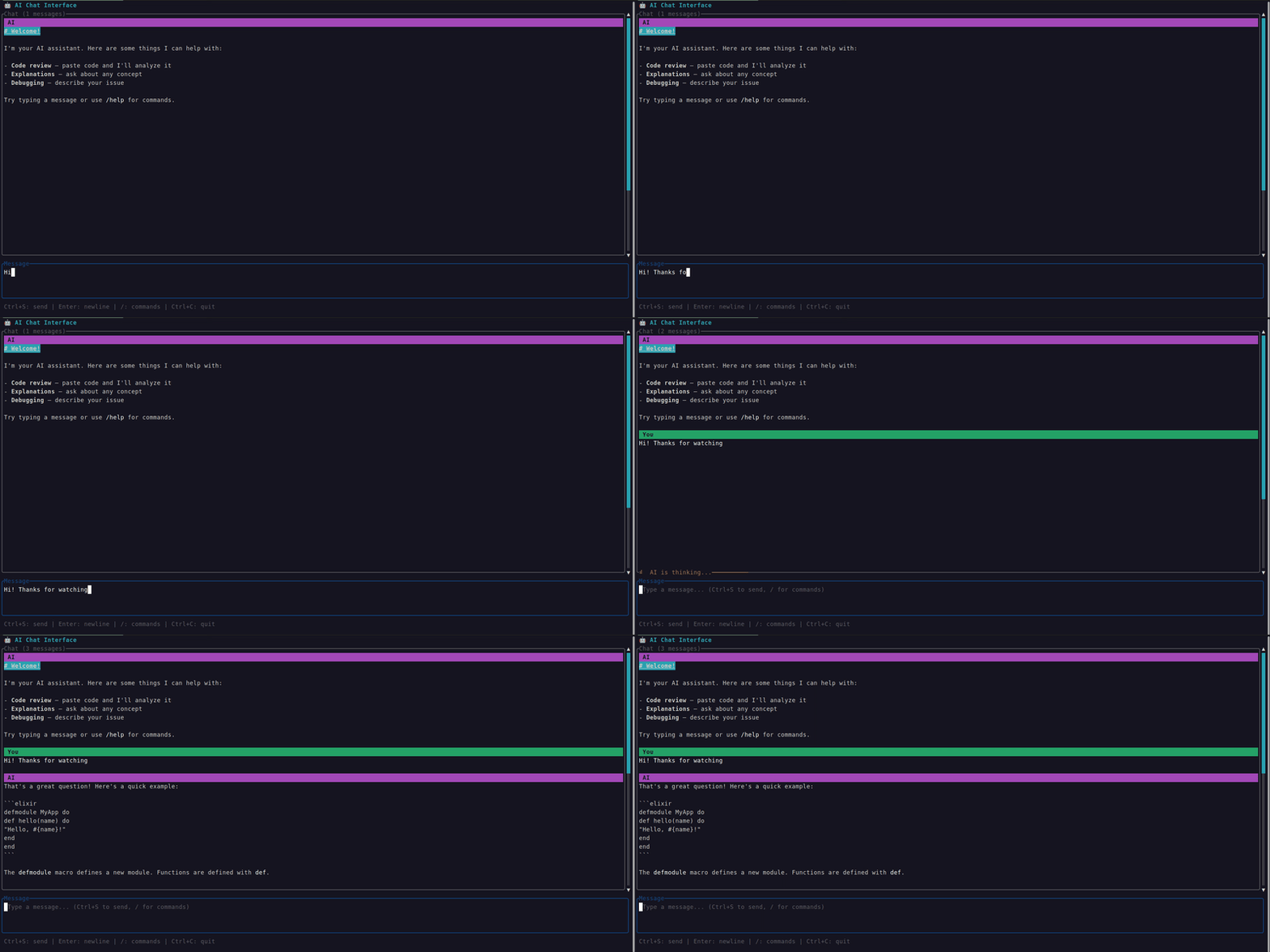
chat_interface.exs | mix run examples/chat_interface.exs | AI chat interface — markdown, textarea, throbber, popup, slash commands |
task_manager/ | See README | Supervised Ecto + SQLite CRUD app |
Built with ExRatatui
- ash_tui — Interactive terminal explorer for Ash domains, resources, attributes, actions, and more.
- nerves_ex_ratatui_example — Example Nerves project demonstrating ExRatatui on embedded hardware, with a system monitor and LED control TUI.
Installation
Add ex_ratatui to your dependencies in mix.exs:
def deps do
  [
    {:ex_ratatui, "~> 0.5"}
  ]
end
Then fetch and compile:
mix deps.get && mix compileA precompiled NIF binary for your platform will be downloaded automatically.
Prerequisites
- Elixir 1.17+
Precompiled NIF binaries are available for Linux (x86_64, aarch64, armv6/hf, riscv64), macOS (x86_64, aarch64), and Windows (x86_64). No Rust toolchain needed.
To compile from source instead, install the Rust toolchain and set:
export EX_RATATUI_BUILD=trueQuick Start
alias ExRatatui.Layout.Rect
alias ExRatatui.Style
alias ExRatatui.Widgets.{Block, Paragraph}

ExRatatui.run(fn terminal ->
  {w, h} = ExRatatui.terminal_size()

  paragraph = %Paragraph{
    text: "Hello from ExRatatui!\n\nPress any key to exit.",
    style: %Style{fg: :green, modifiers: [:bold]},
    alignment: :center,
    block: %Block{
      title: " Hello World ",
      borders: [:all],
      border_type: :rounded,
      border_style: %Style{fg: :cyan}
    }
  }

  ExRatatui.draw(terminal, [{paragraph, %Rect{x: 0, y: 0, width: w, height: h}}])

  # Wait for a keypress, then exit
  ExRatatui.poll_event(60_000)
end)
Try the examples for more, e.g. mix run examples/hello_world.exs.
OTP App Behaviour
For supervised TUI applications, use the ExRatatui.App behaviour — a LiveView-inspired callback interface that manages the terminal lifecycle under OTP:
defmodule MyApp.TUI do
  use ExRatatui.App

  @impl true
  def mount(_opts) do
    {:ok, %{count: 0}}
  end

  @impl true
  def render(state, frame) do
    alias ExRatatui.Widgets.Paragraph
    alias ExRatatui.Layout.Rect

    widget = %Paragraph{text: "Count: #{state.count}"}
    rect = %Rect{x: 0, y: 0, width: frame.width, height: frame.height}
    [{widget, rect}]
  end

  @impl true
  def handle_event(%ExRatatui.Event.Key{code: "q"}, state) do
    {:stop, state}
  end

  def handle_event(%ExRatatui.Event.Key{code: "up"}, state) do
    {:noreply, %{state | count: state.count + 1}}
  end

  def handle_event(_event, state) do
    {:noreply, state}
  end
end
Add it to your supervision tree:
children = [{MyApp.TUI, []}]
Supervisor.start_link(children, strategy: :one_for_one)
Callbacks
| Callback | Description |
|---|---|
mount/1 |
Called once on startup. Return {:ok, initial_state} |
render/2 |
Called after every state change. Receives state and %Frame{} with terminal dimensions. Return [{widget, rect}] |
handle_event/2 |
Called on terminal events. Return {:noreply, state} or {:stop, state} |
handle_info/2 |
Called for non-terminal messages (e.g., PubSub). Optional — defaults to {:noreply, state} |
terminate/2 | Called on shutdown with reason and final state. Optional — default is a no-op |
See the task_manager example for a full Ecto-backed app using this behaviour.
How It Works
ExRatatui bridges Elixir and Rust through Rustler NIFs (Native Implemented Functions):
Elixir structs -> encode to maps -> Rust NIF -> decode to ratatui types -> render to terminal
Terminal events -> Rust NIF (DirtyIo) -> encode to tuples -> Elixir Event structs- Rendering: Elixir widget structs are encoded as string-keyed maps, passed across the NIF boundary, and decoded into ratatui widget types for rendering.
- Events: The
poll_eventNIF runs on BEAM's DirtyIo scheduler, so event polling never blocks normal Elixir processes. - Terminal state: Each process holds its own terminal reference via Rust ResourceArc, supporting two backends — a real crossterm terminal and a headless test backend for CI. The terminal is automatically restored when the reference is garbage collected.
- Layout: Ratatui's constraint-based layout engine is exposed directly, computing split rectangles on the Rust side and returning them as Elixir tuples.
Precompiled binaries are provided via rustler_precompiled so users don't need the Rust toolchain.
Widgets
Paragraph
Text display with alignment, wrapping, and scrolling.
%Paragraph{
  text: "Hello, world!\nSecond line.",
  style: %Style{fg: :cyan, modifiers: [:bold]},
  alignment: :center,
  wrap: true
}
Block
Container with borders and title. Can wrap any other widget via the :block field.
%Block{
  title: "My Panel",
  borders: [:all],
  border_type: :rounded,
  border_style: %Style{fg: :blue}
}

# Compose with other widgets:
%Paragraph{
  text: "Inside a box",
  block: %Block{title: "Title", borders: [:all]}
}
List
Selectable list with highlight support.
%List{
  items: ["Elixir", "Rust", "Haskell"],
  highlight_style: %Style{fg: :yellow, modifiers: [:bold]},
  highlight_symbol: " > ",
  selected: 0,
  block: %Block{title: " Languages ", borders: [:all]}
}
Table
Table with headers, rows, and column width constraints.
%Table{
  rows: [["Alice", "30"], ["Bob", "25"]],
  header: ["Name", "Age"],
  widths: [{:length, 15}, {:length, 10}],
  highlight_style: %Style{fg: :yellow},
  selected: 0
}
Gauge
Progress bar.
%Gauge{
  ratio: 0.75,
  label: "75%",
  gauge_style: %Style{fg: :green}
}
LineGauge
Thin single-line progress bar with separate filled/unfilled styles.
%LineGauge{
  ratio: 0.6,
  label: "60%",
  filled_style: %Style{fg: :green},
  unfilled_style: %Style{fg: :dark_gray}
}
Tabs
Tab bar for switching between views.
%Tabs{
  titles: ["Home", "Settings", "Help"],
  selected: 0,
  highlight_style: %Style{fg: :cyan, modifiers: [:bold]},
  divider: " | ",
  block: %Block{borders: [:all]}
}
Scrollbar
Scroll position indicator for long content. Supports vertical and horizontal orientations.
%Scrollbar{
  content_length: 100,
  position: 25,
  viewport_content_length: 10,
  orientation: :vertical_right,
  thumb_style: %Style{fg: :cyan}
}
Checkbox
Boolean toggle with customizable symbols.
%Checkbox{
  label: "Enable notifications",
  checked: true,
  checked_style: %Style{fg: :green},
  checked_symbol: "✓",
  unchecked_symbol: "✗"
}
TextInput
Single-line text input with cursor navigation and viewport scrolling. This is a stateful widget — its state lives in Rust via ResourceArc.
# Create state (once, e.g. in mount/1)
state = ExRatatui.text_input_new()

# Forward key events
ExRatatui.text_input_handle_key(state, "h")
ExRatatui.text_input_handle_key(state, "i")

# Read/set value
ExRatatui.text_input_get_value(state)  #=> "hi"
ExRatatui.text_input_set_value(state, "hello")

# Render
%TextInput{
  state: state,
  style: %Style{fg: :white},
  cursor_style: %Style{fg: :black, bg: :white},
  placeholder: "Type here...",
  placeholder_style: %Style{fg: :dark_gray},
  block: %Block{title: "Search", borders: [:all], border_type: :rounded}
}
Clear
Resets all cells in its area to empty (space) characters. Useful for rendering overlays on top of existing content.
%Clear{}Markdown
Renders markdown with syntax-highlighted code blocks. Powered by tui-markdown (pulldown-cmark + syntect). Supports headings, bold, italic, inline code, fenced code blocks, bullet lists, links, and horizontal rules.
%Markdown{
  content: "# Hello\n\nSome **bold** text and `inline code`.\n\n```elixir\nIO.puts(\"hi\")\n```",
  wrap: true,
  block: %Block{title: "Response", borders: [:all]}
}
Textarea
Multiline text editor with undo/redo, cursor movement, and Emacs-style shortcuts. This is a stateful widget — state lives in Rust via ResourceArc.
# Create state (once, e.g. in mount/1)
state = ExRatatui.textarea_new()

# Forward key events (with modifier support)
ExRatatui.textarea_handle_key(state, "h", [])
ExRatatui.textarea_handle_key(state, "enter", [])
ExRatatui.textarea_handle_key(state, "w", ["ctrl"])  # delete word backward

# Read value
ExRatatui.textarea_get_value(state)  #=> "h\n"

# Render
%Textarea{
  state: state,
  placeholder: "Type your message...",
  placeholder_style: %Style{fg: :dark_gray},
  block: %Block{title: "Message", borders: [:all], border_type: :rounded}
}
Throbber
Loading spinner that animates through symbol sets. The caller controls animation by incrementing :step on each tick.
%Throbber{
  label: "Loading...",
  step: state.tick,
  throbber_set: :braille,
  throbber_style: %Style{fg: :cyan},
  block: %Block{title: "Status", borders: [:all]}
}
Available sets: :braille, :dots, :ascii, :vertical_block, :horizontal_block, :arrow, :clock, :box_drawing, :quadrant_block, :white_square, :white_circle, :black_circle.
Popup
Centered modal overlay. Renders any widget centered over the parent area, clearing the background underneath. Useful for dialogs, confirmations, and command palettes.
%Popup{
  content: %Paragraph{text: "Are you sure?"},
  block: %Block{title: "Confirm", borders: [:all], border_type: :rounded},
  percent_width: 50,
  percent_height: 30
}
WidgetList
Vertical list of heterogeneous widgets with optional selection and scrolling. Each item is a {widget, height} tuple. Ideal for chat message histories where items have different heights.
%WidgetList{
  items: [
    {%Paragraph{text: "User: Hello!"}, 1},
    {%Markdown{content: "**Bot:** Hi there!\n\nHow can I help?"}, 4},
    {%Paragraph{text: "User: What is Elixir?"}, 1}
  ],
  selected: 1,
  highlight_style: %Style{fg: :yellow},
  scroll_offset: 0,
  block: %Block{title: "Chat", borders: [:all]}
}
Layout
Split areas into sub-regions using constraints:
alias ExRatatui.Layout
alias ExRatatui.Layout.Rect

area = %Rect{x: 0, y: 0, width: 80, height: 24}

# Three-row layout: header, body, footer
[header, body, footer] = Layout.split(area, :vertical, [
  {:length, 3},
  {:min, 0},
  {:length, 1}
])

# Split body into sidebar + main
[sidebar, main] = Layout.split(body, :horizontal, [
  {:percentage, 30},
  {:percentage, 70}
])
Constraint types: {:percentage, n}, {:length, n}, {:min, n}, {:max, n}, {:ratio, num, den}.
Events
Poll for keyboard, mouse, and resize events without blocking the BEAM:
case ExRatatui.poll_event(100) do
  %Event.Key{code: "q", kind: "press"} ->
    :quit

  %Event.Key{code: "up", kind: "press"} ->
    :move_up

  %Event.Key{code: "j", kind: "press", modifiers: ["ctrl"]} ->
    :ctrl_j

  %Event.Resize{width: w, height: h} ->
    {:resized, w, h}

  nil ->
    :timeout
end
Styles
# Named colors
%Style{fg: :green, bg: :black}

# RGB
%Style{fg: {:rgb, 255, 100, 0}}

# 256-color indexed
%Style{fg: {:indexed, 42}}

# Modifiers
%Style{modifiers: [:bold, :dim, :italic, :underlined, :crossed_out, :reversed]}
Testing
ExRatatui includes a headless test backend for CI-friendly rendering verification. Each test terminal is independent, enabling async: true tests:
test "renders a paragraph" do
  terminal = ExRatatui.init_test_terminal(40, 10)

  paragraph = %Paragraph{text: "Hello!"}
  :ok = ExRatatui.draw(terminal, [{paragraph, %Rect{x: 0, y: 0, width: 40, height: 10}}])

  content = ExRatatui.get_buffer_content(terminal)
  assert content =~ "Hello!"
end
Contributing
Contributions are welcome! See CONTRIBUTING.md for development setup and PR guidelines.
License
MIT — see LICENSE for details.