ex_rabbit_pool
A RabbitMQ connection pooling library written in Elixir
Installation
If available in Hex, the package can be installed
by adding ex_rabbit_pool to your list of dependencies in mix.exs:
def deps do
  [
    {:ex_rabbit_pool, "~> 1.0.2"}
  ]
end

General Overview
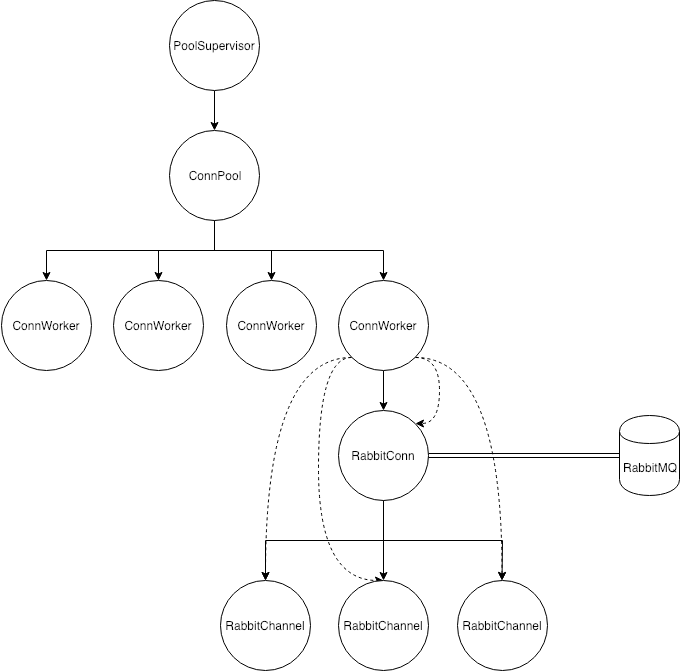
ex_rabbit_poolcreates a pool or many pools of connections to RabbitMQ, we don’t care about isolating access to each worker that’s why we use a pool purely in order to spread load (pool config strategy :fifo)each connection worker traps exits and links the connection process to it
each connection worker creates a pool of channels and links them to it
when a client checks out a channel out of the pool the connection worker monitors that client to return the channel into it in case of a crash
in case you don’t want to pool channels, you can disable this feature by setting the
channelsnumber to 0, then you can create channels on demand
High Level Architecture
When starting a connection worker :
- We start a pool of multiplexed channels to RabbitMQ
- Store the channel pool to the connection workers state (we can move this later to ets).
Then:
-
The connection worker traps exists of RabbitMQ channels - which means that :
- If a channel crashes, the connection worker is going to be able to start another channel
- If a connection to RabbitMQ crashes we are going to be able to restart that connection, remove all crashed channels and then restart them with a new connection;
Also:
-
We are able to easily:
- Monitor clients accessing channels,
- Queue and dequeue channels from the pool in order to make them accessible to one client at a time reducing the potential for race conditions.
Setup RabbitMQ with docker
# pull RabbitMQ image from docker
$> docker pull rabbitmq:3.7.7-management
# run docker in background
# name the container
# remove container if already exists
# attach default port between the container and your laptop
# attach default management port between the container and your laptop
# start rabbitmq with management console
$> docker run --detach --rm --hostname bugs-bunny --name roger_rabbit -p 5672:5672 -p 15672:15672 rabbitmq:3.7.7-management
# if you need to stop the container
$> docker stop roger_rabbit
# if you need to remove the container manually
$> docker container rm roger_rabbit
Supervision hierarchy
Setting Up Multiple Connection pools
It’s a good practice to not have consumers and producers on the same connection (since if something goes to flow mode the connection will be blocked and consumers won’t be able to help RabbitMQ to offload all the messages), that’s why we support setting up multiple queues thanks to poolboy
rabbitmq_config = [
  channels: 1,
]

# Connection Pool Configuration
producers_conn_pool = [
  name: {:local, :producers_pool},
  worker_module: ExRabbitPool.Worker.RabbitConnection,
  size: 1,
  max_overflow: 0
]

consumers_conn_pool = [
  name: {:local, :consumers_pool},
  worker_module: ExRabbitPool.Worker.RabbitConnection,
  size: 1,
  max_overflow: 0
]

ExRabbitPool.PoolSupervisor.start_link(
  rabbitmq_config: rabbitmq_config,
  connection_pools: [producers_conn_pool, consumers_conn_pool]
)

producers_conn = ExRabbitPool.get_connection(:producers_pool)
consumers_conn = ExRabbitPool.get_connection(:consumers_pool)

ExRabbitPool.with_channel(:producers_pool, fn {:ok, channel} ->
  ...
end)

ExRabbitPool.with_channel(:consumers_pool, fn {:ok, channel} ->
  ...
end)
Setting Up Queues on Start Up
We support setting up queues when starting up the supervision tree via
ExRabbitPool.Worker.SetupQueue, right now it doesn’t handle reconnect logic
for you, so if you have a reconnection and you are working with auto_delete: true
queues, you need to handle this case by your self (re-create those queues because
if connectivity drops, auto_delete: true queues are going to be de deleted
automatically and if you try to use one of them you would have an error as the
queue no longer exist).
Images are taken from RabbitMQ Tutorials
Setting up a direct exchange with bindings

rabbitmq_config = [
  ..., # Basic Rabbit Connection Configuration
]

queues_config = [
  queues: [
    [
      queue_name: "Q1",
      exchange: "X",
      queue_options: [],
      exchange_options: [],
      bind_options: [routing_key: "orange"]
    ],
    [
      queue_name: "Q2",
      exchange: "X",
      queue_options: [],
      exchange_options: [],
      bind_options: [routing_key: "black"]
    ],
    [
      queue_name: "Q2",
      exchange: "X",
      queue_options: [],
      exchange_options: [],
      bind_options: [routing_key: "green"]
    ]
  ]
]

# Basic Connection Pool Configuration
rabbitmq_conn_pool = [...]

ExRabbitPool.PoolSupervisor.start_link(
  rabbitmq_config: rabbitmq_config,
  connection_pools: [rabbitmq_conn_pool]
)

ExRabbitPool.Worker.SetupQueue.start_link({pool_id, queues_config})
Setting up a direct exchange with multiple bindings

rabbitmq_config = [
  ..., # Basic Rabbit Connection Configuration
]

queues_config = [
  queues: [
    [
      queue_name: "Q1",
      exchange: "X",
      queue_options: [],
      exchange_options: [],
      bind_options: [routing_key: "black"]
    ],
    [
      queue_name: "Q2",
      exchange: "X",
      queue_options: [],
      exchange_options: [],
      bind_options: [routing_key: "black"]
    ]
  ]
]

# Basic Connection Pool Configuration
rabbitmq_conn_pool = [...]

ExRabbitPool.PoolSupervisor.start_link(
  rabbitmq_config: rabbitmq_config,
  connection_pools: [rabbitmq_conn_pool]
)

ExRabbitPool.Worker.SetupQueue.start_link({pool_id, queues_config})
EchoConsumer - Example
In the examples directory you are going to find an implementation of a RabbitMQ
consumer using the library, all you need to do is, starting RabbitMQ
with docker, and copy/paste the following code into the iex console.
What it does is, setup the connection pool, setup the queues, exchanges and
bindings to use, start the consumer and finally publish some messages to the
exchange so the consumer can echo it.
rabbitmq_config = [channels: 2]

rabbitmq_conn_pool = [
  name: {:local, :connection_pool},
  worker_module: ExRabbitPool.Worker.RabbitConnection,
  size: 1,
  max_overflow: 0
]

{:ok, pid} =
  ExRabbitPool.PoolSupervisor.start_link(
    rabbitmq_config: rabbitmq_config,
    connection_pools: [rabbitmq_conn_pool]
  )

queue = "ex_rabbit_pool"
exchange = "my_exchange"
routing_key = "example"

ExRabbitPool.with_channel(:connection_pool, fn {:ok, channel} ->
  {:ok, _} = AMQP.Queue.declare(channel, queue, auto_delete: true, exclusive: true)
  :ok = AMQP.Exchange.declare(channel, exchange, :direct, auto_delete: true, exclusive: true)
  :ok = AMQP.Queue.bind(channel, queue, exchange, routing_key: routing_key)
end)

{:ok, consumer_pid} = Example.EchoConsumer.start_link(pool_id: :connection_pool, queue: queue)

ExRabbitPool.with_channel(:connection_pool, fn {:ok, channel} ->
  :ok = AMQP.Basic.publish(channel, exchange, routing_key, "Hello World!")
  :ok = AMQP.Basic.publish(channel, exchange, routing_key, "Hell Yeah!")
end)