ExFlowGraph
Interactive flow graph component library for Phoenix LiveView
Build powerful, interactive workflow editors and visual node-based interfaces in your Phoenix LiveView applications.






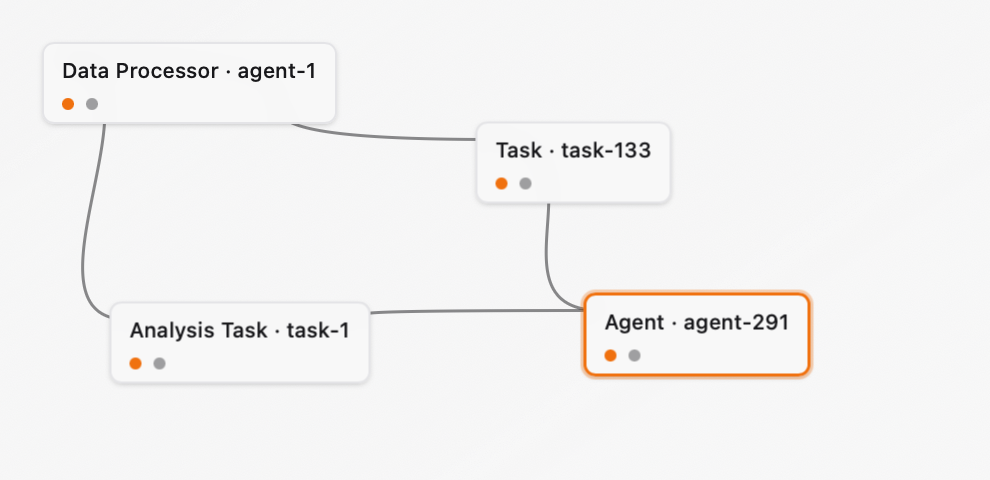
Features
Interactive Canvas
- Drag & Drop: Move nodes around with smooth animations
- Pan & Zoom: Navigate large graphs with ease (zoom coming soon)
- Edge Creation: Connect nodes by dragging from source to target handles
- Multi-Select: Select multiple nodes with Shift/Ctrl/Cmd
- Selection Visual: Clear visual feedback for selected elements
Graph Management
- Nodes & Edges: Full support for directed graphs
- Labels & Metadata: Attach custom data to any element
- Undo/Redo: Complete history management with command pattern
- Persistence: Built-in storage with InMemory backend
LiveView Native
- Real-time Updates: Changes sync automatically via LiveView
- Server-Side State: Graph data managed on the server
- Event Driven: Hook-based JavaScript for smooth interactions
- No External Dependencies: Pure Elixir + minimal JavaScript
Developer Friendly
- Type Safe: Comprehensive typespecs throughout
- Well Documented: Extensive guides and examples
- Customizable: Override styles and behaviors
- Demo App: Complete reference implementation included
Quick Start
Installation
Add to your mix.exs:
def deps do
  [
    {:ex_flow_graph, "~> 0.1.0"}
  ]
end
Basic Usage
defmodule MyAppWeb.FlowLive do
  use MyAppWeb, :live_view
  alias ExFlow.Core.Graph, as: FlowGraph

  def mount(_params, _session, socket) do
    graph = FlowGraph.new()

    {:ok, graph} = FlowGraph.add_node(graph, "node-1", :task, %{
      position: %{x: 100, y: 100},
      label: "Start"
    })

    {:ok, assign(socket, graph: graph)}
  end

  def render(assigns) do
    ~H"""
    <ExFlowGraphWeb.ExFlow.Canvas.canvas
      id="my-canvas"
      nodes={prepare_nodes(@graph)}
      edges={prepare_edges(@graph)}
      selected_node_ids={MapSet.new()}
    />
    """
  end
end
See INSTALLATION.md for complete setup guide.
Documentation
Getting Started
- Installation Guide - Complete setup instructions
- Quick Start - Get running in 5 minutes
- Demo Application - Reference implementation in
/demo
Reference
- Events & Callbacks - Complete event reference with examples
Features
- Labels & Metadata - Attach custom data
- Option+Click Events - Custom interactions
- Undo/Redo - History management with command pattern
Advanced
- Customization - Custom styling, storage, and node types
API Reference
- Core Graph (
ExFlow.Core.Graph) - Graph operations - Canvas Component (
ExFlowGraphWeb.ExFlow.Canvas) - Main canvas - Commands (
ExFlow.Commands.*) - Undo/redo commands - History Manager (
ExFlow.HistoryManager) - Undo/redo management
Demo Application
A complete, production-ready workflow editor is included in the /demo directory.
Features
Core Functionality
- Create, move, and delete nodes
- Connect nodes with edges
- Select single or multiple elements
- Undo/Redo with full history
- Save/Load graph states
- Pan and navigate canvas
Advanced Features
- Edit Modals: Option+Click to edit labels and metadata
- Edge Selection: Click edges to select them
- Keyboard Shortcuts: Comprehensive keyboard support
- Test Graphs: Generate sample graphs for testing
- Live Stats: Real-time node/edge count
- Documentation: Built-in feature guide
Running the Demo
cd demo
mix deps.get
mix ecto.create  # If using database
mix phx.server
Visit http://localhost:4000
Architecture
Component Structure
ExFlowGraph/
├── lib/
│   ├── ex_flow/
│   │   ├── core/
│   │   │   └── graph.ex          # Core graph operations
│   │   ├── commands/              # Undo/redo commands
│   │   ├── storage/               # Persistence backends
│   │   └── history_manager.ex    # History management
│   └── ex_flow_graph_web/
│       └── components/
│           └── ex_flow/
│               ├── canvas.ex      # Main canvas component
│               ├── node.ex        # Node component
│               └── edge.ex        # Edge component
├── assets/
│   └── js/
│       └── hooks/
│           └── ex_flow.js         # JavaScript hook
└── demo/                          # Complete example app
Core Concepts
Graph Structure
# Nodes
%{
  id: String.t(),
  type: atom(),
  label: String.t() | nil,
  position: %{x: number(), y: number()},
  metadata: map()
}

# Edges
%{
  id: String.t(),
  source: String.t(),
  source_handle: String.t(),
  target: String.t(),
  target_handle: String.t(),
  label: String.t() | nil,
  metadata: map()
}
Keyboard Shortcuts
| Action | Shortcut | Description |
|---|---|---|
| Select Node | Click | Single selection |
| Multi-select | Shift/Ctrl/Cmd + Click | Add to selection |
| Drag Node | Click + Drag | Move node |
| Create Edge | Drag from handle | Connect nodes |
| Pan Canvas | Drag background | Move viewport |
| Custom Action | Option/Alt + Click | Trigger custom event |
| Deselect All | Escape | Clear selection |
License
MIT License
Credits
Built with:
Made for the Phoenix community