EventBus

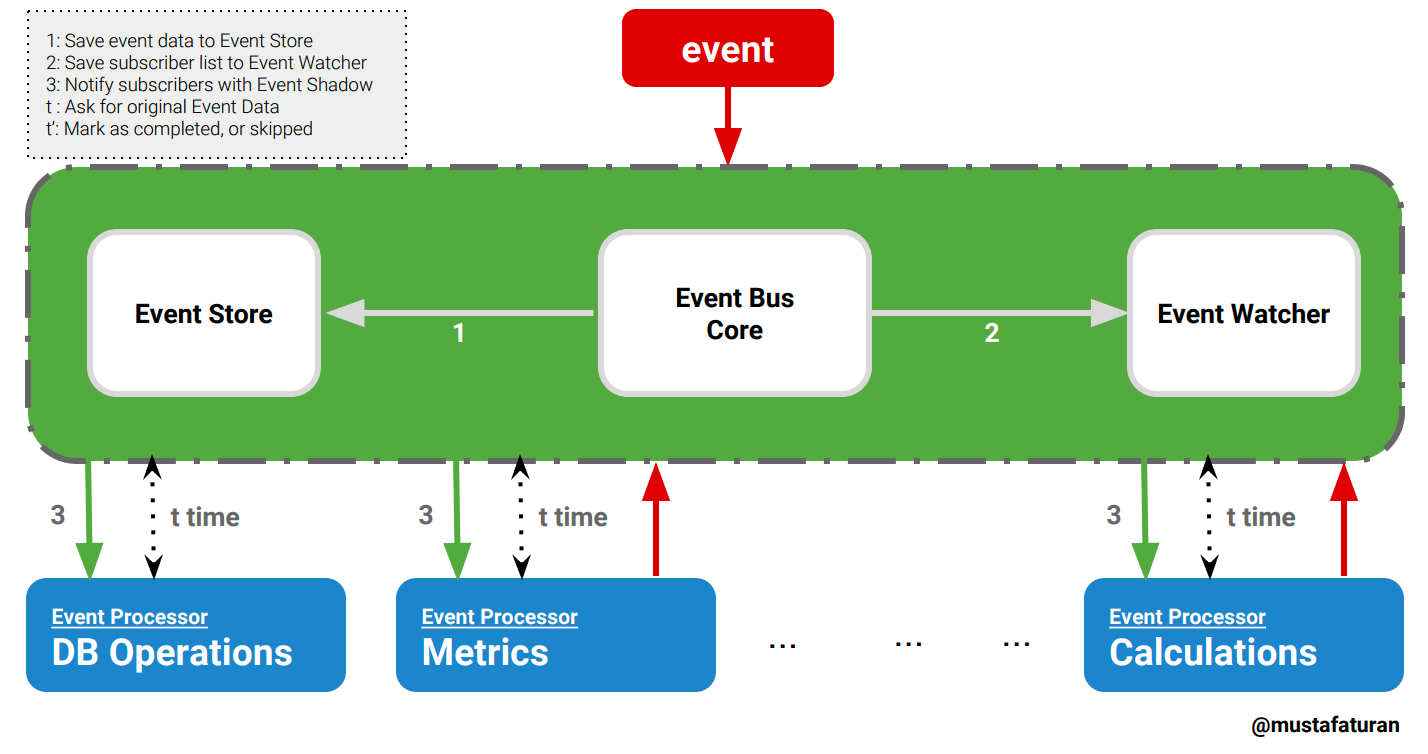
Simple event bus implementation using ETS as an event store.
Installation
The package can be installed by adding event_bus to your list of dependencies in mix.exs:
def deps do
  [{:event_bus, "~> 0.5.0"}]
end
Usage
Register event topics in config.exs
config :event_bus, topics: [:message_received, :another_event_occured]
Subscribe to the 'event bus' with a listener and list of given topics, EventManager will match with Regex
# to catch every event topic
EventBus.subscribe({MyEventListener, [".*"]})
> :ok

# to catch specific topics
EventBus.subscribe({MyEventListener, ["purchase_", "booking_confirmed$", "flight_passed$"]})
> :ok
Unsubscribe from the 'event bus'
EventBus.unsubscribe(MyEventListener)
> :ok
List subscribers
EventBus.subscribers()
> [{MyEventListener, [".*"]}]
List subscribers of a specific event
EventBus.subscribers(:hello_received)
> [MyEventListener]
EventBus.Model.Event structure
%EventBus.Model.Event{
  id: String.t | integer(), # required
  transaction_id: String.t | integer(), # optional
  topic: atom(), # required
  data: any() # required
}
Why there is a transaction_id attribute on structure?
Firstly, transaction_id attribute is an optional field, if you need to store any meta identifier related to event transaction, it is the place to store. Secondly, transaction_id is one of the good ways to track events related to the same transaction on a chain of events. If you have time, have a look to the story.
Define an event struct
alias EventBus.Model.Event
event = %Event{id: "123", transaction_id: "1",
  topic: :hello_received, data: %{message: "Hello"}}
another_event = %Event{id: "124", transaction_id: "1",
  topic: :bye_received, data: [user_id: 1, goal: "exit"]}
Important Note: It is important to have unique identifier for each event struct per topic. I recommend to use a unique id generator like {:uuid, "~> 1.1"}.
Notify all subscribers with EventBus.Model.Event data
EventBus.notify(event)
> :ok
EventBus.notify(another_event)
> :ok
Fetch an event from the store
topic = :bye_received
id = "124"
EventBus.fetch_event({topic, id})
> %EventBus.Model.Event{data: [user_id: 1, goal: "exit"], id: "124", topic: :bye_received, transaction_id: "1"}
Mark as completed on Event Watcher
EventBus.mark_as_completed({MyEventListener, :bye_received, id})
> :ok
Mark as skipped on Event Watcher
EventBus.mark_as_skipped({MyEventListener, :bye_received, id})
> :ok
Sample Listener Implementation
defmodule MyEventListener do
  ...

  def process({topic, id} = event_shadow) do
    GenServer.cast(__MODULE__, event_shadow)
    :ok
  end

  ...


  def handle_cast({:bye_received, id}, state) do
    event = EventBus.fetch_event({:bye_received, id})
    # do sth with event

    # update the watcher!
    EventBus.mark_as_completed({__MODULE__, :bye_received, id})
    ...
    {:noreply, state}
  end
  def handle_cast({:hello_received, id}, state) do
    event = EventBus.fetch_event({:hello_received, id})
    # do sth with EventBus.Model.Event

    # update the watcher!
    EventBus.mark_as_completed({__MODULE__, :hello_received, id})
    ...
    {:noreply, state}
  end
  def handle_cast({topic, id}, state) do
    EventBus.mark_as_skipped({__MODULE__, topic, id})
    {:noreply, state}
  end

  ...
end
Event Storage Details
When an event configured in config file, 2 ETS tables will be created for the event on app start.
All event data is temporarily saved to the ETS tables with the name :eb_es_<<topic>> until all subscribers processed the data. This table is a read heavy table. When a subscriber needs to process the event data, it queries this table to fetch event data.
To watch event status, a separate watcher table is created for each event type with the name :eb_ew_<<topic>>. This table is used for keeping the status of the event. EventWatcher updates this table frequently with the notification of the event processors/subscribers.
When all subscribers process the event data, data in the event store and watcher, automatically deleted by the EventWatcher. If you need to see the status of unprocessed events, event watcher table is one of the good places to query.
For example; to get the list unprocessed events for :hello_received event:
# The following command will return a list of tuples with the `id`, and `event_subscribers_list` where `subscribers` is the list of event subscribers, `completers` is the subscribers those processed the event and notified EventWatcher, and lastly `skippers` is the subscribers those skipped the event without processing.

# Assume you have an event with the name ':hello_received'
:ets.tab2list(:eb_ew_hello_received)
> [{id, {subscribers, completers, skippers}}, ...]
ETS storage SHOULD NOT be considered as a persistent storage. If you need to store events to a persistant data store, then subscribe to all event types by a module with [".*"] event topic then save every event data.
For example;
EventBus.subscribe({MyDataStore, [".*"]})

# then in your data store save the event
defmodule MyDataStore do
  ...

  def process({topic, id} = event_shadow) do
    GenServer.cast(__MODULE__, event_shadow)
    :ok
  end

  ...

  def handle_cast({topic, id}, state) do
    event = EventBus.fetch_event({topic, id})
    # write your logic to save event_data to a persistant store

    EventBus.mark_as_completed({__MODULE__, topic, id})
    {:noreply, state}
  end
end
Documentation
Module docs can be found at https://hexdocs.pm/event_bus.
Implementation details can be found at: https://medium.com/@mustafaturan/event-bus-implementation-s-d2854a9fafd5
Contributing
Issues, Bugs, Documentation, Enhancements
Fork the project
Make your improvements and write your tests(make sure you covered all the cases).
Make a pull request.
License
MIT