Why? 🤷
We needed a much simpler and extensively documented way to add "Sign-in with Google" capability to our Elixir App(s). <br />
What? 💭
An Elixir package that seamlessly handles Google OAuth2 Authentication/Authorization in as few steps as possible. <br /> Following best practices for security & privacy and avoiding complexity by having sensible defaults for all settings.
We built a lightweight solution that only does one thing and is easy for complete beginners to understand/use. <br /> There were already several available options for adding Google Auth to apps on hex.pm/packages?search=google <br /> that all added far too implementation steps (complexity) and had incomplete documentation (
@doc false) and testing. <br /> e.g: github.com/googleapis/elixir-google-api which is a "generated" client and is considered "experimental". <br /> We have drawn inspiration from several sources including code from other programming languages to build this package. This result is much simpler than anything else and has both step-by-step instructions and an complete working example App including how to encrypt tokens for secure storage to help you ship your app fast.
Who? 👥
This module is for people building apps using Elixir/Phoenix who want to ship the "Sign-in with Google" feature faster and more maintainably.
It's targetted at complete beginners with no prior experience/knowledge of auth "schemes" or "strategies". <br /> Just follow the detailed instructions and you'll be up-and running in 5 minutes.
How? ✅
You can add Google Authentication to your Elixir App
using elixir_auth_google <br />
in under 5 minutes
by following these 5 easy steps:
1. Add the hex package to deps 📦
Open your project's mix.exs file
and locate the deps (dependencies) section. <br />
Add a line for :elixir_auth_google in the deps list:
def deps do
  [
    {:elixir_auth_google, "~> 1.0.0"}
  ]
end
Once you have added the line to your mix.exs,
remember to run the mix deps.get command
in your terminal
to download the dependencies.
2. Create Google APIs Application OAuth2 Credentials 🆕
Create a Google Application if you don't already have one, generate the OAuth2 Credentials for the application and save the credentials as environment variables accessible by your app.
Note: There are a few steps to creating a set of Google APIs credentials, so if you don't already have a Google App, we created the following step-by-step guide to make it quick and relatively painless: create-google-app-guide.md <br /> Don't be intimidated by all the buzz-words; it's quite straightforward. And if you get stuck, ask for help!
By the end of this step you should have these two environment variables set:
GOOGLE_CLIENT_ID=631770888008-6n0oruvsm16kbkqg6u76p5cv5kfkcekt.apps.googleusercontent.com
GOOGLE_CLIENT_SECRET=MHxv6-RGF5nheXnxh1b0LNDq
⚠️ Don't worry, these keys aren't valid. They are just here for illustration purposes.
3. Create a GoogleAuthController in your Project 📝
Create a new file called
lib/app_web/controllers/google_auth_controller.ex
and add the following code:
defmodule AppWeb.GoogleAuthController do
  use AppWeb, :controller

  @doc """
  `index/2` handles the callback from Google Auth API redirect.
  """
  def index(conn, %{"code" => code}) do
    {:ok, token} = ElixirAuthGoogle.get_token(code, conn)
    {:ok, profile} = ElixirAuthGoogle.get_user_profile(token.access_token)
    conn
    |> render(:welcome, profile: profile)
  end
end
This code does 3 things:
-
Create a one-time auth
tokenbased on the responsecodesent by Google after the person authenticates. -
Request the person's profile data from Google based on the
access_token -
Render a
:welcomeview displaying some profile data to confirm that login with Google was successful.
4. Create the /auth/google/callback Endpoint 📍
Open your router.ex file
and locate the section that looks like scope "/", AppWeb do
Add the following line:
get "/auth/google/callback", GoogleAuthController, :indexSample: lib/app_web/router.ex#L20
5. Add the "Login with Google" Button to your Template ✨
In order to display the "Sign-in with Google" button in the UI, we need to generate the URL for the button in the relevant controller, and pass it to the template.
Open the lib/app_web/controllers/page_controller.ex file
and update the index function:
From:
def index(conn, _params) do
  render(conn, "index.html")
end
To:
def index(conn, _params) do
  oauth_google_url = ElixirAuthGoogle.generate_oauth_url(conn)
  render(conn, "index.html",[oauth_google_url: oauth_google_url])
end
Update the page/index.html.eex Template
Open the /lib/app_web/templates/page/index.html.eex file
and type the following code:
<section class="phx-hero">
  <h1>Welcome to Awesome App!</h1>
  <p>To get started, login to your Google Account: <p>
  <a href="<%= @oauth_google_url %>">
    <img src="https://i.imgur.com/Kagbzkq.png" alt="Sign in with Google" />
  </a>
</section>Done! 🚀
The home page of the app now has a big "Sign in with Google" button:
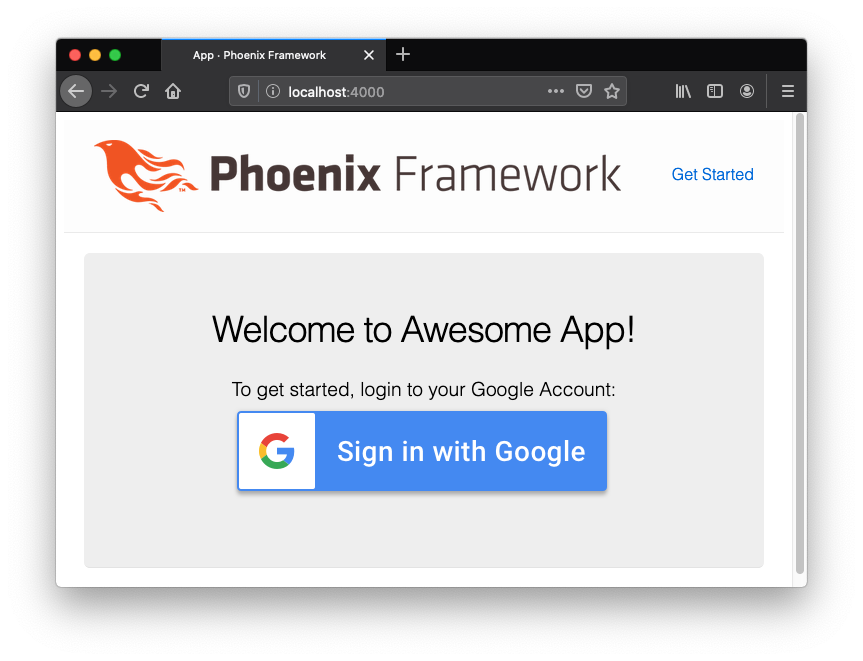
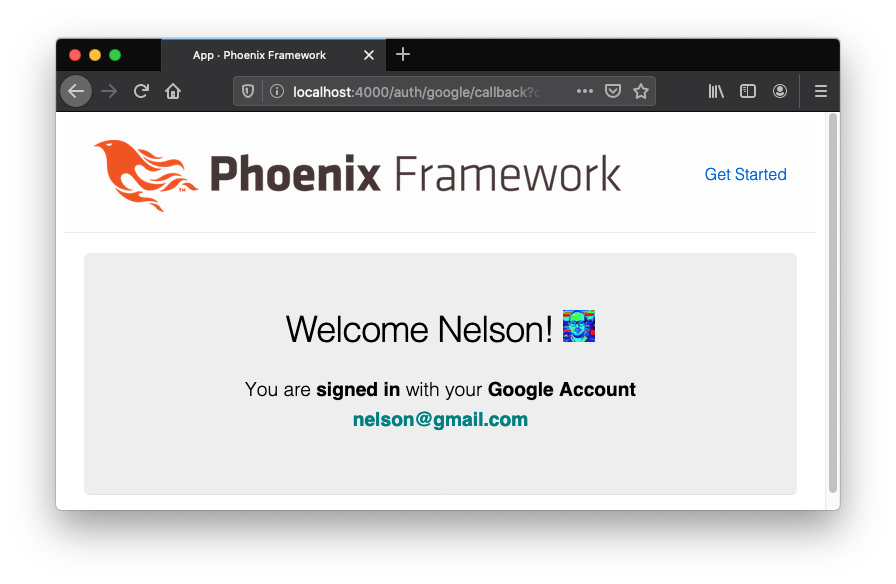
When the person clicks the button, and authenticates with their Google Account, they will be returned to your App where you can display a "login success" message:
<br />
Even More Detail 💡
If you want to dive a bit deeper into understanding how this package works,
You can read and grok the code in under 10 minutes:
/lib/elixir_auth_google.ex
We created a basic demo Phoenix App,
to show you exactly how you can implement
the elixir_auth_google package:
https://github.com/dwyl/elixir-auth-google-demo
It's deployed to Heroku: https://elixir-auth-google-demo.herokuapp.com <br />
(no data is saved so you can play with it - and try an break it!)
And if you want/need a more complete real-world example including creating sessions and saving profile data to a database, take a look at our MVP: https://github.com/dwyl/app-mvp-phoenix
<br />
Notes 📝
-
Official Docs for Google Identity Platform:
https://developers.google.com/identity/choose-auth
- Web specific sample code (JS): https://developers.google.com/identity/sign-in/web
- Google Sign-In for server-side apps: https://developers.google.com/identity/sign-in/web/server-side-flow
- Using OAuth 2.0 for Web Server Applications: https://developers.google.com/identity/protocols/OAuth2WebServer
-
Google Auth Branding Guidelines:
https://developers.google.com/identity/branding-guidelines <br />
Only two colors are permitted for the button:
white
#FFFFFFand blue#4285F4

Fun Facts 📈📊
Unlike other "social media" companies, Google/Alphabet does not report it's Monthly Active Users (MAUs) or Daily Active Users (DAUs) however they do release stats in drips in their Google IO or YouTube events. The following is a quick list of facts that make adding Google Auth to your App a compelling business case:
- As of May 2019, there are over 2.5 Billionactive Android devices; 87% global market share. All these people have Google Accounts in order to use Google services.
- YouTube has 2 billion monthly active YouTube users (signed in with a Google Account).
- Gmail has 1.5 Billion monthly active users a 27% share of the global email client market.
- 65% of Small and Medium sized businesses use Google Apps for business.
- 90%+ of startups use Gmail. This is a good proxy for "early adopters".
- 68% of schools in the US use Google Classroom and related G-suite products. <br /> So the next generation of internet/app users have Google accounts.
- Google has 90.46% of the search engine market share worldwide. 95.4% on Mobile.
Of the 4.5 billion internet users (58% of the world population), around 3.2 billion (72%) have a Google account. 90%+ of tech "early adopters" use Google Apps which means that adding Google OAuth Sign-in is the logical choice for most Apps.
Privacy Concerns? 🔐
A common misconception is that adding Google Auth Sign-in
sends a user's application data to Google.
This is false and App developers have 100% control
over what data is sent to (stored by) Google.
An App can use Google Auth to authenticate a person
(identify them and get read-only access
to their personal details like first name and email address)
without sending any data to Google.
Yes, it will mean that Google "knows" that the person is using your App,
but it will not give Google any insight into how they are using it
or what types of data they are storing in the App. Privacy is maintained.
So if you use the @dwyl app to plan your wedding or next holiday,
Google will not have any of that data
and will not serve any annoying ads based on your project/plans.