EcspanseStateMachine
ECSpanse State Machine is a state machine implementation for ECSpanse. It is an Ecspanse component you include in your entities.
Features
- Every entity can have a state machine executing simultaneously - create, start, and stop independently
- Validation - all states must be defined and reachable
- State changes on command or timeout
- Observable: Events and Telemetry
- Mermaid state diagram generation
Installation
If available in Hex, the package can be installed
by adding ecspanse_state_machine to your list of dependencies in mix.exs:
def deps do
  [
    {:ecspanse_state_machine, "~> 0.3.0"}
  ]
end
How to Use
- Systems Setup
- Add a state machine
- Listen for state changes
- Command a state change
- Stopping a state machine
Systems Setup
As part of your ESCpanse setup, you will have defined a manager with a setup(data) function. In that function, chain a call to ESCpanseStateMachine.setup
  def setup(data) do
    data
    # register the state machine's systems
    |> EcspanseStateMachine.setup()

    # Be sure to register the Ecspanse System Timer!
    |> Ecspanse.add_frame_end_system(Ecspanse.System.Timer)

    # register your systems too
ECSpanseStateMachine will add the systems it needs for you.
Add a state machine
The state machine is an ECSpanse component. You add it to your entity's spec in the components list. EcspanseStateMachine.new is a convenience API function to create the state machine component.
- Create a state machine component spec
    state_machine =
      EcspanseStateMachine.new(
        :idle,
        [
          [name: :idle, exits: [:patrol, :fight], timeout: 5_000],
          [name: :patrol, exits: [:fight, :idle], timeout: 10_000, default_exit: :idle],
          [name: :fight, exits: [:idle, :die]],
          [name: :die]
        ]
      )
- Include the component in your entity
    Ecspanse.Command.spawn_entity!({
      Ecspanse.Entity,
      components: [state_machine]
    })
Defining States
A state definition is a keyword list with the following keys. :name is the only required key but most states will also include :exits.
States that have at least one exit have a default exit. The default exit is the first exit in the :exits list unless specified by the :default_exit keyword.
States that have timeout will transition to the default exit. The Api provides a convenience function for transitioning to the default exit.
- :name - A State must have a unique name (an atom or String).
- :exits - Exits is a list of state names that can be transitioned to from this state. The majority of your states will have at least one value. Terminal states will not have any.
- :default_exit - The state to transition to by default. The default exit must be in the list of exits.
- :timeout - The number of milliseconds to be in this state before automatically transitioning to the default exit.
Examples
  # This is a terminal state since it has no exits.  The state machine will stop once it enters a terminal state.
  [name: :die]

  # The :fight state can transition to :idle or :die. You must call a transition function on the api to change from the :fight state since there is no :timeout.
  [name: :fight, exits: [:idle, :die]],

  # :idle can transition to :patrol or :fight.  You can use the api to transition to either state.
  # After 5 seconds (the :timeout), the state will transition to :patrol.
  # :patrol is the default exit state since it is first in the :exits list and :default_exit isn't specified
  [name: :idle, exits: [:patrol, :fight], timeout: 5_000]

  # :patrol can transition to :fight or :idle.  You can use the api to transition to either state.
  # After 10 seconds (the :timeout), the state will transition to :idle.
  # :idle is the default exit state since it is specified as the :default_exit.
  [name: :patrol, exits: [:fight, :idle], timeout: 10_000, default_exit: :idle]
Starting your state machine
The default behavior is to automatically start a state machine. If you don't want that behavior, then you can 'set auto_start to false' and call EcspanseStateMachine.start when you're ready.
Auto start is an option, the third parameter to EcspanseStateMachine.new(). Here's an example of turning off auto_start and then starting the state machine later.
  state_machine =
    EcspanseStateMachine.new(
      :idle,
      [
        [name: :idle, exits: [:patrol, :fight], timeout: 5_000],
        [name: :patrol, exits: [:fight, :idle], timeout: 10_000, default_exit: :idle],
        [name: :fight, exits: [:idle, :die]],
        [name: :die]
      ],
      auto_start: false
    )

  entity = Ecspanse.Command.spawn_entity!({
    Ecspanse.Entity,
    components: [ state_machine]
  })

  # some time later
  EcspanseStateMachine.start(entity.id)
Listen for state changes
ECSpanseStateMachine publishes Started, Stopped, and StateChanged events. State changed is the primary event. It's your chance to take action after a transition.
defmodule OnStateChanged do
  use Ecspanse.System,
    event_subscriptions: [EcspanseStateMachine.Events.StateChanged]

  def run(
        %EcspanseStateMachine.Events.StateChanged{
          entity_id: entity_id,
          from: from,
          to: to,
          trigger: _trigger
        },
        _frame
      ) do
      # respond to the transition
  end
end
Command a state change
State changes happen when a timeout elapses or upon request. Call EcspanseStateMachine.transition to trigger a transition.
EcspanseStateMachine.transition(entity_id, :fight, :idle)
Here were changing state from :fight to :idle.
Stopping a state machine
The state machine will automatically stop when it reaches a state no exits.
You can stop a state machine anytime by calling EcspanseStateMachine.stop.
EcspanseStateMachine.stop(entity_id)
Telemetry
ECSpanse State Machine implements telemetry for the following events.
| event name | measurement | metadata | description |
|---|---|---|---|
| ecspanse_state_machine.start | system_time | state_machine | Executed on state machine start |
| ecspanse_state_machine_stop | duration | state_machine | Executed on state machine stop |
| ecspanse_state_machine.state.start | system_time | state_machine, state | Executed on entering a state |
| ecspanse_state_machine.state.stop | duration | state_machine, state | Executed on exiting a state |
Mermaid State Diagrams
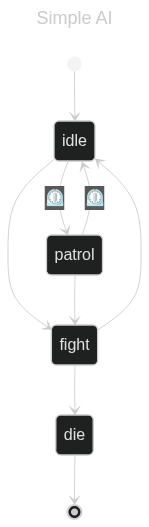
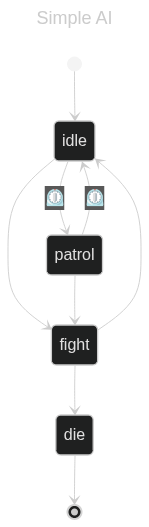
ECSpanseStateMachine generates Mermaid.js state diagrams for your state machines.
EcspanseStateMachine.format_as_mermaid_diagram(entity_id)
Here's an example output.
---
title: Simple AI
---
stateDiagram-v2
[*] --> idle
fight --> die
fight --> idle
idle --> fight
idle --> patrol: ⏲️
patrol --> fight
patrol --> idle: ⏲️
die --> [*]
Which produces the following state diagram when rendered