Drafter
An Elixir Terminal User Interface framework inspired by Python's Textual. Build rich, interactive terminal applications with a declarative API similar to Phoenix LiveView.
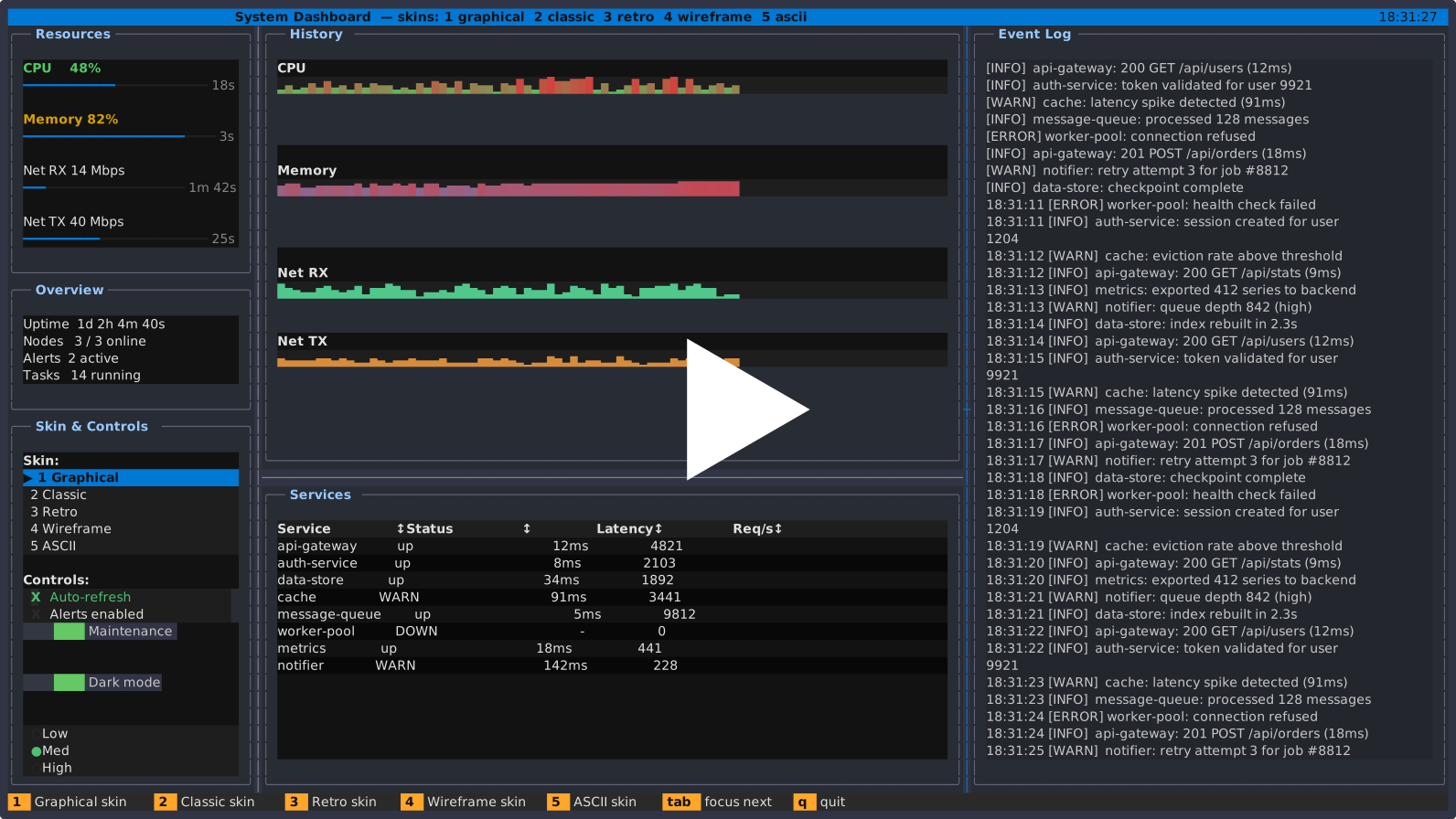
Features
- Declarative API - Phoenix LiveView-inspired component model
- Rich Widget Library - 30+ widgets including DataTable, Tree, Charts, Inputs
- Event-Driven Architecture - Keyboard, mouse, and custom events
- Flexible Layout System - Vertical, horizontal, grid, and scrollable layouts
- Multi-Screen Navigation - Push/pop screens, modals, toasts, panels
- Theming System - Built-in themes with customization support
- Animation Support - Smooth property animations with easing functions
- Remote TUI - Serve apps over SSH or Telnet with isolated or shared sessions (see Remote TUI)
- Headless Testing - Drive an app from ExUnit with no terminal and assert on the rendered screen (see Testing)
- Embeddable - Run an app against an in-memory cell grid instead of a terminal and render the rows yourself (see Embedding)
- Minimal Dependencies - Elixir implementation with NIF-based terminal I/O
Requirements
- Elixir ~> 1.18
- Erlang/OTP 28 or later
Drafter relies on OTP 28's raw terminal mode (-noshell raw input), improved ANSI escape sequence handling, and lazy input reading. Earlier OTP versions will not handle keyboard input or screen updates correctly.
Installation
Add drafter to your mix.exs:
def deps do
  [
    {:drafter, "~> 0.3"}
  ]
end
Quick Start
defmodule MyApp do
  use Drafter.App

  def mount(_props) do
    %{counter: 0}
  end

  def render(state) do
    vertical([
      header("My App"),
      label("Counter: #{state.counter}"),
      horizontal([
        button("Decrement", on_click: :decrement),
        button("Increment", on_click: :increment)
      ], gap: 2),
      footer(bindings: [{"q", "Quit"}])
    ])
  end

  def handle_event(:increment, _data, state) do
    {:ok, %{state | counter: state.counter + 1}}
  end

  def handle_event(:decrement, _data, state) do
    {:ok, %{state | counter: state.counter - 1}}
  end

  def handle_event(_name, _data, state), do: {:noreply, state}

  def handle_event({:key, :q}, _state), do: {:stop, :normal}
  def handle_event({:key, :c, [:ctrl]}, _state), do: {:stop, :normal}
end
handle_event/3 handles the named callbacks the buttons emit; handle_event/2
handles raw key presses. use Drafter.App appends the catch-all handle_event/2
clause for you, but not the handle_event/3 one.
Run your app:
mix run -e "Drafter.run(MyApp)"
Core Concepts
Application Structure
Every TUI application implements the Drafter.App behaviour. mount/1 and render/1
are required; everything else is optional.
@callback mount(props :: map()) :: state :: term()
@callback render(state :: term()) :: element | [element]

@callback handle_event(event :: Drafter.Event.t(), state) ::
            {:ok, state} | {:noreply, state} | {:stop, term()} | {:error, term()}

@callback handle_event(name :: atom(), data :: term(), state) ::
            {:ok, state} | {:noreply, state} | {:stop, term()} | {:error, term()}

@callback on_ready(state) :: state
@callback on_timer(timer_id :: atom(), state) :: state
@callback on_message(msg :: term(), state) :: state
@callback update(props :: map(), state) :: state
@callback unmount(state) :: :ok
@callback refresh_rate() :: pos_integer() | String.t() | :unlimited
use Drafter.App imports every element constructor and the keybinding/3 macro, so
vertical/2, label/2, button/2 and friends are available unqualified. It takes
four options:
:css_path- path to a CSS file used for widget styling. Defaultnil:styles- map of inline style overrides. Default%{}:mouse_hover-true(default) puts the terminal into hover tracking mode.falsecuts mouse event volume for apps with no hover effects:runtime- the runtime backend: a module, or the shorthand:callback,:reducer, or:shared. DefaultDrafter.Runtime.Callback, themount/render/handle_eventstyle documented here
use Drafter is the same thing plus an import of state/1, which declares the
initial state in place of writing mount/1:
use Drafter
state %{count: 0}
Starting an App
Drafter.run/2 blocks until the app exits. Every option has a default, so
Drafter.run(MyApp) is a complete call:
:props- map handed to the app'smount/1. Default%{}:refresh_rate- frame pacing:"30fps","7.5fps",:unlimited, or a millisecond integer. Anything else raisesArgumentError. Defaults to the app'srefresh_rate/0, and"30fps"when that is not defined:clipboard-true(default) letsDrafter.Clipboard.copy/1write to the user's clipboard via OSC 52.falsemakes copying a no-op and drops bracketed pastes. A keyword list sets the directions separately:clipboard: [copy: true, paste: false]:scroll_optimization-true(default) renders from the cached hierarchy during a scroll gesture and defers a full re-render until 150 ms after the last scroll event.falsere-renders on every scroll tick:syntax_highlighting-false(default).truestarts the tree-sitter servercode_viewneeds:widget_libraries- modules to register before the app mounts. Default[]:mode- global chart rendering mode::auto,:pixel,:kitty,:iterm2,:sixel,:braille, or:text. A per-widget:rendereroverrides it, and theDRAFTER_MODEenv var overrides both:log-false(default) silences the console handler so logs cannot corrupt the display;truewritesdrafter.login the current directory; a path string writes there:level- minimum level for the file log. Default:debug. Read only when:logistrueor a path:halt_on_exit-true(default) callsSystem.halt/1once the app exits, so the return value is not observable: exit status0for:ok,1otherwise. Setfalsewhen embedding a run in a longer-lived VM
Drafter.run(MyApp, props: %{user_id: 7}, refresh_rate: "60fps", log: "/tmp/app.log")
Returns :ok when the app stopped with {:stop, :normal} or the global Ctrl+Q,
and {:error, reason} otherwise. Called from inside an app that is already running,
run/2 pushes a nested session instead of starting a second terminal, always returns
:ok, and honours only :props and :refresh_rate.
The two handle_event arities
handle_event/2 and handle_event/3 are separate callbacks and both are dispatched
on. Which one runs depends on where the event came from:
handle_event/2receives raw input events straight from the terminal:{:key, key},{:key, key, modifiers},{:char, codepoint},{:mouse, map},{:resize, {width, height}}. Printable ASCII 32..126 arrives as a named key —qis{:key, :q}, space is{:key, :" "}— and only codepoints above 126 arrive as{:char, codepoint}.handle_event/3receives named callbacks:nameis the atom a widget was given ason_click:,on_change:,on_submit:and so on, anddatais that widget's payload (nilfor widgets that carry none).Drafter.send_app_event/2and a popped screen's result also arrive here.
use Drafter.App appends a catch-all handle_event/2 clause returning
{:noreply, state}, so a module only writes the raw-event clauses it cares about.
No catch-all is generated for handle_event/3 — a module that defines any
handle_event/3 clause must also define a final clause, or an unmatched named
callback raises FunctionClauseError:
def handle_event(_name, _data, state), do: {:noreply, state}
Widget Types
These are the constructors use Drafter.App imports, so they are called unqualified
from render/1.
Display Widgets
label(text, opts)- Text displaymarkdown(content, opts)- Markdown renderingdigits(value, opts)- Large ASCII art numbers (see Formatting numbers)sparkline(data, opts)- Mini inline chartschart(data, opts)- Line, bar, and area chartspie_chart(data, opts)- Pie chartprogress_bar(opts)- Progress indicationgauge(opts)- Dial-style value readoutmeter(opts)- Labelled value barloading_indicator(opts)- Animated spinnerrule(opts)- Horizontal/vertical dividersplaceholder(opts)- Labelled block that fills its spacestatic(content, opts)- Pre-rendered content, drawn as givenpretty(data, opts)- Inspect-style rendering of a termlog(opts)/rich_log(opts)- Append-only log viewscode_view(opts)- Syntax-highlighted source view
Input Widgets
button(text, opts)- Clickable buttontext_input(opts)- Single-line text inputtext_area(opts)- Multi-line text editorcheckbox(label, opts)- Boolean toggleswitch(opts)- On/off switchslider(opts)- Draggable value slider, horizontal or verticalradio_set(options, opts)- Mutually exclusive optionsselection_list(options, opts)- Multi-select listoption_list(items, opts)- Single-select listmasked_input(opts)- Formatted input (phone, date, etc.)link(text, url_or_opts)- Clickable hyperlink
Data Widgets
data_table(opts)- Full-featured table with sorting, selectiontree(opts)- Hierarchical data displaydirectory_tree(opts)- File system browsercalendar(opts)- Month calendarbreadcrumb(items, opts)- Path trail
Layout Widgets
vertical(children, opts)- Vertical stackhorizontal(children, opts)- Horizontal rowcontainer(children, opts)- Generic containerscrollable(children, opts)- Scrollable areasidebar(left, right, opts)- Two-column layoutsplit_pane(children, opts)- Panes separated by draggable dividers
Drafter.Widget.Grid has no constructor in Drafter.App. Place it in a render tree
as the element tuple {:grid, children, opts}, where each child is a
{module, props} pair such as Drafter.label/2 returns:
{:grid, [Drafter.label("a"), Drafter.label("b")], [grid_size: 2]}
Container Widgets
card(children, opts)- Bordered cardbox(children, opts)- Simple boxcollapsible(title, content, opts)- Expandable sectiontabbed_content(tabs, opts)- Tab navigationheader(title, opts)- App headerfooter(opts)- App footer with keybindings
Drafter.Widget.FilePicker has no constructor — open it from an event handler with
Drafter.Widget.FilePicker.show/1.
Event Handling
Named callbacks go to handle_event/3, raw input events to handle_event/2. Keep the
clauses of each arity grouped together:
def handle_event(:button_clicked, _data, state) do
  {:ok, %{state | clicked: true}}
end

def handle_event(_name, _data, state), do: {:noreply, state}

def handle_event({:key, :enter}, state) do
  {:ok, state}
end

def handle_event({:key, :q}, _state) do
  {:stop, :normal}
end

def handle_event({:key, :c, [:ctrl]}, _state) do
  {:stop, :normal}
end
Event Return Values
{:ok, new_state}- The app claimed the event. Update state and re-render; the event is not offered to the widget hierarchy{:noreply, new_state}- The app did not claim the event. Update state, then route the event to the focused widget and its ancestors. This is what a catch-all clause should return — returning{:ok, state}from a catch-all swallows every key and click before any widget can see it{:stop, reason}- Exit the application.:normalmakesDrafter.run/2return:ok; any other reason makes it return{:error, reason}{:error, reason}- Discard the event, leaving state unchanged{:show_modal, module, props, opts}- Display a modal{:show_toast, message, opts}- Show a toast notification{:push, module, props, opts}- Push a new screen{:replace, module, props, opts}- Replace the top screen{:pop, result}- Pop current screen
Any other term returned from handle_event/3 is offered to the handlers registered
with Drafter.ActionRegistry; an unrecognised term leaves the state unchanged. Any
other term returned from handle_event/2 raises FunctionClauseError in the loop.
Custom Action Handlers
By default, return values from handle_event/3 are handled by Drafter's built-in
dispatcher. You can extend this system without modifying any framework code by
implementing the Drafter.ActionHandler behaviour.
This is the right approach for third-party widgets or plugins that introduce new action shapes — no changes to the base library required.
1. Implement the behaviour:
defmodule MyApp.DrawerHandler do
  @behaviour Drafter.ActionHandler

  @impl true
  def handle_action({:open_drawer, id}, acc_state) do
    {:ok, %{acc_state | open_drawer: id}}
  end

  def handle_action({:close_drawer}, acc_state) do
    {:ok, %{acc_state | open_drawer: nil}}
  end

  def handle_action(_action, _acc_state), do: :unhandled
end
2. Register before Drafter.run/2:
Drafter.ActionRegistry.register(MyApp.DrawerHandler)
Drafter.run(MyApp)
3. Return custom actions from any event handler:
def handle_event(:open_settings, _data, _state) do
  {:open_drawer, :settings}
end
Handlers are checked in registration order. Returning {:ok, new_state} stops
dispatch; returning :unhandled passes control to the next handler. The built-in
handler runs last and covers all standard return values.
See examples/internal/16_custom_actions.exs for a complete working example that
demonstrates custom action types, state mutation, and native desktop notifications.
Screens and Navigation
Create multi-screen applications with modals and toasts:
defmodule MainScreen do
  use Drafter.Screen

  def mount(_props), do: %{items: []}

  def render(_state) do
    vertical([
      label("Main Screen"),
      button("Open Modal", on_click: :open_modal),
      button("Show Toast", on_click: :show_toast)
    ])
  end

  def handle_event(:open_modal, _state) do
    {:show_modal, MyModal, %{title: "Info"}, [width: 50, height: 15]}
  end

  def handle_event(:show_toast, _state) do
    {:show_toast, "Hello!", [variant: :success]}
  end

  def handle_event(_event, state), do: {:noreply, state}
end

defmodule MyModal do
  use Drafter.Screen

  def mount(props), do: %{title: props.title}

  def render(state) do
    vertical([
      label(state.title),
      button("Close", on_click: :close)
    ])
  end

  def handle_event(:close, _state), do: {:pop, :closed}
  def handle_event({:key, :escape}, _state), do: {:pop, :dismissed}
  def handle_event(_event, state), do: {:noreply, state}
end
Unlike use Drafter.App, use Drafter.Screen does not append a catch-all. Its
injected handle_event/2 default is replaced outright by the clauses a screen
defines, and its injected handle_event/3 forwards to handle_event/2. A screen
that omits the final handle_event(_event, state) clause above raises
FunctionClauseError on the first event it does not name.
Screen Types
The type is chosen with :type in the screen's options; the default is :default,
and any other value raises FunctionClauseError. Sizes are in terminal cells.
:default- Full-screen content. Takes no options; any key passed with it is discarded:modal- Centered dialog with overlay.:width,:height(both:auto),:position(:center),:overlay(true),:overlay_color({0, 0, 0}),:overlay_opacity(0.5),:dismissable(true),:title(nil),:border(true):popover- Anchored popup.:width,:height(both:auto),:position({:at, 0, 0}),:anchor(nil),:anchor_offset({0, 1}),:overlay(false),:dismissable(true),:border(true):panel- Edge-docked side panel.:width(30),:height(:full),:position(:right),:overlay(false),:resizable(false),:collapsible(true):toast- Auto-dismissing notification.:width(40, height is always 3 rows),:position(:bottom_right),:duration(3000ms),:variant(:info),:dismissable(true)
:dismissable decides who receives Escape, not what Escape does: true delivers it
to that screen's handle_event/2, which must return {:pop, result} to close;
false passes Escape down to the layer below untouched.
Toast Variants
{:show_toast, "Info message", [variant: :info]}
{:show_toast, "Success!", [variant: :success]}
{:show_toast, "Warning!", [variant: :warning]}
{:show_toast, "Error!", [variant: :error]}
Toast positions: :top_left, :top_center, :top_right, :bottom_left, :bottom_center, :bottom_right. Default :bottom_right, which is also what any other value falls back to.
Widget State Binding
Bind widget values directly to app state. A bound widget reads its value from the app
state key each render, so render/1 never has to thread the value through itself:
def mount(_props) do
  %{username: "", remember: false}
end

def render(_state) do
  vertical([
    text_input(placeholder: "Username", bind: :username),
    checkbox("Remember me", bind: :remember),
    button("Submit", on_click: :submit)
  ])
end

def handle_event(:submit, _data, state) do
  IO.puts("Username: #{state.username}")
  {:ok, state}
end
Accessing Widget State
Drafter.get_widget_value(:my_input)    # the widget's primary value, or nil
Drafter.get_widget_state(:my_checkbox) # the widget's full state struct, or nil
Drafter.query_one("#submit")           # the id atom of the first match, or nil
Drafter.query_all("Button")            # the id atoms of every match
Selectors take three forms: a widget type as the module's last segment in CamelCase
or snake_case ("Button", "TextInput", "text_input"), "#id", and ".class".
Combine them without spaces to require all of them ("Button.primary",
"TextInput#name"); a space separates alternatives rather than nesting them, so
"Button Label" matches any button or any label.
Timers
def on_ready(state) do
  Drafter.set_interval(1000, :tick)
  Drafter.set_timeout(2000, :hide_banner)
  state
end

def on_timer(:tick, state) do
  %{state | seconds: state.seconds + 1}
end

def on_timer(:hide_banner, state) do
  %{state | banner: nil}
end
set_interval/2 repeats, set_timeout/2 fires once. timer_id defaults to :tick
for set_interval/2 and is required for set_timeout/2. set_interval(value, :fps)
treats value as a frame rate rather than a period, and uses round(1000 / value)
milliseconds.
Both must be called from the application process — inside on_ready/1,
handle_event, on_timer/2, or on_message/2. An interval runs until the app
stops; there is no cancel, and a second call with the same timer_id starts a second
timer that also fires on_timer/2 with that id. use Drafter.App appends a
catch-all on_timer/2, so unmatched ids pass the state through unchanged.
Animations
Drafter.animate(:my_widget, :opacity, 0.5, duration: 500, easing: :ease_out)
Drafter.animate(:my_label, :background, {255, 0, 0}, duration: 1000)
animate/4 returns a reference; pass it to Drafter.stop_animation/1 to end the
animation early, or use Drafter.stop_all_animations/1 for every animation on a
widget. Options are :duration (milliseconds, default 300), :easing (default
:ease_out), and :on_complete (a zero-arity function, not run when stopped early).
Available easing functions: :linear, :ease, :ease_in, :ease_out, :ease_in_out, :ease_in_quad, :ease_out_quad, :ease_in_out_quad, :ease_in_cubic, :ease_out_cubic, :ease_in_out_cubic, :ease_in_elastic, :ease_out_elastic, :ease_in_bounce, :ease_out_bounce, :ease_in_out_bounce, :ease_in_back, :ease_out_back
Complete Example
Mix.install([{:drafter, "~> 0.1"}, {:elixir_make, "~> 0.9"}])
defmodule TodoApp do
  use Drafter.App

  def mount(_props) do
    %{
      todos: ["Learn Drafter", "Build awesome CLI apps"],
      new_todo: ""
    }
  end

  def render(state) do
    todo_items =
      Enum.map(state.todos, fn todo ->
        label("  • #{todo}")
      end)

    vertical([
      header("Todo App"),
      scrollable(todo_items, flex: 1),
      horizontal(
        [
          text_input(
            id: :new_todo_input,
            placeholder: "Add todo...",
            bind: :new_todo,
            on_submit: :add_todo,
            keep_focus: true,
            flex: 1
          ),
          button("Add", on_click: :add_todo)
        ],
        gap: 1
      ),
      footer(bindings: [{"q", "Quit"}, {"Enter", "Add"}])
    ])
  end

  def handle_event(:add_todo, _data, state) do
    if String.trim(state.new_todo) != "" do
      {:ok, %{state | todos: state.todos ++ [state.new_todo], new_todo: ""}}
    else
      {:noreply, state}
    end
  end

  def handle_event(_name, _data, state), do: {:noreply, state}

  def handle_event({:key, :q}, _state), do: {:stop, :normal}
end

Drafter.run(TodoApp)
Testing
Drafter.Test runs an app headless: against an in-memory terminal, with no PTY and
no real keyboard. The flow is start_headless/3 to boot, send_key/3 and the other
send_* functions to drive it, get_state/1 and screen_text/1 to assert, stop/1
to shut it down.
Given this app:
defmodule Counter do
  use Drafter.App

  def mount(_props), do: %{count: 0}

  def render(state) do
    vertical([
      label("Count: #{state.count}"),
      button("Increment", id: :inc, on_click: :increment)
    ])
  end

  def handle_event(:increment, _data, state), do: {:ok, %{state | count: state.count + 1}}
  def handle_event(_name, _data, state), do: {:noreply, state}

  def handle_event({:key, :q}, _state), do: {:stop, :normal}
end
its test looks like this:
defmodule CounterTest do
  use ExUnit.Case, async: false
  import Drafter.Test

  setup do
    ctx = start_headless(Counter, %{}, size: {40, 6})
    on_exit(fn -> stop(ctx) end)
    %{ctx: ctx}
  end

  test "starts at zero", %{ctx: ctx} do
    assert get_state(ctx).count == 0
    assert screen_text(ctx) =~ "Count: 0"
  end

  test "a click increments", %{ctx: ctx} do
    send_click(ctx, query_one(ctx, "Button"))

    assert get_state(ctx).count == 1
    assert screen_text(ctx) =~ "Count: 1"
  end

  test "a click by id increments too", %{ctx: ctx} do
    send_click(ctx, :inc)

    assert get_state(ctx).count == 1
  end
end
start_headless/3 takes the app module, the props map handed to mount/1 (default
%{}), and options: :size, a {columns, rows} tuple defaulting to {80, 24}, and
:test_pid, the process notified on each render (default self()). It returns a
context map — every other function in the module takes that context as its first
argument. It raises RuntimeError if the app fails to start, and the app has
completed its first render before it returns.
The headless driver is a globally registered process, so only one instance runs at a
time: tests using it must be async: false, and stop/1 must run before the next
one starts. Put stop/1 in on_exit/1 so a failing test still frees the services.
Every send_* function blocks until the app has finished handling the input, so a
send and the assertion after it need no sleep between them.
Driving the app
send_key(ctx, key, modifiers \\ [])- a key press.keyis a key atom (:enter,:up,:f1,:q,:" ");modifiersis drawn from:ctrl,:alt,:shift. Injects{:key, key}whenmodifiersis empty,{:key, key, modifiers}otherwisesend_char(ctx, char)- a{:char, codepoint}event, for codepoints above ASCII 126. Plain letters arrive from a real terminal as{:key, key}, so usesend_key/3for thosesend_click(ctx, x, y)- a left-buttonmouse_upat a zero-based cellsend_click(ctx, widget_id)- a left-buttonmouse_upat the centre of that widget's current rect. An id not in the hierarchy is ignoredsend_mouse(ctx, event)- a raw mouse event map:%{type: :mouse_down | :mouse_up | :drag, button: button, x: x, y: y},%{type: :move, x: x, y: y}, or%{type: :scroll, direction: :up | :down | :left | :right, x: x, y: y}
Inspecting the app
get_state(ctx)- the app's current stateget_widget_value(ctx, widget_id)/get_widget_state(ctx, widget_id)- a widget's primary value or full state struct,nilwhen there is no such widgetquery_one(ctx, selector)/query_all(ctx, selector)- matching widget ids, using the same selector forms asDrafter.query_one/1get_widget_hierarchy(ctx)- the wholeDrafter.WidgetHierarchystruct, including:widget_rectsand:focused_widgetscreen_text(ctx)- what is on screen as plain text, one screen row per linescreen_lines(ctx)- the same rows as a list, trailing blanks removedget_rendered_output(ctx)- every byte written since start, escape sequences included
Waiting and asserting
await_render(ctx, opts)- waits for a render that arrives without input, such as a timer tick.:timeoutdefaults to1000;:min_countpolls the driver's total render count instead of consuming a mailbox messagewait_for(ctx, fn ctx -> ... end, opts)- polls the function until it returns truthy.:timeoutdefaults to1000,:intervalto50. Returns:okor:timeoutassert_widget_present(ctx, selector)- returns the matched widget's id, so it can be fed straight tosend_click/2; raises when nothing matchesrefute_widget_present(ctx, selector)- raises when something matchesassert_widget_value(ctx, selector, expected)- raises when the selector matches nothing or the value differs
The three assertion helpers are macros, so import Drafter.Test or
require Drafter.Test before calling them.
Embedding
Drafter.CellSession runs an app against an in-memory cell grid rather than a
terminal, and hands you the composited screen as rows. Use it when something other
than a terminal is doing the drawing — a web front end, a notebook cell, a pane
inside another application — or when a host wants to own input and output itself.
session = Drafter.CellSession.start(MyApp, size: {80, 24})

Drafter.CellSession.take_cells(session)   # [%Drafter.Draw.Strip{}, ...] one per row
Drafter.CellSession.take_text(session)    # the same screen as plain text
Drafter.CellSession.feed_input(session, {:key, :enter})
Drafter.CellSession.resize(session, 100, 30)
Drafter.CellSession.close(session)
take_cells(session)- the full grid asDrafter.Draw.Stripstructs, one per screen row, each a list of styled segments. This is what a host renderstake_cells_diff(session)- only the rows that changed since the last call, as{row_index, strip}tuples, with an updated session. Redraw those rows alone rather than the whole gridtake_lines(session)/take_text(session)- the screen as plain text, styling dropped and trailing blanks trimmed. The same viewDrafter.Test.screen_lines/1gives, for logging or asserting rather than renderingfeed_input(session, event)- inject an input event:{:key, key},{:char, codepoint},{:mouse, map}resize(session, columns, rows)- resize the surface; the app re-rendersclose(session)- release the processes the session owns
Each session owns unnamed services, so many run concurrently in one node without
colliding. start/2 also takes :shared — a shared-state server pid — to join an
existing multi-user session; every other option is passed to mount/1 as a prop.
Formatting numbers
Drafter.Format turns numbers into the short strings a digits readout has room
for. It is a plain helper — call it in render/1, nothing calls it for you.
digits(Drafter.Format.compact(1_240_000))          # "1.2M"
digits(Drafter.Format.bytes(1_048_576))            # "1MB"
digits(Drafter.Format.percent(0.42, as_ratio: true))  # "42%"
compact(number)- a magnitude suffix,k/M/B/T. Below 1000 there is no suffix; a fractional result keeps one decimal placebytes(number)- a byte count in powers of 1024, suffixedB,KB,MB,GBorTBpercent(number, opts)- a percentage.as_ratio: truetreats the input as0.0..1.0;:decimalssets the precision
examples/spark/03_digits.exs switches between all three against live values.
Syntax Highlighting
Drafter supports syntax highlighting via the tree-sitter CLI. This is entirely optional — if you don't need it, no setup is required.
If you already have tree-sitter installed
Nothing to do. Pass syntax_highlighting: true when starting your app:
Drafter.run(MyApp, syntax_highlighting: true)
Then use code_view with a file path:
code_view(path: "/path/to/file.rs", show_line_numbers: true, flex: 1)
Language is detected automatically from the file extension. Highlighting quality depends on which grammars you have installed in your tree-sitter environment.
If you don't have tree-sitter
Skip syntax_highlighting: true (or don't pass it). The code_view widget will still work — Elixir files get built-in highlighting, all other files render as plain text.
Installing tree-sitter
# macOS
brew install tree-sitter

# Or via npm
npm install -g tree-sitter-cli
After installing, set up grammars for the languages you want to highlight by following the tree-sitter getting started guide. The more grammars you have installed, the more languages code_view will highlight.
Supported in code_view
code_view(
  path: state.selected_file,   # preferred — tree-sitter reads the file directly
  show_line_numbers: true,
  flex: 1
)

code_view(
  source: some_string,         # also works — uses a temp file under the hood
  language: :python,
  flex: 1
)
When path: is given, tree-sitter reads the file directly (one system call, no temp file). When only source: is given, a temp file is created, highlighted, then deleted.
Running Examples
Standalone scripts live under examples/, grouped by the API style they use:
examples/spark/- the flat surface:use Drafter, declarativestate, unqualified widgets, named callbacks viahandle_event/3examples/reducer/- the Elm-style runtime:use Drafter, runtime: :reducerwith a singleupdate/2message handlerexamples/internal/- theuse Drafter.Appstyle this README documents
Each script installs the library from the checkout, so run one directly with
elixir:
elixir examples/internal/01_hello_world.exs
elixir examples/internal/04_counter.exs
elixir examples/internal/07_todo.exs
elixir examples/internal/11_data_table.exs
elixir examples/internal/15_screens.exs
elixir examples/internal/16_custom_actions.exs
elixir examples/internal/17_charts.exs
elixir examples/internal/21_theme_sandbox.exs
elixir examples/internal/25_file_picker.exs

elixir examples/spark/04_counter.exs
elixir examples/reducer/04_counter.exs
examples/README.md indexes all of them. To browse them in a gallery:
elixir run_examples.exs
Two of them cover styling and layout rather than a widget:
elixir examples/spark/33_css_styling.exs
elixir examples/spark/34_breakpoints.exs
Guides
- Writing Widgets & Libraries - build a custom widget and package it for reuse
- Remote TUI - serve an app over SSH or Telnet
- Large Text - the
digitsfont catalogue, how the fonts are built, and how to choose between them - Design Notes - why the internals are built the way they are; background for anyone changing them
Keyboard Shortcuts
Ctrl+Q- Quit application. The only globally handled quit key; it fires before the app's own callbacks see the eventTab- Next focusable widgetShift+Tab- Previous focusable widget- Arrow keys - Navigate within widgets
Enter- Activate/confirmEscape- Dismiss a dismissable modal or popover
Ctrl+C is not a global quit. It is delivered to the app as
{:key, :c, [:ctrl]}, and is the copy binding inside text inputs and text areas.
Match it in handle_event/2 and return {:stop, :normal} if you want it to exit.
License
MIT