
CSV2SQL - Blazing fast csv to database loader!
Table of Contents
- What is Csv2sql ?
- Why Csv2sql ?
- Using the browser based interface
- Running from source
- Supported data types
- Handling custom date/datetime formats
- Known issues, caveats and troubleshooting
- Future plans
Please have a quick look over the Known issues, caveats and troubleshooting section before using the app.
What is Csv2sql?
Csv2Sql is a blazing fast fully automated tool to load huge CSV files into a RDBMS.
Csv2Sql can automatically...
- Read csv files and infer the database table structure
- Create the required tables in the database
- Insert all the csvs into the database
- Do a simple validation check to ensures that all the data as been imported correctly.
Why Csv2sql ?
Utilizing the power of modern multi core processors, csv2sql does most of its tasks in parallel, this makes it super fast and more efficient than other tools.
It is completely automatic, provide a path with hundreds of csvs having size in gigabytes and start the application, it will handle the rest!
It comes as browser user interface and is super easy to configure and use.
While you can have maximum utilization of your cpu to get excellent performance, csv2sql is fully customizable, also comes with lots of options which can be changed to fine tune the application based on requirement and to lower down resource usage and database load.
Csv2Sql supports partial operations, so if you want to only create the tables or insert data from the csvs into already created tables without creating the tables again or create both the tables and also insert the data from csvs, Csv2Sql has got you covered !
Use csv2sql from your browser
For ease of use csv2sql has browser interface which can be used to easily configure the tool and also provides an interface that shows what is the progress of the various running tasks, which files are currently being processed, the current cpu and memory usage, etc.
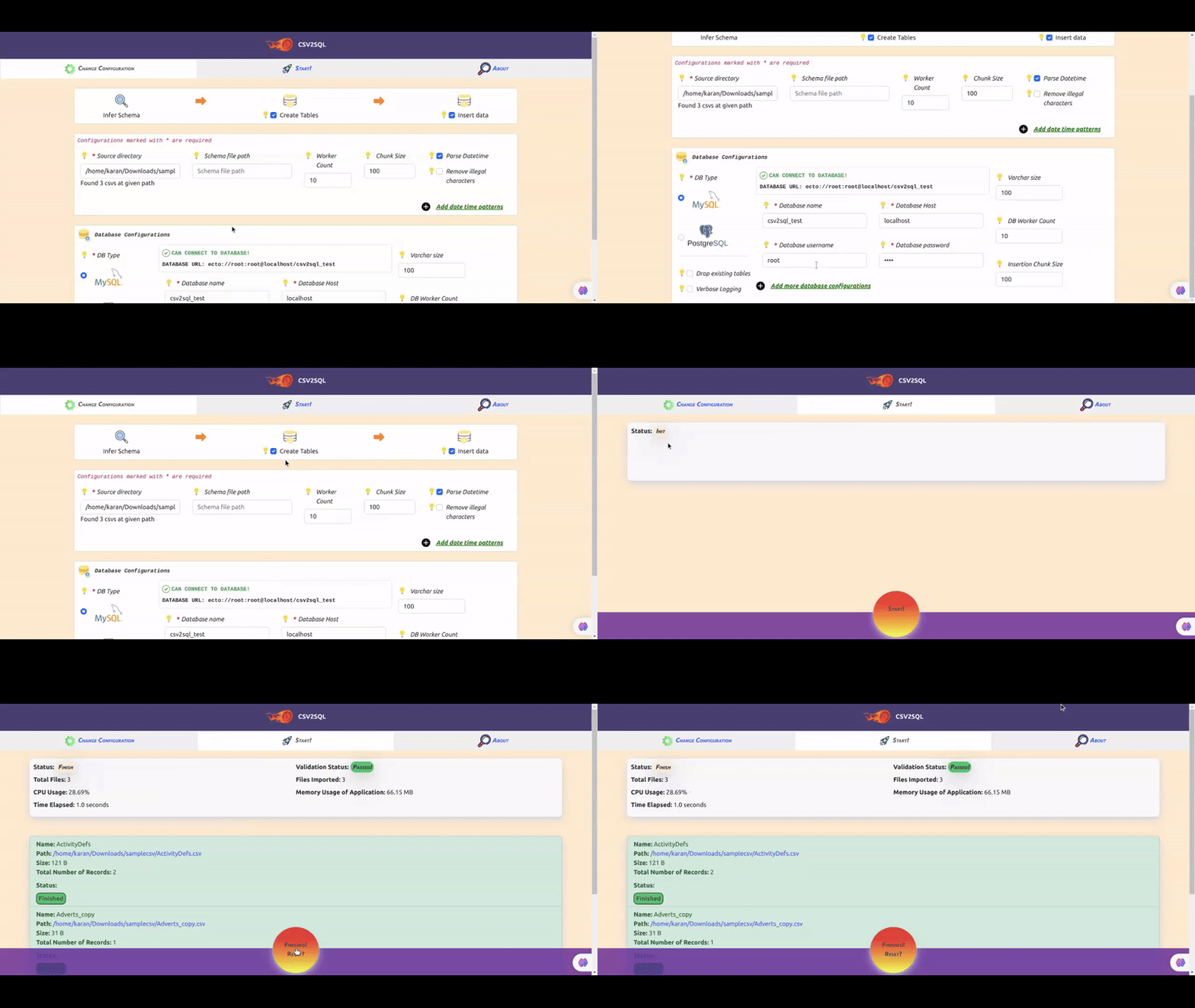
Installation and usage: <a name="dashboardinstall"></a>
There are no dependencies needed to use the app via your browser, however you must have mysql or postgres installed.
Download the latest release of the app from the releases section in this repository.
You can now easily run the executable on your linux system, by:
-
Extract the zip file named
csv2sql_xx -
cd into the extracted directory from your terminal:
cd csv2sql_xx -
Execute the following command:
./bin/csv2sql_and_dashboard start
This will run a local server which your access at localhost:4000 in your browser.
Thats all!
Please create an issue with details of your OS distribution, architecture(for example, x86_64 or ARM) and ABI (for example, musl or gnu) if the app does not run on your system
Using the app via the browser is super easy, once the app is running, go to localhost:4000 in your browser.
Now go to the Change configuration tab, and enter the relevant configuration details, hover over any configuration option to see what it does.
Whenever your are done, click on the Start tab and click on Start button below to start the import process.
Running the app from source code
You must have elixir and mysql/postgresql installed in your system to run Csv2Sql.
To use the app just clone this repository and then install dependencies
by mix deps.get
Finally, start the application by mix phx.server
This runs the phoenix server at localhost:4000 which provides a browser based interface to use the app.
Thats all !
Supported data types
Csv2sql currently supports MySql and PostgreSQL database.
Csv2Sql will map data in CSVs into one of the following data types:
| Type | mysql | postgres |
|---|---|---|
| date | For values matching pattern like YYYY-MM-DD or custom patterns | NOT SUPPORTED, will map to VARCHAR |
| datetime | For values matching pattern like YYYY-MM-DD hh:mm:ss or custom patterns , (WARNING: fractional seconds or timezone information will be lost if present) | NOT SUPPORTED, will map to VARCHAR |
| boolean | Maps values 0/1 or true/false to BIT type | Maps values 0/1 or true/false to BOOLEAN type |
| integer | INT | INT |
| float | DOUBLE | NUMERIC(1000, 100) |
| varchar | VARCHAR | VARCHAR |
| text | TEXT | TEXT |
All other types of data, will map to either VARCHAR or TEXT.
Handling custom date/datetime formats
By default csv2sql will identify date or datetime of the following patterns YYYY-MM-DD and YYYY-MM-DD hh:mm:ss respectively.
If a csv file contains date or datetime in some other format then they will be imported as varchar by default however by specifying custom
patterns we can import such data of arbitrary formats as date or datetime.
csv2sql uses the Timex library to parse date/datetime.
You can specify multiple custom patterns for date or datetime as a string having one or more patterns separated by ;
When using the Web UI for csv2sql enter these pattern strings in the config page under "Custom date patterns" or "Custom datetime patterns".
The patterns should be compatible with Timex directives specified here.
(Custom patterns are only supported when using the web ui and are not available in the cli version of the application)
Good to know/Caveats
- Fractional seconds or timezone information is not handled when importing datetime data.
- When multiple custom patterns are specified for large csvs the import process might be slower due to the additional overhead of matching patterns.
- Always double check the patterns specified and verify imported date or datetime data
Examples
To parse datetime like 11/14/2021 3:43:28 PM a pattern like {0M}/{0D}/{YYYY} {h12}:{m}:{s} {AM} can be specified
The custom pattern needed is like...
{0M}/{0D}/{YYYY} {h12}:{m}:{s} {AM}
Consider a CSV with date or datetime having multiple formats like...
| Example Date | Date Pattern | Example Datetime | Datetime Pattern |
|---|---|---|---|
| 2021-11-14 | {YYYY}-{0M}-{0D} | 2021-11-14T15:43:28 | {YYYY}-{0M}-{0D}T{0h24}:{m}:{s} |
| 11-14-2021 | {0M}-{0D}-{YYYY} | 11-14-2021 15:43:28 | {0M}-{0D}-{YYYY} {0h24}:{m}:{s} |
| 11/14/2021 | {0M}/{0D}/{YYYY} | 11/14/2021 3:43:28 PM | {0M}/{0D}/{YYYY} {h12}:{m}:{s} {AM} |
The pattern strings to parse the above csv would look like...
For date
{YYYY}-{0M}-{0D};{0M}-{0D}-{YYYY}
For datetime
{YYYY}-{0M}-{0D}T{0h24}:{m}:{s};{0M}-{0D}-{YYYY} {0h24}:{m}:{s};{0M}/{0D}/{YYYY} {h12}:{m}:{s} {AM}
Known issues, caveats and troubleshooting:
Timestamp columns will lose there fractional seconds data or time zone information when importing to mysql.
When importing into a mysql/postgres database you must create the database manually before running the application, otherwise it will fail.
Csvsql uses the csv file names as table names, make sure that the csv file names are valid table names.
Make sure your csvs have correct encoding and valid column names to avoid errors.
If you face database connection timeout errors try reducing the worker and db_worker count in the configurations or change the database timeout, pool size and other related database configurations.
In case of errors, check your terminal for a clue, or create an issue.
Future
- Support for windows os
- Work on known issues and better support for various data types