BB.TUI


Terminal-based dashboard for Beam Bots robots. Built on ExRatatui.
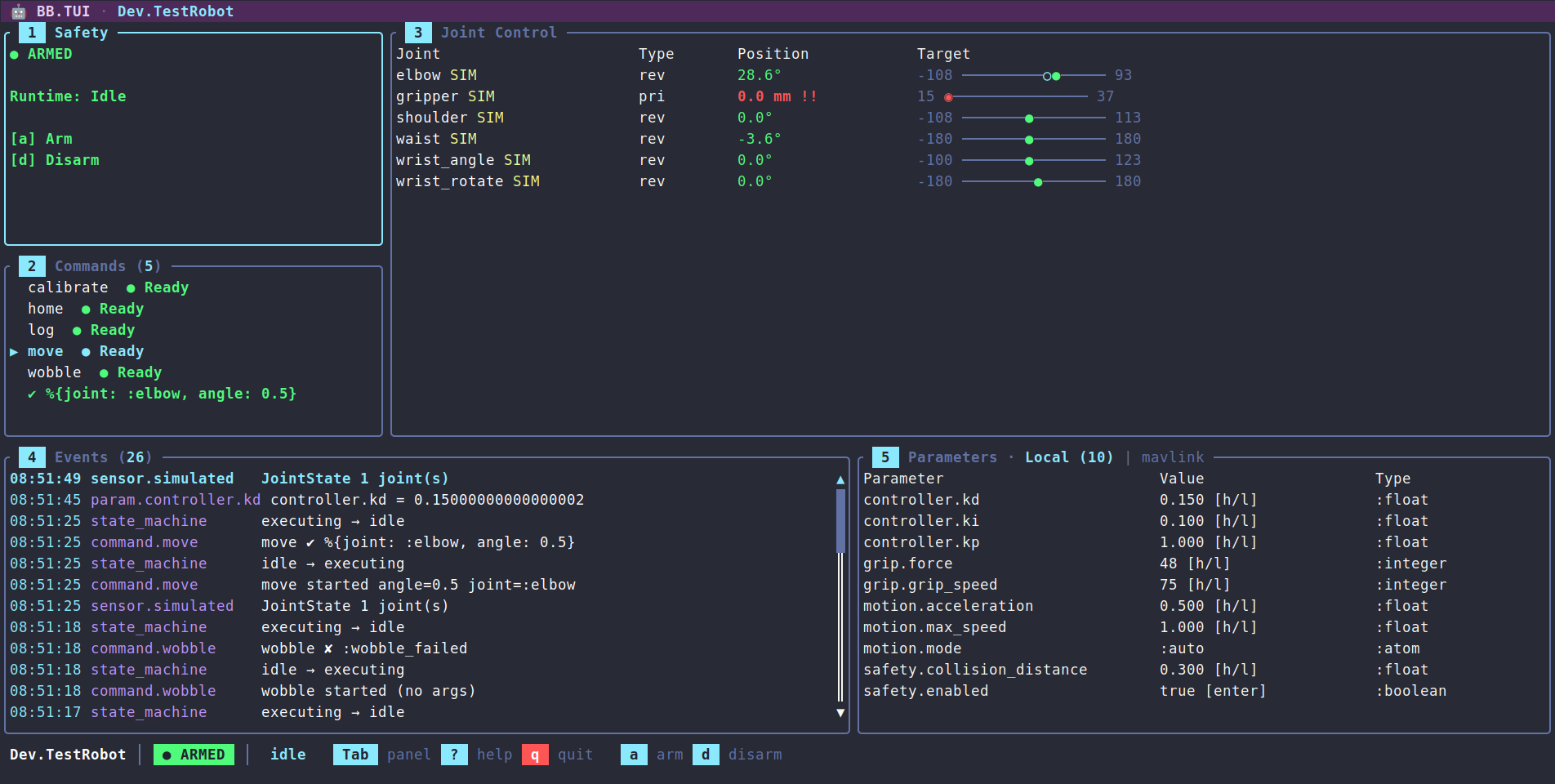
Features
- Safety controls — arm / disarm / force disarm with confirmation popup
- Joint control panel — position table with type (revolute/prismatic/continuous), units (degrees/mm), visual range bars, target tracking, simulated joint markers, and direct position adjustment via keyboard (1% and 10% steps)
- Event stream — scrollable, color-coded event list with formatted timestamps and message summaries; pause/resume, clear, and Enter to open a detail popup showing full payload. Surfaces hardware-error detail (
[:safety, :error]) and estimator output ([:estimator]) alongside state, sensor, parameter, and command events - Commands panel — lists available robot commands with Ready/Blocked indicators based on runtime state, and a Running badge on any command running on the robot, whoever started it (
ccancels it). Argument-less commands execute on Enter; commands with declared arguments open an inline edit mode (Tab to cycle fields, type-to-edit, Enter to run, Esc to cancel). Argument types — boolean, integer, float, atom, enum ({:in, [...]}), string — are parsed before dispatch - Parameters panel — live parameter table grouped by path with real-time updates and the selected parameter's
docon the panel border. Numeric and unit-typed values step by 1% / 10% of their declared range withh/l/H/L, booleans toggle on Enter, string and atom values open an inline editor, and{:in, [...]}fixed-set parameters cycle through their allowed values. Bridge tabs expose remote parameters for numeric stepping and boolean toggling - Controllers tab — every controller the robot declares, whether it is running, and its state, pretty-printed on demand
- 3D visualization tab — renders the live robot in the terminal from its URDF topology and joint positions, with an orbitable/zoomable camera. Built on
ExRatatui'sViewport3D: crisp pixel graphics on capable terminals (Ghostty/WezTerm/Kitty) with automatic braille fallback over SSH; the arm reposes in real time as sensor data arrives - High-rate-safe — the event log debounces repeated sensor messages and renders coalesce to ~30fps, so fast telemetry never floods the log or stalls the UI
- Status bar, help overlay, and theming — robot name / safety / runtime indicators, who holds the wheel, a battery / power readout when the robot reports it (colored by remaining charge), the link's round trip under
node:, a scrollable keybinding reference, and a consistent semantic color palette - Keyboard-driven navigation —
[/]to switch between the Control Panel, Visualization, Controllers and extension tabs, Tab to cycle panels, number keys to jump, vim-stylej/k/h/lwithin panels - Five transports — local terminal, SSH (a daemon or a
nerves_sshsubsystem, with isolated operator sessions), an IEx shell over SSH or--remsh, Erlang distribution (render here withnode:, or attach a thin renderer to a TUI on the robot node), and the browser (use BB.TUI.Livein a Phoenix LiveView, via the optionalphoenix_ex_ratatuidependency) - Runtime inspection — snapshot, trace, and inject events into a running TUI via
ExRatatui.Runtime - Driving — an extension's drive turns the arrows into a hold-to-drive pad on its own tab, working on every transport, with key releases where the terminal reports them and autorepeat inference otherwise; a pilot lease keeps it to one driver per robot across sessions and nodes, and also lets a velocity-only joint (a wheel) spin from the Joints panel while
h/lis held. See the Driving guide - Robot and kit extensions — a
use BB.TUI.Extensionmodule, passed asextensions:, declares hold-to-drive, panels of live readouts, plots and attitude indicators, keys bound to commands, and per-state hints for a particular robot; bb_tui renders them with its own widgets and never names the kit. See the Extensions guide - Extensible rendering — register
BB.TUI.Renderermodules per PubSub path prefix (:renderers) to render a consumer's own payloads in the event log and status bar, without bb_tui depending on their structs - Mix task —
mix bb.tui --robot MyApp.Robotfor standalone launch - Headless test suite — full coverage using Mimic and ExRatatui's test backend
Layout
 🤖 BB.TUI · MyApp.Robot                                                  ← title bar
╭ Safety ────────╮╭ Joint Control ────────────────────────────────────╮
│ ● ARMED        ││ Joint       Type  Position    Target              │
│ Runtime: Idle  ││ elbow       rev   -63.8°      -90 ─────●────── 90 │  60%
│ a  arm         ││ gripper SIM pri    30.6 mm      0 ─────●────── 50 │  height
│ d  disarm      ││ wrist       rev    87.0° !    -90 ──────────◆─ 90 │
├ Commands (2) ──┤│ ...                                               │
│ ▶ home  ● Ready││                                                   │
│   calibrate    ││                                                   │
╰────────────────╯╰───────────────────────────────────────────────────╯
╭ Events (47) ───╮╭ Parameters ───────────────────────────────────────╮
│ 18:23:12 sensor.sim       JointState 2 joint(s)                    ││
│ 18:23:11 state_machine    disarmed → armed                         ││
╰────────────────────────────────────────────────────────────────────╯╯
 MyApp.Robot │ ● ARMED │ idle │ 🔋 78%   Tab panel  ? help  q quit  a arm  d disarm
That is the Control Panel tab. Pressing ] switches to the Visualization tab, which renders the live robot in 3D from its URDF topology and joint positions — orbitable, zoomable, and re-posed in real time as sensor data arrives — then to the Controllers tab when the robot declares controllers, and to the tabs its extensions add: a Drive tab with the hold-to-drive pad, and panels of live readouts, charts and attitude indicators.
Installation
Use Igniter to add bb_tui to a project. The installer imports formatter rules and prints a launch notice tailored to the chosen install shape. If the project already has a BB robot module (typically scaffolded by mix igniter.install bb):
mix igniter.install bb_tui
mix igniter.install bb_tui --robot MyApp.Arm
The install shape can be tuned with flags:
--auto-bb— scaffold aBBrobot viabb.installwhen none is present (skips the interactive prompt).--ssh— append a supervised{BB.TUI, …}child wired for an SSH daemon, so the dashboard is reachable as soon as the app boots. Accepts--port,--user,--password. Idempotent; change the generated credentials before deploying.--nerves— registerBB.TUI.subsystem(<Robot>)underconfig :nerves_ssh, :subsystemsso the dashboard rides on an existingnerves_sshdaemon.--web— serve the dashboard in the browser: adds the optionalphoenix_ex_ratatuidependency, generates ause BB.TUI.LiveLiveView under the web namespace, mounts it inside the router's:browserscope (/robotby default, or--path), and registers the JS hook inassets/js/app.js. Needs a Phoenix router; idempotent.
Local dashboards are not supervised — a child that claims the terminal on boot would fight an IEx session for stdin/stdout — so the local entry points are mix bb.tui and BB.TUI.run/1. See mix help bb_tui.install for the full option reference, and the Transports guide for SSH, browser, and distribution setups.
To skip Igniter, add the dep directly:
def deps do
  [
    {:bb_tui, "~> 0.9"}
  ]
end
Quick Start
Standalone, via the mix task:
mix bb.tui --robot MyApp.RobotFrom IEx:
BB.TUI.start(MyApp.Robot)Under a supervision tree:
children = [
  {BB.Supervisor, MyApp.Robot},
  {BB.TUI, robot: MyApp.Robot}
]
In the browser, with the optional {:phoenix_ex_ratatui, "~> 0.4"} dependency added next to bb_tui:
defmodule MyAppWeb.RobotLive do
  use BB.TUI.Live, robot: MyApp.Robot
end

# router.ex
live "/robot", MyAppWeb.RobotLive
With a robot's extension, on any of them:
BB.TUI.run(MyApp.Robot, extensions: [MyApp.TUI])Serving the dashboard over SSH or in the browser, or attaching to a robot on another BEAM node, is covered in the Transports guide. The full key reference lives in the Keybindings guide (and in the in-app ? overlay).
Transports
| Transport | Start it with | Key releases (for driving) |
|---|---|---|
| Local terminal | mix bb.tui, BB.TUI.run/2 |
from terminals speaking the kitty keyboard protocol (Ghostty, kitty, WezTerm, foot, Alacritty, iTerm2); inferred from autorepeat elsewhere |
| SSH | BB.TUI.start_ssh/2, or BB.TUI.subsystem/2 on nerves_ssh |
as the client's terminal reports them |
IEx shell over SSH or --remsh |
BB.TUI.run/2 from that shell |
as the client's terminal reports them |
| Browser | use BB.TUI.Live |
always |
| Erlang distribution | node: on any of the above, or ExRatatui.Distributed.attach/3 |
as the local terminal reports them (attach/3 takes keyboard_enhancement: true) |
bb_tui asks for key releases itself whenever an extension declares a drive; without them, driving still works and stops within 150 ms of letting go. See the Driving guide.
How It Works
BB stores state in ETS and publishes changes over PubSub. The TUI subscribes to the [:state_machine], [:sensor], [:param], [:actuator], [:command], [:safety], and [:estimator] paths, takes a one-time ETS snapshot on mount, then keeps state fresh from PubSub messages. This subscription set is configurable — passing :subscribe_paths to BB.TUI.run/2 points the dashboard at a narrower or downsampled set of paths instead. Most paths drive dedicated panels; [:safety, :error] hardware-error reports and [:estimator] output flow into the event log. A consumer can override that fallback for paths it owns by passing :renderers — a %{prefix => module} map of BB.TUI.Renderer implementations — so its own payloads get a custom event-log summary (and an optional status-bar readout) without bb_tui depending on their structs; messages route to a renderer by longest-matching prefix. Keyboard events call BB APIs directly (safety, actuator, parameters, command execution) — there are no optimistic updates, so the dashboard is a faithful reflection of the robot's actual state. Each call that waits on the robot runs off the dashboard's event loop, so an arm sequence or a slow bridge never freezes the UI, and a refusal — a disarmed jog, an :already_armed, a parameter value of the wrong type — lands in the event log.
All state transitions live in BB.TUI.State as pure functions — no side effects, no process communication — which makes the dashboard easy to test headlessly. BB.TUI.App wires input and async results to those transitions through ExRatatui's reducer runtime.
Robots can publish sensor data faster than a terminal can usefully redraw, so the event log debounces repeats of the same {path, payload-type} within a one-second window (command and state-machine events are never debounced, and a repeated parameter change replaces its earlier row so the log shows where it ended up), and sensor-driven renders coalesce to at most one frame every ~33ms (~30fps). Key presses, command results, and safety/parameter/state changes still render immediately. Both windows are fields on BB.TUI.State.Throttle.
The Visualization tab is built the same way — as a pure projection of state. BB.TUI.Viz.RobotScene reads the robot's URDF topology and the live joint configurations, hands them to bb core's BB.Robot.Kinematics for base-frame link transforms — so every joint type poses correctly, planar and floating included — and emits an ExRatatui.ThreeD scene of the robot's links; BB.TUI.Panels.Visualization hands that scene, plus the orbit camera and render mode held in BB.TUI.State.Viz, to ExRatatui's Viewport3D widget. Every sensor frame that moves a joint re-runs the kinematics, so the on-screen arm tracks the real one. Viewport3D picks the sharpest pixel protocol the terminal advertises (kitty / sixel / iTerm2) and falls back to half-block, braille, or ASCII when those aren't available — which is why the view stays usable over SSH; the m key forces a specific mode.
Running commands
Commands dispatched from the UI are awaited with :infinity, so a continuous command — one that only returns when it stops or is cancelled — is never reported as timed out while it is still running. Runaways stay bounded by the command's own DSL timeout. Press c in the commands panel to cancel the selected command while it runs — including one started from another session, a browser tab or automation; the event log then shows the cancellation.
Development
The project ships a simulated WidowX-200 robot arm that starts automatically in dev:
mix deps.get
mix bb.tui --robot Dev.TestRobot
Dev.TestRobot exercises every panel feature end-to-end:
- Commands with all argument shapes —
home(no args),move(enum + float),log(string + integer),wobble(always returns{:error, :wobble_failed}),calibrate(runs ~2s, so it shows as Running andccan cancel it), andstream(emits a high-rateJointStateburst to show debounce + render coalescing). - Real actuators on
waist,shoulderandelbow(Dev.Servo, swapped for bb's simulated actuator in kinematic simulation, with an open-loop position estimator each), so jogging them goes through bb's actuator path: refused while disarmed, one jog in flight per actuator, late answers logged as warnings. The wrist and gripper have none and showSIM, driven by the dashboard's simulatedJointStatefallback. - Telemetry demos —
power(drains a simulated battery so the status-bar readout shifts green → yellow → red) anddiagnostics(publishes a[:safety, :error]hardware-error report and an[:estimator]pose so both surface in the event log). - A multi-DoF demo — the arm rides a planar
base_motionjoint, anddrivesends the base around a ~3s circle ofTransform2Dposes: the joints panel shows the read-onlyplarow tracking the pose, the event stream renders it compactly as(x, y, θ°), and the 3D view shows the whole arm driving the loop. - A trajectory demo —
trajectorypublishes aBB.Message.Actuator.Command.Trajectoryper joint and then sweepsshoulderandelbowthrough those waypoints over ~2.4s: the event log summarizes each command asshoulder ← trajectory 4 waypoints over 2400msand lists the waypoints asposition@time, while the arm moves through them instead of snapping between targets. - Parameter groups covering every shape the panel knows — float, integer, boolean, atom, string, unit-typed (
motion.cruise_speedin m/s,controller.trimin degrees with bounds declared in radians), and a fixed-setgait.pattern({:in, [:walk, :trot, :crawl]}, registered byDev.GaitSelector) — most with:min/:maxso 1%-of-range stepping applies, and every one carrying adocfor the panel border. - A
:mavlinkbridge (Dev.MockBridge) with a fixed remote-parameter list and in-memory writes — presstin the Parameters panel to cycle to the Bridge tab. - An extension —
Dev.TUI(dev/tui.ex) adds Drive, Oscillator and Telemetry tabs of live readouts and charts: joints in degrees with an attitude horizon driven by the shoulder and waist, a parameter, the[:drive]topic in cm/s, and the state ofDev.Oscillator, a controller that publishes nothing (also listed, with its state on Enter, in the Controllers tab);wrunswobblefrom any tab, and a hint banner follows the runtime state. It loads in the browser and distributed dev sessions, and withmix bb.tui --robot Dev.TestRobot --extension Dev.TUI. - A browser dashboard — the dev application also serves
Dev.TestRobotthroughBB.TUI.Liveathttp://localhost:4040(dev/web/, npm-free), so the same robot can be driven from a terminal and a browser tab at once.
The WidowX-200 ships a full URDF, so the Visualization tab is live in dev too — press ] to switch to it, then move joints from the Joint Control panel, run stream to watch the 3D arm repose in real time, run trajectory to watch it sweep smoothly through a set of waypoints, or run drive to watch it tour the ground plane.
Exercising the SSH, browser, and Erlang-distribution transports against the simulated robot is covered in the Transports guide.
Guides
| Guide | Description |
|---|---|
| Transports | Serve the dashboard over SSH or in the browser, attach over Erlang distribution, inspect a running session, and test each transport locally |
| Driving | Hold-to-drive with the arrow keys: the Drive tab, the pilot lease, repeat and release modes, when driving stops, and spinning a wheel from the Joints panel |
| Extensions | Add a robot's drive, panels of readouts, charts and attitude indicators, key binds and hints with a BB.TUI.Extension, and wire it into every transport |
| Keybindings | Full per-panel key reference, including command argument editing, parameter stepping, and inline parameter editing |
| Telemetry | :telemetry events for mount, input, dispatch, and frames — logging and Telemetry.Metrics |
Contributing
See CONTRIBUTING.md for development setup and guidelines.
BB.TUI is built on ExRatatui - a general-purpose terminal UI library for Elixir, and Beam Bots - robotics framework. Contributions to underlying libraries are very welcome too.
License
Apache-2.0 — see LICENSE.