BB.TUI



Terminal-based dashboard for Beam Bots robots. Built on ExRatatui.
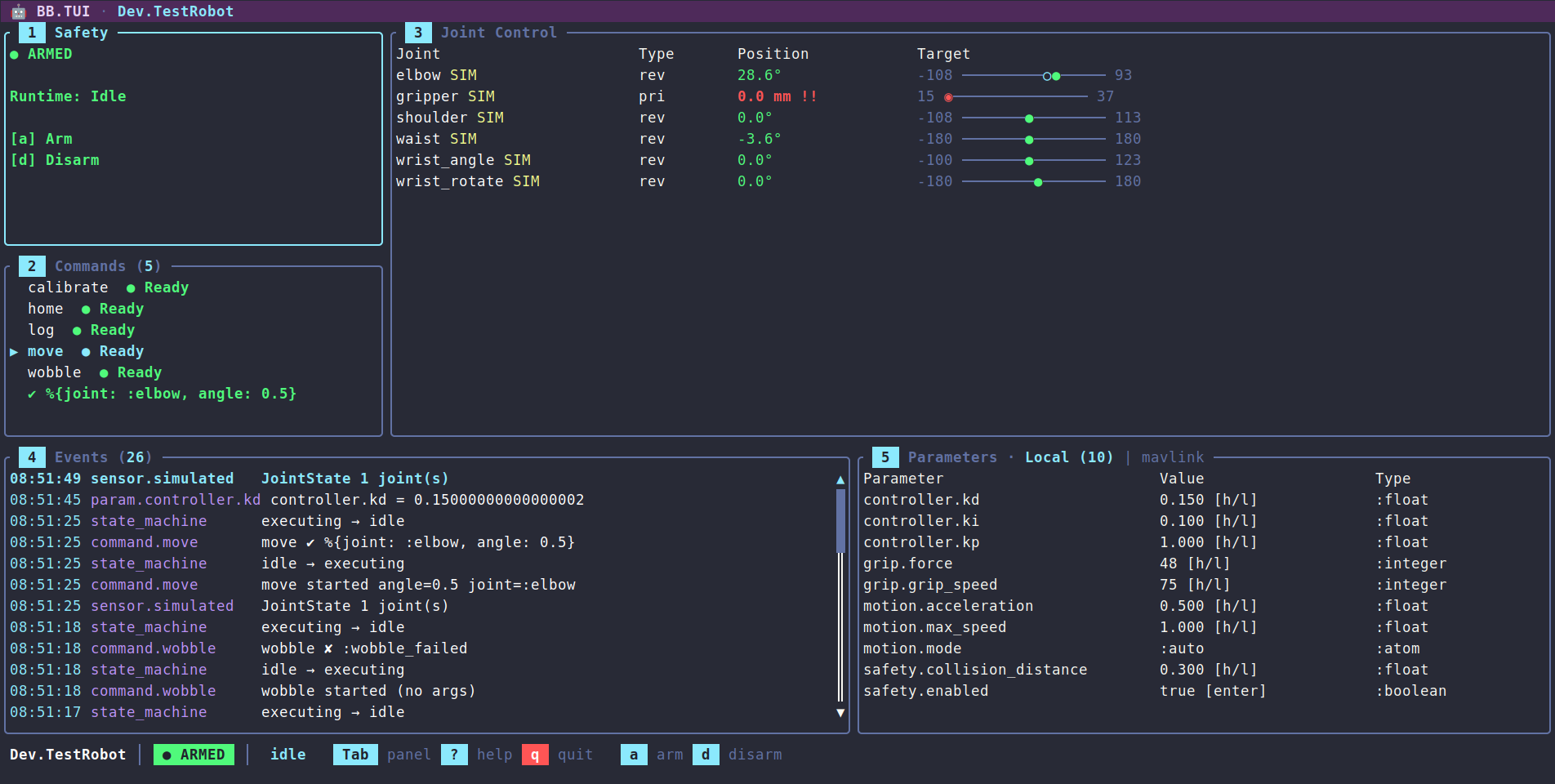
Features
- Safety controls — arm / disarm / force disarm with confirmation popup
- Joint control panel — position table with type (revolute/prismatic/continuous), units (degrees/mm), visual range bars, target tracking, simulated joint markers, and direct position adjustment via keyboard (1% and 10% steps)
- Event stream — scrollable, color-coded event list with formatted timestamps and message summaries; pause/resume, clear, and Enter to open a detail popup showing full payload
- Commands panel — lists available robot commands with Ready/Blocked indicators based on runtime state. Argument-less commands execute on Enter; commands with declared arguments open an inline edit mode (Tab to cycle fields, type-to-edit, Enter to run, Esc to cancel). Argument types — boolean, integer, float, atom, enum (
{:in, [...]}), string — are parsed before dispatch - Parameters panel — live parameter table grouped by path with real-time updates, plus bridge tabs for editing remote parameters
- High-rate-safe — the event log debounces repeated sensor messages and renders coalesce to ~30fps, so fast telemetry never floods the log or stalls the UI
- Status bar, help overlay, and theming — robot name / safety / runtime indicators, a scrollable keybinding reference, and a consistent semantic color palette
- Keyboard-driven navigation — Tab to cycle panels, number keys to jump, vim-style
j/k/h/lwithin panels - Three transports — local terminal, SSH (multiple isolated operator sessions), and Erlang distribution (attach a thin renderer to a TUI running on the robot node)
- Runtime inspection — snapshot, trace, and inject events into a running TUI via
ExRatatui.Runtime - Mix task —
mix bb.tui --robot MyApp.Robotfor standalone launch - Headless test suite — full coverage using Mimic and ExRatatui's test backend
Layout
 🤖 BB.TUI · MyApp.Robot                                                  ← title bar
╭ Safety ────────╮╭ Joint Control ────────────────────────────────────╮
│ ● ARMED        ││ Joint       Type  Position    Target              │
│ Runtime: Idle  ││ elbow       rev   -63.8°      -90 ─────●────── 90 │  60%
│ a  arm         ││ gripper SIM pri    30.6 mm      0 ─────●────── 50 │  height
│ d  disarm      ││ wrist       rev    87.0° !    -90 ──────────◆─ 90 │
├ Commands (2) ──┤│ ...                                               │
│ ▶ home  ● Ready││                                                   │
│   calibrate    ││                                                   │
╰────────────────╯╰───────────────────────────────────────────────────╯
╭ Events (47) ───╮╭ Parameters ───────────────────────────────────────╮
│ 18:23:12 sensor.sim       JointState 2 joint(s)                    ││
│ 18:23:11 state_machine    disarmed → armed                         ││
╰────────────────────────────────────────────────────────────────────╯╯
 MyApp.Robot │ ● ARMED │ idle   Tab panel  ? help  q quit  a arm  d disarm
Installation
Use Igniter to add bb_tui to a project. The installer imports formatter rules and prints a launch notice tailored to the chosen install shape. If the project already has a BB robot module (typically scaffolded by mix igniter.install bb):
mix igniter.install bb_tui
mix igniter.install bb_tui --robot MyApp.Arm
The install shape can be tuned with flags:
--auto-bb— scaffold aBBrobot viabb.installwhen none is present (skips the interactive prompt).--ssh— append a supervised{BB.TUI, …}child wired for an SSH daemon, so the dashboard is reachable as soon as the app boots. Accepts--port,--user,--password. Idempotent; change the generated credentials before deploying.--nerves— registerBB.TUI.subsystem(<Robot>)underconfig :nerves_ssh, :subsystemsso the dashboard rides on an existingnerves_sshdaemon.
Local dashboards are not supervised — a child that claims the terminal on boot would fight an IEx session for stdin/stdout — so the local entry points are mix bb.tui and BB.TUI.run/1. See mix help bb_tui.install for the full option reference, and the Transports guide for SSH and distribution setups.
To skip Igniter, add the dep directly:
def deps do
  [
    {:bb_tui, "~> 0.1"}
  ]
end
Quick Start
Standalone, via the mix task:
mix bb.tui --robot MyApp.Robot
From IEx:
BB.TUI.start(MyApp.Robot)
Under a supervision tree:
children = [
  {BB.Supervisor, MyApp.Robot},
  {BB.TUI, robot: MyApp.Robot}
]
Serving the dashboard over SSH or attaching to a robot on another BEAM node is covered in the Transports guide. The full key reference lives in the Keybindings guide (and in the in-app ? overlay).
How It Works
BB stores state in ETS and publishes changes over PubSub. The TUI subscribes to the [:state_machine], [:sensor], and [:param] paths, takes a one-time ETS snapshot on mount, then keeps state fresh from PubSub messages. Keyboard events call BB APIs directly (safety, actuator, command execution) — there are no optimistic updates, so the dashboard is a faithful reflection of the robot's actual state.
All state transitions live in BB.TUI.State as pure functions — no side effects, no process communication — which makes the dashboard easy to test headlessly. BB.TUI.App wires input and async results to those transitions through ExRatatui's reducer runtime.
Robots can publish sensor data faster than a terminal can usefully redraw, so the event log debounces repeats of the same {path, payload-type} within a one-second window, and sensor-driven renders coalesce to at most one frame every ~33ms (~30fps). Key presses, command results, and safety/parameter/state changes still render immediately. Both windows are fields on BB.TUI.State.Throttle.
Configuration
| Key | Default | Notes |
|---|---|---|
:bb_tui, :command_timeout | 30_000 ms | Wait window for BB.Command.await/2 on commands dispatched from the UI. Compile-time only — downstream apps need mix deps.compile bb_tui --force after changing it. |
# config/config.exs
config :bb_tui, command_timeout: 30_000
Development
The project ships a simulated WidowX-200 robot arm that starts automatically in dev:
mix deps.get
mix bb.tui --robot Dev.TestRobot
Dev.TestRobot exercises every panel feature end-to-end:
- Commands with all argument shapes —
home(no args),move(enum + float),log(string + integer),wobble(always returns{:error, :wobble_failed}),calibrate(sleeps ~2s so the throbber is visible), andstream(emits a high-rateJointStateburst to show debounce + render coalescing). - Parameter groups covering every primitive type — float, integer, boolean, atom — most with
:min/:maxso 1%-of-range stepping applies. - A
:mavlinkbridge (Dev.MockBridge) with a fixed remote-parameter list and in-memory writes — presstin the Parameters panel to cycle to the Bridge tab.
Exercising the SSH and Erlang-distribution transports against the simulated robot is covered in the Transports guide.
Guides
| Guide | Description |
|---|---|
| Transports | Serve the dashboard over SSH or attach over Erlang distribution, inspect a running session, and test both locally |
| Keybindings | Full per-panel key reference, including command argument editing and parameter stepping |
| Telemetry | :telemetry events for mount, input, dispatch, and frames — logging and Telemetry.Metrics |
Contributing
See CONTRIBUTING.md for development setup and guidelines.
BB.TUI is built on ExRatatui - a general-purpose terminal UI library for Elixir, and Beam Bots - robotics framework. Contributions to underlying libraries are very welcome too.
License
Apache-2.0 — see LICENSE.