
BB Kino




Interactive Livebook widgets for controlling and monitoring BB robots.
Features
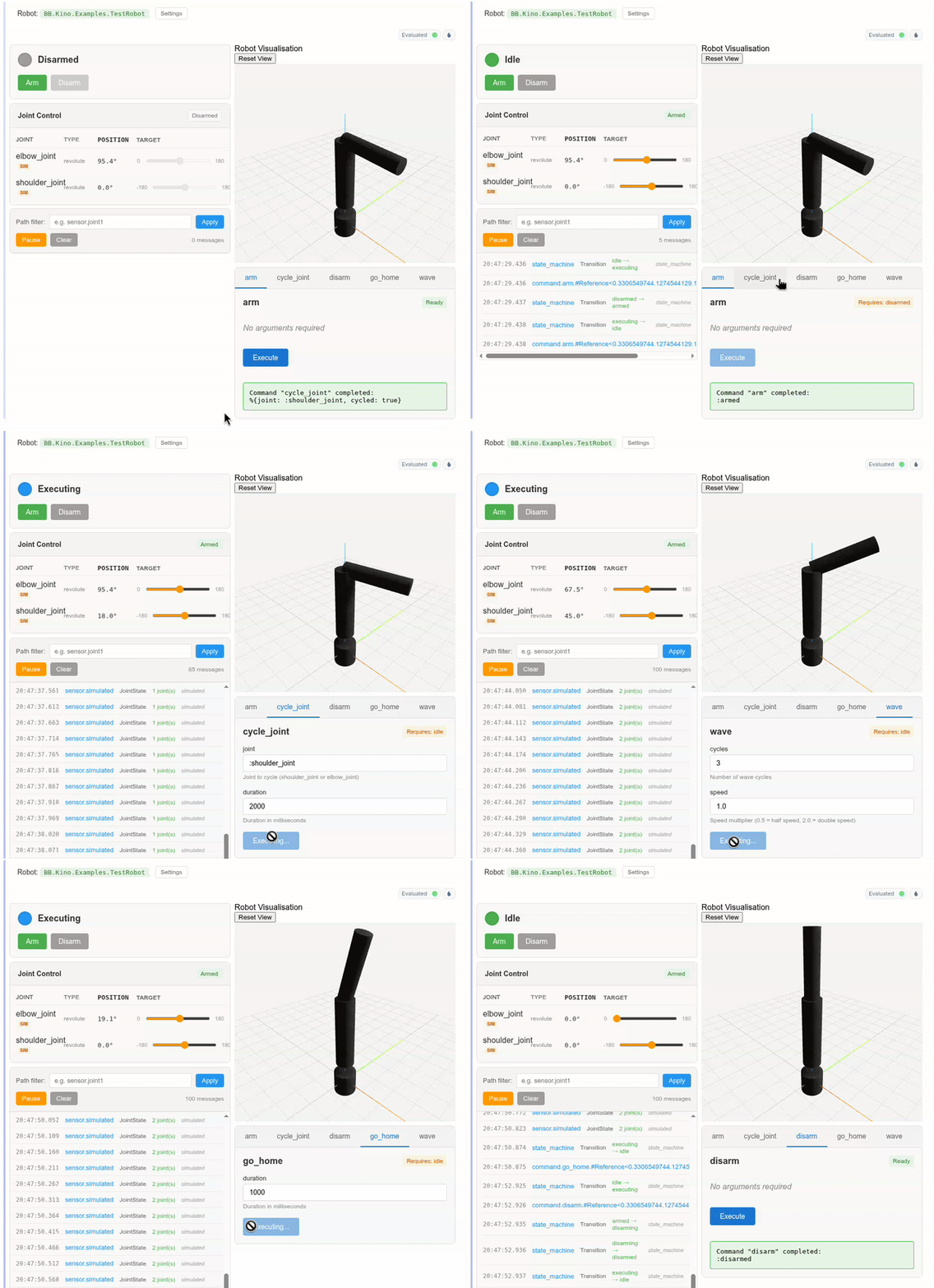
BB Kino provides a suite of interactive widgets for working with BB robots in Livebook:
- Safety Widget - Arm/disarm controls with real-time state indicators
- Joint Control Widget - Sliders for controlling joint positions with limit enforcement
- Event Stream Widget - Real-time message monitoring with path filtering and pause/resume
- Command Widget - Dynamic forms for executing robot commands with argument validation
- 3D Visualisation Widget - Interactive Three.js rendering with real-time joint updates
- Manage Robot Smart Cell - Unified dashboard combining all widgets
Installation
Add bb_kino to your dependencies in mix.exs:
def deps do
  [
    {:bb_kino, "~> 0.1"}
  ]
end
Usage
In Livebook
The easiest way to use BB Kino is with the Manage Robot smart cell:
- Click + Smart in your Livebook notebook
- Select Manage robot
-
Enter your robot module name (e.g.,
MyRobot) - Select which widgets to display
- Evaluate the cell
Individual Widgets
You can also use widgets individually:
# Safety controls (arm/disarm)
BB.Kino.safety(MyRobot)

# Joint position control with sliders
BB.Kino.joints(MyRobot)

# Real-time event stream
BB.Kino.events(MyRobot)

# Command execution forms
BB.Kino.commands(MyRobot)

# 3D visualisation
BB.Kino.visualisation(MyRobot)
Combined Layout
Create a custom dashboard layout:
Kino.Layout.grid([
  Kino.Layout.grid([
    BB.Kino.safety(MyRobot),
    BB.Kino.joints(MyRobot),
    BB.Kino.events(MyRobot)
  ], columns: 1),
  Kino.Layout.grid([
    BB.Kino.visualisation(MyRobot),
    BB.Kino.commands(MyRobot)
  ], columns: 1)
], columns: 2)
Widget Details
Safety Widget
Displays the current robot state (disarmed, idle, executing, error) and provides buttons to arm and disarm the robot. The disarm button is only enabled when the robot is in the idle state.
Joint Control Widget
Shows all robot joints with:
- Current position display (in degrees for revolute joints)
- Target position sliders respecting joint limits
- Visual indication of simulation mode vs real actuators
- Sliders are disabled when the robot is not armed
Event Stream Widget
Real-time display of BB PubSub messages with:
-
Path-based filtering (e.g.,
sensor.joint1) - Pause/resume functionality
- Message count display
- Expandable message details
- Automatic scrolling with newest messages
Command Widget
Dynamically generates forms for robot commands:
- Tab-based navigation between commands
- Automatic form fields based on argument types
- State-aware execution (commands only available in allowed states)
- Result/error display
3D Visualisation Widget
Interactive Three.js-based robot visualisation:
- Real-time joint position updates
- Orbit camera controls (rotate, pan, zoom)
- Support for box, cylinder, and sphere geometries
- Reset view button
Requirements
- Elixir ~> 1.19
- BB framework ~> 0.4
- Kino ~> 0.18
Documentation
- Interactive Control in Livebook - getting started tutorial
- Create Combined Widget Layout - custom layouts
Full API documentation is available at HexDocs.