Why? 🤷
Frustrated by the complexity
and incomplete docs/tests
in existing auth solutions,
we built auth_plug to simplify our lives. <br />
We needed a way to minimise
the steps
and code required
to add auth to our app(s).
auth_plug allows us to setup
auth in any Elixir/Phoenix
App in less than 2 minutes
with only 5 lines of config/code
and one environment variable.

What? 🔐
An Elixir Plug (HTTP Middleware)
that a complete beginner can use to add auth to a
Phoenix App
and understand how it works. <br />
No macros/behaviours to use (confuse).
No complex configuration or "implementation".
Just a basic plug that uses Phoenix Sessions
and standards-based JSON Web Tokens (JWT).
Refreshingly simple. The way auth should be done.
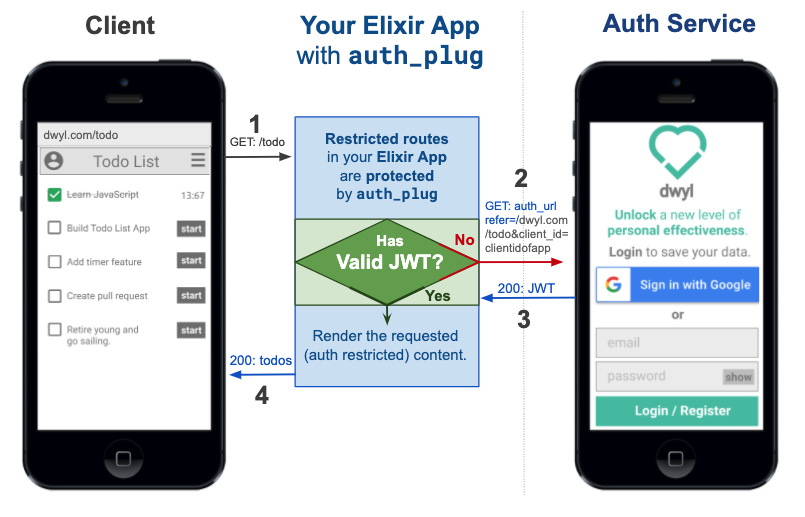
Edit this diagram: docs.google.com/presentation/d/1PUKzbRQOEgHaOmaEheU7T3AHQhRT8mhGuqVKotEJkM0
auth_plug protects any routes in your app
that require authentication. <br />
For more detail on how the Auth service works,
please see: https://github.com/dwyl/auth
auth_plug is just
57 lines
of (significant)
code;
the rest is comprehensive comments
to help everyone understand how it works.
As with all our code,
it's meant to be as beginner-friendly as possible.
If you get stuck or have any questions,
please ask!
Who? 👥
We built this plug for use in our products/services. It does exactly what we want it to and nothing more. It's tested, documented and open source the way all our code is. It's not yet a general purpose auth solution that anyone can use. If after reading through this you feel that this is something you would like to have in your own Elixir/Phoenix project, let us tell us!
How? 💡
1. Installation 📝
Add auth_plug
to your list of dependencies in mix.exs:
def deps do
  [
    {:auth_plug, "~> 0.8.0"}
  ]
end
Once you've saved the mix.exs file,
download the dependency with:
mix deps.get
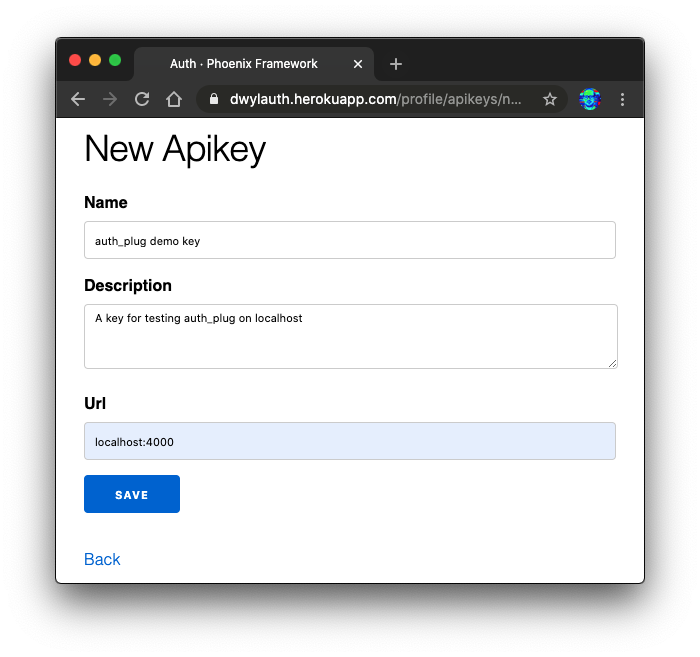
2. Get Your AUTH_API_KEY 🔑
Visit: https://dwylauth.herokuapp.com/profile/apikeys/new
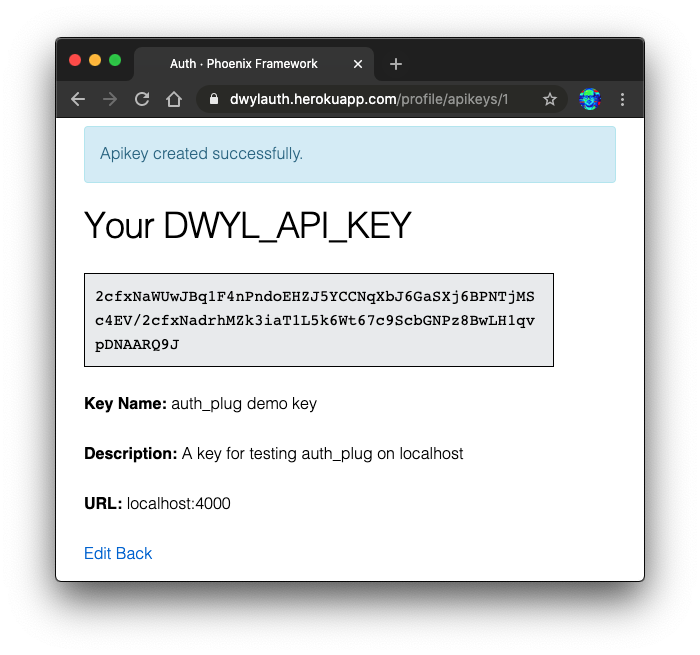
And create your AUTH_API_KEY.
e.g:
2.1 Save it as an Environment Variable
Create a file called .env in the root directory of your app
and add the following line:
export AUTH_API_KEY=2cfxNaWUwJBq1F4nPndoEHZJ5YCCNqXbJ6GaSXj6BPNTjMSc4EV/2cfxNadrhMZk3iaT1L5k6Wt67c9ScbGNPz8BwLH1qvpDNAARQ9JThe run the following command in your terminal:
source .envThat will export the environment variable AUTH_API_KEY.
Remember to add .env to your .gitignore file.
e.g:
echo ".env" >> .gitignore3. Protect a Route
Open your project's router.ex file. e.g:
(Optional) Update endpoint.ex
Documentation
Documentation can be found at https://hexdocs.pm/auth_plug. <br /> All our code is commented, but if anything is unclear, please open an issue: https://github.com/dwyl/auth_plug/issues
Recommended / Relevant Reading
If you are new to Elixir Plug, we recommend following: github.com/dwyl/elixir-plug-tutorial.
To understand JSON Web Tokens, read: https://github.com/dwyl/learn-json-web-tokens.