AshTui


Terminal-based interactive explorer for Ash Framework applications, built on ExRatatui.
Navigate your domains, resources, attributes, actions, and relationships — without leaving the terminal.
Features
- Two-panel navigable interface with domain/resource tree
- Three detail tabs: Attributes, Actions, Relationships
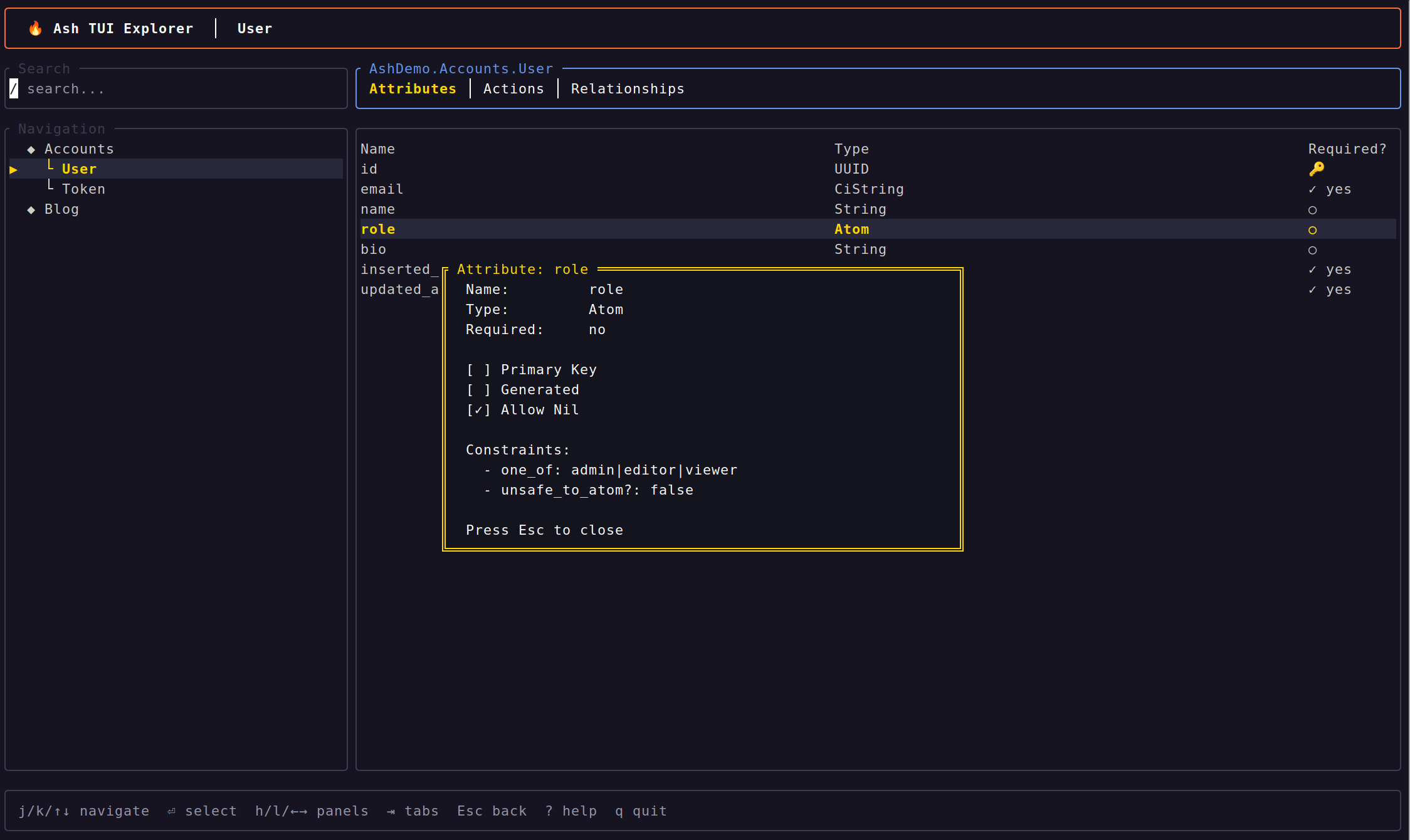
- Attribute detail overlay — press Enter for full details including constraints, with checkbox indicators for boolean fields
- Relationship navigation with breadcrumb trail and back stack
-
Resource search/filter — press
/to filter the navigation panel - Scrollbar indicators when lists overflow the viewport
-
Vim keybindings (
j/k/h/l) and arrow key support -
Tab switching with
Tabor1/2/3 - Help overlay
- No database connection needed — reads compile-time metadata only
mix ash.tuitask for instant launch- SSH transport — serve the explorer to remote clients over SSH, multiple simultaneous sessions
- Erlang distribution transport — attach to the explorer from a remote BEAM node
UI Layout
┌─ Search ─────────────┐ ┌─ Accounts.User ─────────────────────┐
│ / search...           │ │  Attributes │ Actions │ Relationships│
├─ Navigation ─────────┤ ├──────────────────────────────────────┤
│  ◆ Accounts          │ │ Name        Type       Required?     │
│    └ User ◀          │ │ ────        ────       ────────      │
│    └ Token           │ │ :id         :uuid      🔑 auto      │▒
│  ◆ Blog              │ │ :email      :ci_string ✓ yes        │▒
│                      │ │ :name       :string    ○             │
│                      │ │ :role       :atom      ○             │
│                      │ │                                      │
└──────────────────────┘ └──────────────────────────────────────┘
 j/k navigate  / search  Enter select  ? help  q quit
Installation
Add ash_tui to your dependencies:
def deps do
  [
    {:ash_tui, "~> 0.3"}
  ]
end
Tip: For local-only exploration during development, restrict to
:dev:{:ash_tui, "~> 0.3", only: :dev}If you plan to use the SSH or distributed transports in production (e.g. an admin TUI on a running node), include it without the
:onlyrestriction.
Usage
Launch the explorer from your Ash project:
mix ash.tui
The OTP app is auto-detected from your mix.exs. To specify it explicitly:
mix ash.tui --otp-app my_appYou can also launch programmatically:
AshTui.explore(:my_app)Transports
The same explorer works across three ExRatatui transports — switch with a single flag. Each transport provides full session isolation: every connected client gets its own independent explorer state.
Local (default)
Renders directly to the local terminal. This is the default when no transport flag is given.
mix ash.tuiSSH
Serves the explorer over SSH. Multiple clients can connect simultaneously, each with an isolated session. Useful for inspecting Ash resources on a remote server or sharing the explorer with teammates without requiring them to clone the project.
mix ash.tui --sshThen connect from another terminal:
ssh ash@localhost -p 2222
# password: tui
Custom port:
mix ash.tui --ssh --port 4000Programmatic usage with custom credentials:
AshTui.explore(:my_app,
  transport: :ssh,
  port: 4000,
  user_passwords: [{~c"admin", ~c"secret"}]
)
See the ExRatatui SSH guide for the full option reference (public key auth, custom host keys, idle timeouts, etc.).
Erlang Distribution
Starts a listener on the current node. Remote BEAM nodes attach over Erlang distribution — useful for headless servers, Nerves devices, or cross-architecture inspection where the remote node may not have the NIF available.
# Terminal 1 — start the listener
elixir --sname app --cookie demo -S mix ash.tui --distributed

# Terminal 2 — attach from another node
iex --sname local --cookie demo -S mix
iex> ExRatatui.Distributed.attach(:"app@hostname", AshTui.App)
Programmatic usage:
AshTui.explore(:my_app, transport: :distributed)See the ExRatatui Distribution guide for details on options, testing, and troubleshooting.
Embedding in a Supervision Tree
For deployed applications, you can embed the SSH daemon or distribution listener directly in your supervision tree so it starts with your app and is always available — no mix ash.tui needed:
# In your application.ex
def start(_type, _args) do
  state =
    :my_app
    |> AshTui.Introspection.load()
    |> AshTui.State.new()

  children = [
    # ... your existing children ...
    {AshTui.App,
     transport: :ssh,
     port: 2222,
     auto_host_key: true,
     auth_methods: ~c"password",
     user_passwords: [{~c"admin", ~c"secret"}],
     app_opts: [state: state]}
  ]

  Supervisor.start_link(children, strategy: :one_for_one)
end
See the ash_demo example for a complete working setup.
How It Works
AshTui uses Ash's compile-time introspection API to load your domain model:
mix ash.tui
  → Mix.Task.run("app.start")
  → Ash.Info.domains(otp_app)
  → Ash.Domain.Info.resources(domain)
  → Ash.Resource.Info.attributes/actions/relationships(resource)
  → Pre-loaded into navigable state struct
  → ExRatatui.App renders it (local, SSH, or distributed)
No database connection is needed. The tool reads the shape of your app, not its data.
The rendering layer is provided by ExRatatui, which bridges Elixir and Rust's ratatui via NIFs. The same AshTui.App module works across all three transports without changes — ExRatatui handles session isolation, event polling, and terminal management per transport.
Keybindings
Navigation
| Key | Action |
|---|---|
j / Down | Move selection down |
k / Up | Move selection up |
h / Left | Focus navigation panel |
l / Right | Focus detail panel |
Enter | Select item / drill into relationship / show attribute detail |
Esc | Go back / close overlay |
Tabs
| Key | Action |
|---|---|
Tab | Cycle through tabs |
1 | Attributes tab |
2 | Actions tab |
3 | Relationships tab |
Search
| Key | Action |
|---|---|
/ | Start filtering resources |
Enter | Accept filter |
Esc | Clear filter and cancel |
Other
| Key | Action |
|---|---|
? | Toggle help overlay |
q | Quit |
Example App
The examples/ash_demo directory contains a small Ash application with two domains (Accounts and Blog) for trying out the explorer:
cd examples/ash_demo
mix deps.get
mix ash.tui
Contributing
See CONTRIBUTING.md for development setup and guidelines.
AshTui is built on ExRatatui, a general-purpose terminal UI library for Elixir. If you're interested in improving the underlying rendering, widgets, or layout engine, contributions to ExRatatui are very welcome as well.
License
MIT — see LICENSE.